
Solved

hitting a wall here with OS X configuration profiles with exchange payloads

  • October 13, 2015
  • 4 replies
  • 37 views

Forum|alt.badge.img+7


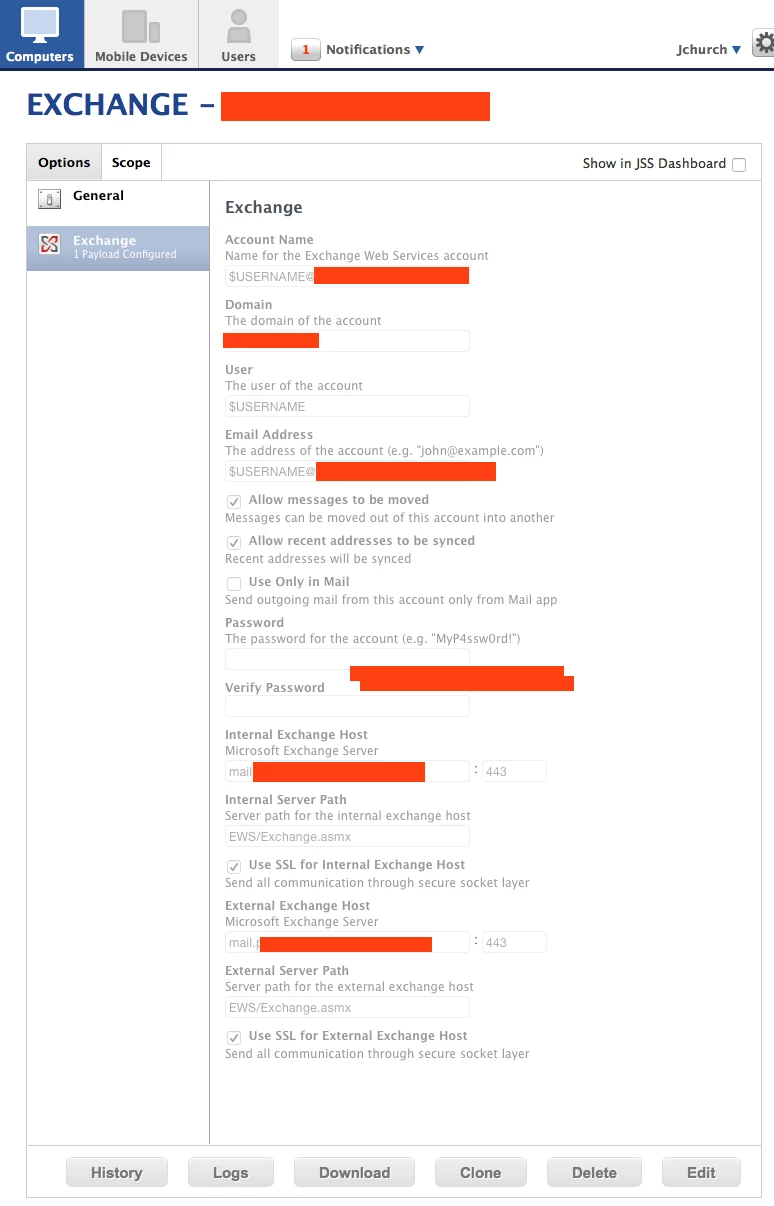
this is my config profile. set to install automatically. looks ok to me but i keep getting this error.

Install Configuration Profile EXCHANGE - The operation couldn’t be completed. (ProfileDomainPluginController error 101.)

my google-fu is failing me on this one.

Best answer by jchurch

ended up leaving the internal and external server path fields blank and it works now.

4 replies

Forum|alt.badge.img+17
  • Contributor
  • October 13, 2015

@jchurch

That -100 error usually means, in the generic sense, that there is a bad setting somewhere in the profile’s payload(s).

The first one that jumps out to me is the Account Name: Name for the Exchange Web Services account.

This typically would be an exact username/account name for your Exchange Web Service, not a variable $USERNAME (as that will pull the account name of the logged in user, which is not likely to be correct) and may be the cause of the failure.

Please let us know if you have further questions.

Thanks!
Amanda Wulff
JAMF Software Support


Forum|alt.badge.img+7
  • Author
  • Valued Contributor
  • October 13, 2015

no dice. changed the account name to just "email" and redeployed. still getting the same error
The operation couldn’t be completed. (ProfileDomainPluginController error 101.)


Forum|alt.badge.img+17
  • Contributor
  • October 13, 2015

@jchurch

Is this a computer level or user level profile that we're trying to install?

Further troubleshooting may be best done with your Technical Account Manager, as we may need to dig into it and look at settings that we wouldn't want to post publicly and un-redacted here, so it'd be a good idea to get in touch with them if you haven't done so already to get that started.

Thanks!
Amanda Wulff
JAMF Software Support


Forum|alt.badge.img+7
  • Author
  • Valued Contributor
  • Answer
  • November 11, 2015

ended up leaving the internal and external server path fields blank and it works now.