Solved

How to remove unwanted Chrome Extensions (hangout) and lock down Chrome.

  • March 26, 2015
  • 34 replies
  • 398 views

Show first post

34 replies

Forum|alt.badge.img+1
  • New Contributor
  • January 31, 2017

[


Forum|alt.badge.img
  • New Contributor
  • May 15, 2017

@roadrunner2348 I am interested in your method but having some troubles getting it to take. What are the steps from start to finish to get the profile onto the laptops? So far I have created in vim then converted to xml then to plist then uploaded it with proper preference domain. Am i missing something?


Forum|alt.badge.img
  • New Contributor
  • August 28, 2017

I know this thread is old, but I wanted to share what I did for Chrome. Hopefully it helps someone out.

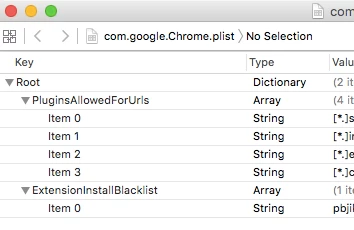
I used Xcode to create com.google.Chrome.plist. I found all of the settings from https://www.chromium.org/administrators/policy-list-3

I took the plist, placed it in /Library/Managed Preferences/, and the relaunched chrome to get the settings to apply.


Forum|alt.badge.img+4
  • Contributor
  • November 10, 2017

Hey ed_sfdc,

I downloaded Xcode and created the plist. If I put the plist in the proper spot it kills the extension that I want killed.

However if I reboot the machine the plist is gone.

I'm new to a lot of this but wonder if you have any suggestions? Also about deploying it properly via Jamf. I can deploy it all day long but it doesn't seem to be "taking" on the computers like if it is installed directly, but that doesn't matter once they reboot.

Any ideas?


dsweigart
Forum|alt.badge.img+5
  • Contributor
  • November 20, 2017

I have created this config profile and set it to automatically install at the computer level but it seems it never actually installed and just sits in the "remaining" section. Any insight on why that might be happening? I checked to make sure that the computer has checked in after creating the policy.

Thanks in advance


Forum|alt.badge.img+6
  • Contributor
  • November 20, 2017

If you are running the google admin console you can shut off unnecessary apps and programs either to a single student or the entire grade level, changes take place almost instantly.


Forum|alt.badge.img+2
  • New Contributor
  • November 20, 2017

Google Admin Console options only works when a user is logged into their google account they can easily log out and into their personal account and add whatever extensions they like.


dsweigart
Forum|alt.badge.img+5
  • Contributor
  • November 21, 2017

Correct, we can block them through or Google Admin Console but that does not prevent them from logging into their own Google account and using the extensions feature that way. I was looking to blacklist known bad extensions.


Forum|alt.badge.img
  • New Contributor
  • October 7, 2019

You can follow these steps:
Open Google Chrome.
Look at the right of the window, find three dots and click on them.
Choose the icon “Settings”.
After you click on “Settings”, you’ll see another menu. Now click on “Extensions”.
Find what particular extension must be removed.
Click the button “Remove”.

If you use Mac you can delete extensions with finder. I haven't done this but you can see the full guide here https://freewindows10.download/articles/how-to-remove-extensions-on-chrome