

Solved

Install Swatches for Illustrator

  • March 11, 2022
  • 2 replies
  • 21 views

sbrammer
Forum|alt.badge.img+6

Our graphic desiggn instructor would like some swatches installed so they can be used within Illustrator. I have found the location on where they need to be installed, but can't get it working with Jamf. 

The location needs to be in Applications\\Illustrator\\presets\\en-us\\swatches

There is a folder with about 7 files that need to go in the above location. I put the files in that location and used composer to get them packaged and put the package in JSS Self Service. I then tried to install them from Self Service on another Mac and it did not work. In composer, I made the folder that has the seven files use root and wheel and gave owner\\group\\everyone r\\w\\x rights. 


Best answer by jeffevanslpk

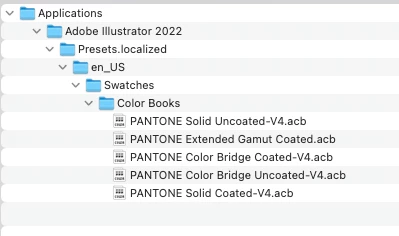
Here is the path I use in Composer to accomplish this for Illustrator 2022.

2 replies

jeffevanslpk
Forum|alt.badge.img+2
  • New Contributor
  • Answer
  • March 14, 2022

Here is the path I use in Composer to accomplish this for Illustrator 2022.


sbrammer
Forum|alt.badge.img+6
  • Author
  • Contributor
  • March 15, 2022

Here is the path I use in Composer to accomplish this for Illustrator 2022.


Since the swatches were .ai files as the Color Books showed .acb files and not .ai files, I tried placing the Roland folder in the Default Swatches folder, and it worked. I was able to install the swatches using Self Service with no issue. Thanks for the help.