Solved

Installing CP210x USB to UART Bridge VCP Drivers

  • December 15, 2025
  • 11 replies
  • 46 views

dletkeman
Forum|alt.badge.img+16

I’m trying to install a driver for a robotics course in our school division.  The teacher says that this is the correct version for their devices:

https://www.silabs.com/software-and-tools/usb-to-uart-bridge-vcp-drivers?tab=downloads

Unfortunately it doesn’t seem to have a PKG installer.  The drivers are a system extension and are installed through an app and not a pkg.  There is a pkg in the dmg but it doesn’t install the system extension as far as I can see.

I did attempt to package using Composer to monitor for changes but when I run the created pkg afterwards it fails.  I’m assumning due to the system extension needing additional permissions perhaps.

I have investigated this and it may be that Sonoma and beyond have the driver installed by default as per an article here:

https://forum.netgate.com/topic/187597/cp210x-usb-to-uart-driver-for-mac-sonoma/3

I don’t have a device to test with but will check it out tomorrow hopefully.

I can handle the security for system extensions via a configuration profile but I’m just having troubles packaging the drivers themselves.  Any tips?

Best answer by dletkeman

Got it figured out.  A bit of digging.  Answer is here:

https://community.silabs.com/s/question/0D58Y00008RmQuqSAF/is-it-possible-to-install-the-cp210x-vcp-mac-osx-driver-via-the-command-line-and-suppress-the-installer-app-gui?language=en_US

Follow some steps below:

  1. /Applications/CP210xVCPDriver.app/Contents/MacOS/CP210xVCPDriver install
  • Uninstall this driver by:
  1. /Applications/CP210xVCPDriver.app/Contents/MacOS/CP210xVCPDriver uninstall

In addition, please remember to accept loading the kernel extension before you start running this comment.


Really appreciate your help ​@Chris_Hafner .  Sometimes you need a wingman as a santity check.  You were my wingman during this journey.

From the above instructions can pretty simply script the rest of the install.  Have tested manually but I don’t forsee any further issues.

11 replies

Chris_Hafner
Forum|alt.badge.img+27
  • Jamf Heroes
  • December 15, 2025

Without digging to far, this sounds like a good opportunity to play with Composer “snapshot” packages again. I mean, without deciding to rebuild the installer from scratch that is. Basically, you can use Composer to index a computer, then run the installer followed by another index. So you get a differential comparison that identified the files essentially installed by the .app. Composer will then let you repackage those items. 


You already know you’ve got kexts to contend with!


dletkeman
Forum|alt.badge.img+16
  • Author
  • Jamf Heroes
  • December 15, 2025

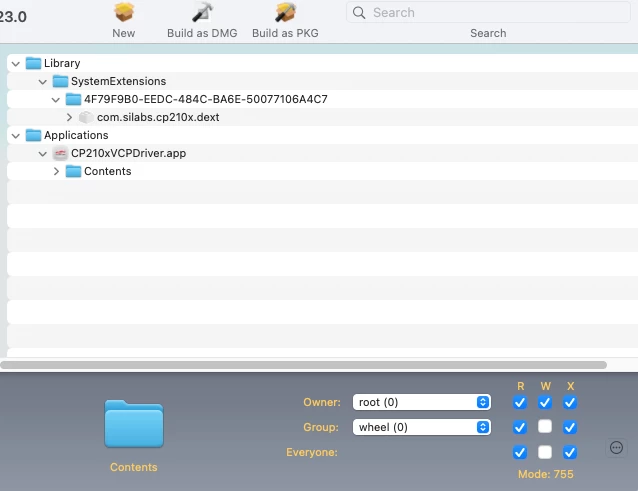
@Chris_Hafner , my thought exactly.  The differential is pretty simple:


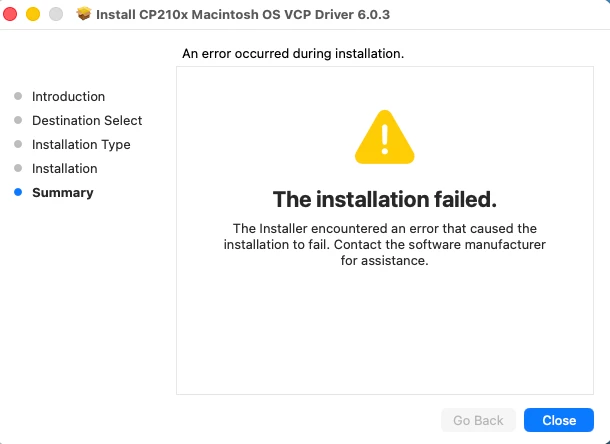
Except when I run the created pkg the install fails:


I’m assuming it’s because of the System Extension but I’m unsure how to work around this.

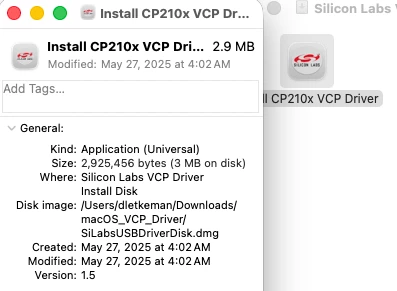
Unfortunately the installer is an application and not a pkg:


Chris_Hafner
Forum|alt.badge.img+27
  • Jamf Heroes
  • December 15, 2025

I would assume you would need to run that as a .dmg


dletkeman
Forum|alt.badge.img+16
  • Author
  • Jamf Heroes
  • December 15, 2025

@Chris_Hafner Good call.  I was doing that just as you replied back.

It installs successfully through Self Service but it doesn’t install the /Library/SystemExtensions folder and items.  I’m assuming it’s protected.  Unsure how to make that part happen.  The application installs without issue.  Hmmm.


Chris_Hafner
Forum|alt.badge.img+27
  • Jamf Heroes
  • December 15, 2025

Yea, I was wondering about that myself. 


Chris_Hafner
Forum|alt.badge.img+27
  • Jamf Heroes
  • December 15, 2025

Did they have the configuration profile on to approve the kext first? Just wondering. 


dletkeman
Forum|alt.badge.img+16
  • Author
  • Jamf Heroes
  • December 15, 2025

@Chris_Hafner Good catch, but yes.  I’m just testing on a single computer at the moment.  macOS 26.2.


Chris_Hafner
Forum|alt.badge.img+27
  • Jamf Heroes
  • December 15, 2025

While I’ve stayed away from some legacy items… I remember a thing about needing to restart a unit, using the “MDM Restart with Kernel Cache Rebuild” but that might just be older legacy Intel stuff. 


dletkeman
Forum|alt.badge.img+16
  • Author
  • Jamf Heroes
  • December 15, 2025

@Chris_Hafner I wasn’t aware of that one.  I found the command:

sudo kextcache -i /

Reboot the computer, but that didn’t work.

I can run the application and get it to install, that’s no problem there, but getting it to install via Self Service is the challenge.


dletkeman
Forum|alt.badge.img+16
  • Author
  • Jamf Heroes
  • Answer
  • December 15, 2025

Got it figured out.  A bit of digging.  Answer is here:

https://community.silabs.com/s/question/0D58Y00008RmQuqSAF/is-it-possible-to-install-the-cp210x-vcp-mac-osx-driver-via-the-command-line-and-suppress-the-installer-app-gui?language=en_US

Follow some steps below:

  1. /Applications/CP210xVCPDriver.app/Contents/MacOS/CP210xVCPDriver install
  • Uninstall this driver by:
  1. /Applications/CP210xVCPDriver.app/Contents/MacOS/CP210xVCPDriver uninstall

In addition, please remember to accept loading the kernel extension before you start running this comment.


Really appreciate your help ​@Chris_Hafner .  Sometimes you need a wingman as a santity check.  You were my wingman during this journey.

From the above instructions can pretty simply script the rest of the install.  Have tested manually but I don’t forsee any further issues.


Chris_Hafner
Forum|alt.badge.img+27
  • Jamf Heroes
  • December 15, 2025

Nice work! And yea, always feels better to bounce ideas off folks!