

Question

Invalid Request SSL Error

  • May 1, 2024
  • 3 replies
  • 110 views

SMR1
Forum|alt.badge.img+13
  • Valued Contributor

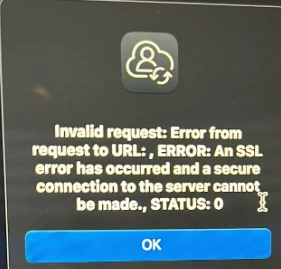
We have a user getting the below error and can't access anything. The help desk also reset the password. A couple of commands were ran, the removeFramework command was ran and they then tried the profiles -renew -type enrollment, and get the Update prompt and it opens system preferences and then I choose update again, but it looks like it doesn't do anything. I can see all the profiles.


3 replies

Forum|alt.badge.img+5
  • Contributor
  • May 1, 2024

We have a couple of Macs with the same issue, but also with Adobe and Microsoft products. Everything is back on track when updated to the latest version of Sonoma


AJPinto
Forum|alt.badge.img+26
  • Legendary Contributor
  • May 2, 2024

If the remove framework command was successfully run, the device needs to have macOS re-enrolled as running the profiles command will not restore the Jamf Framework that was removed. Honestly, I would not give the Helpdesk the access to run commands like remove framework and removing the mdm profile as these are not troubleshooting steps.


There is a chance the date and time on the device are out of sync, if more than a few minutes to a few days out of sync will cause these issues. This should be basic SSL certificate troubleshooting if it's just a single device. Also tools that perform SSL redirection will do this, so check your VPN clients and network security tools.


Forum|alt.badge.img

Thank you so much for the information.
