Question

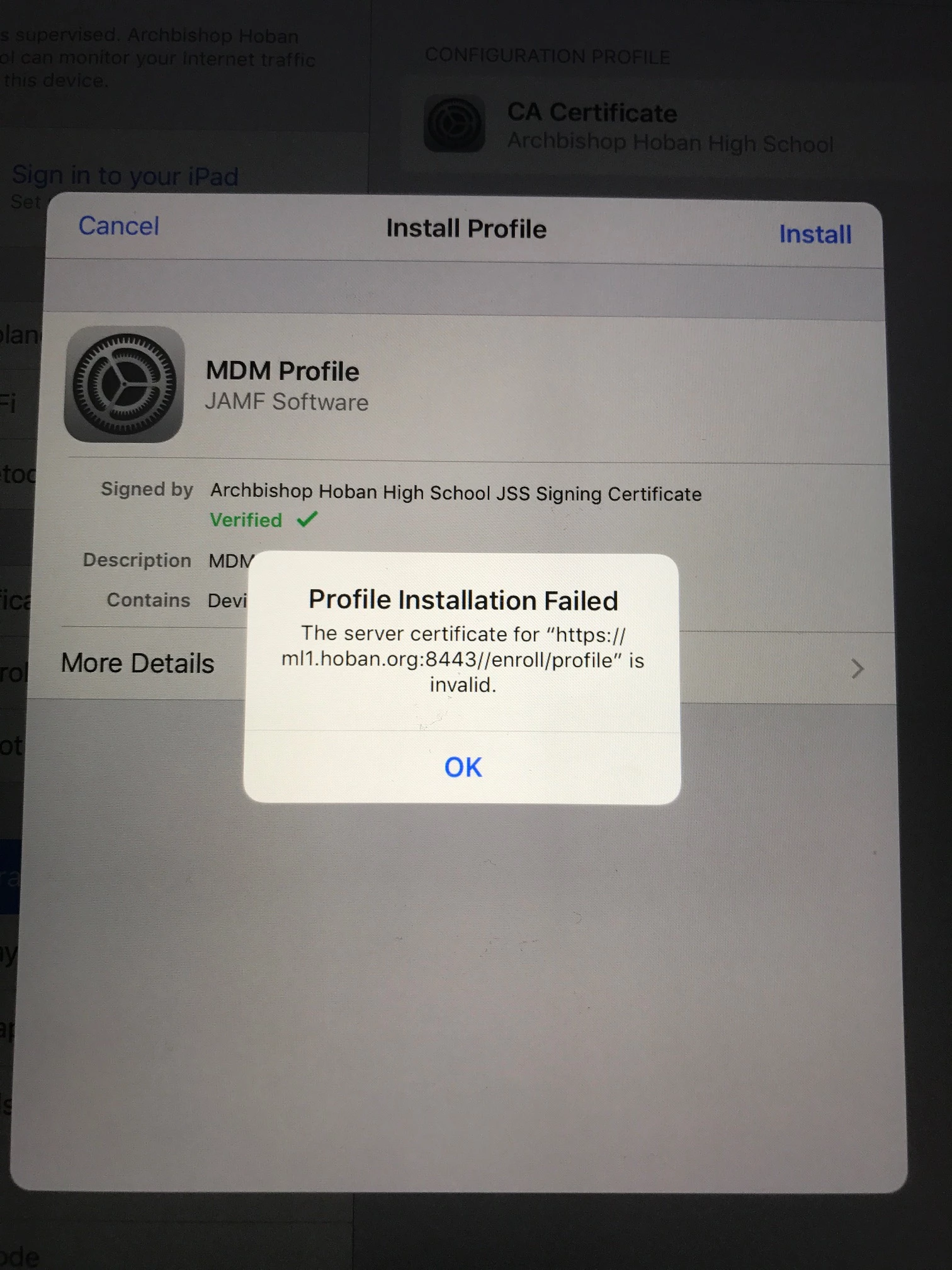
iOS 10.3 MDM Profile Installation Failed

  • March 29, 2017
  • 5 replies
  • 27 views

Forum|alt.badge.img+4

My MDM Profile fails when I try to install it on an iPad Air with iOS 10.3. When I install it on a non iOS 10.3, it works. Any suggestions?

5 replies

Forum|alt.badge.img+3
  • New Contributor
  • 2 replies
  • March 29, 2017

You could be running into this issue if you're running 9.98:

http://docs.jamf.com/9.98/casper-suite/release-notes/Known_Issues.html

Beginning with iOS 10.3, during user-initiated enrollment of a device, the MDM profile is unable to be installed if the device does not trust the JSS built-in certificate authority (CA) signed Tomcat SSL certificate. This is also true of any Tomcat SSL certificates that are self-signed or issued from a CA that the device does not trust by default. In previous versions of iOS, installing the CA certificate during enrollment caused the device to trust the CA but this is no longer the case. This is the result of intended behavior and will not be resolved.
To manually trust the CA certificate installed during enrollment on the iOS device, go to Settings > About > Certificate Trust Settings.
For a list of trusted certificates for iOS devices, see the following Apple Knowledge Base article: https://support.apple.com/en-us/HT204132


Forum|alt.badge.img+5
  • Contributor
  • 18 replies
  • April 5, 2017

I had a very similar issue if not the same. I had to delete the Safari cache and always allow cookies to get the MDM to install. The above steps from JAMF didn't work for me.


Forum|alt.badge.img+9
  • Valued Contributor
  • 173 replies
  • April 6, 2017

I came across this today - I'm assuming that this feature will make its way into macOS eventually?

So the ultimate fix would be to stop using self signed certificates altogether?


jaymckay
Forum|alt.badge.img+4
  • Contributor
  • 17 replies
  • May 16, 2017

Antzinoz's steps worked for me. I think the trick is before you go to install the MDM profile (right after you install the certificate) hop over to settings, toggle the switch in that About-Trust Certificates area, then hop back to safari and finish the MDM installation. This worked perfectly for me...


Forum|alt.badge.img
  • New Contributor
  • 1 reply
  • July 6, 2017

Antzinoz's steps also worked for me. Thanks!