Question

ios apps not installing

  • May 4, 2018 5:01 PM UTC
  • 40 replies
  • 534 views

Show first post

40 replies

Forum|alt.badge.img+15
  • Valued Contributor
  • Mar 11, 2019 9:50 PM UTC

Hi @Sandy ,

We've been battling the same errors... where it only affects some apps but not all. We haven't been able to fix it yet. Have you been able to resolve the issue?

~Joe


Forum|alt.badge.img+26
  • Esteemed Contributor
  • Mar 15, 2019 5:49 PM UTC

Hi @nsdjoe Joe,

https://support.apple.com/en-us/HT201999

And from Apple Enterprise: The ACTUAL FX WAS:
We needed to whitelist bag.itunes.apple.com

We have Fortinet firewall, used their preset Apple filter settings. We found out that we could not wildcard *.apple.com, had to whitelist more specifically


Forum|alt.badge.img+8
  • Valued Contributor
  • Sep 27, 2019 8:51 PM UTC

Now, I'm having this issue. Did whitelisting the domain above fix the issue?


Forum|alt.badge.img
  • New Contributor
  • Oct 1, 2019 2:41 PM UTC

Having same issue. Is anyone have any solution?


Forum|alt.badge.img+26
  • Esteemed Contributor
  • Oct 1, 2019 3:15 PM UTC

Have you reviewed this document and whitelisted all servers?
https://support.apple.com/en-us/HT201999
We found out that we could not wildcard *.apple.com, had to whitelist more specifically


Forum|alt.badge.img+8
  • Valued Contributor
  • Oct 1, 2019 4:49 PM UTC

Yes, we are only having issues on particular network that is more locked down network.

Was Amazon AWS added to this list recently?


Forum|alt.badge.img+8
  • Valued Contributor
  • Oct 1, 2019 6:11 PM UTC

This article has more detailed information about firewall rules and whitelisting.

https://support.apple.com/en-us/HT210060


Forum|alt.badge.img+3
  • New Contributor
  • Dec 3, 2019 2:14 AM UTC

I got this on one iPad out of 15 after migrating between JAMF servers.
I found I had to go into the old server and unscope all the Apps which had failed with the error as in the OP.
EDIT: Well. it helped some Apps install. Still some giving the OP error.
Second EDIT: I unmanaged the device from JAMF, then Erased it. Now every App has installed, eventually! Phew...
Third edit : ) Had the same problem with three other iPads. Unmanaging and Erasing them got all the Apps back!


Forum|alt.badge.img+5

Hi All,

Ive been having the same issue. I will give the Firewall fix a try. However, what ive been doing as a temp fix is refreshing the VPP content of the apps under VPP Accounts in settings in Jamf. Give that a go as it resolves the issue everytime for me.

Cheers
Chris


kwoodard
Forum|alt.badge.img+12
  • Valued Contributor
  • Feb 28, 2023 10:56 PM UTC

I know this is an old issue, but I am running into it now. Is there a way to refresh all of the apps under the VPP content page, rather than one at a time? I don't care how long it takes, but I have several hundred applications on our VPP...one at a time will take me a significant amount of time.


jastrickland
Forum|alt.badge.img
  • New Contributor
  • Apr 11, 2023 5:59 PM UTC

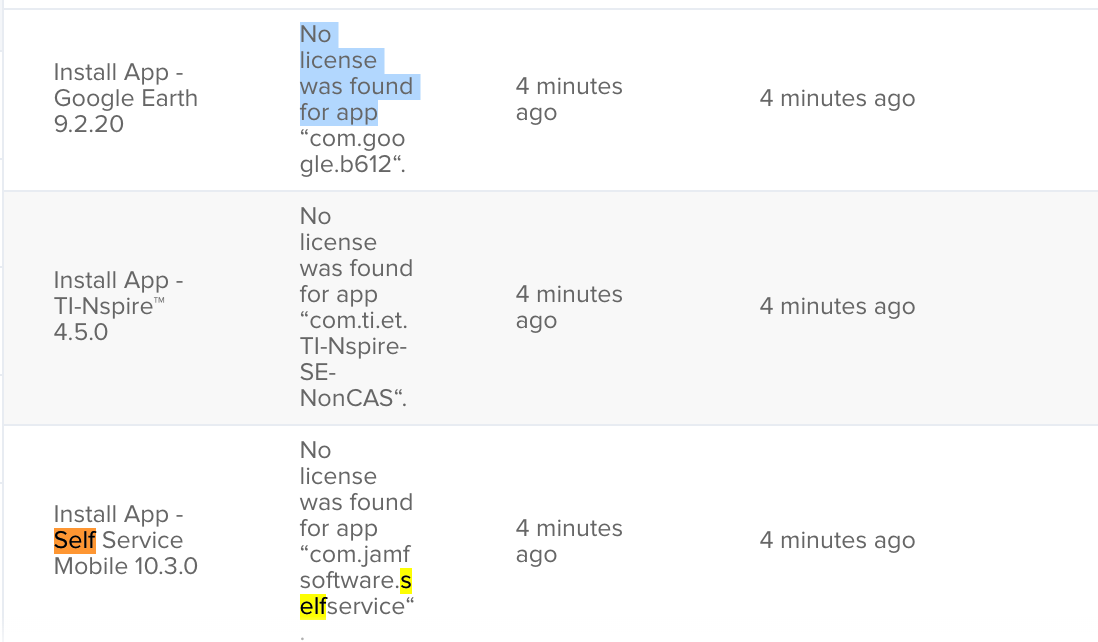
I have just started seeing it also:  No license was found for app “com.jamfsoftware.selfservice”

Other apps are getting License not found.  Re-scoping does not fix


kwoodard
Forum|alt.badge.img+12
  • Valued Contributor
  • Apr 11, 2023 9:30 PM UTC

Been working with Jamf since freaking January 2023...still having this issue. I am checking to see if our firewall is causing this issue, but I have tried my test iPad from home...same result.


Forum|alt.badge.img+1
  • New Contributor
  • Oct 13, 2023 2:38 PM UTC

I'm currently getting this issue too. Most apps are now showing as ‘License not found. ‘ or ‘No licence was found for app “appname“.

We’ve renewed the VPP token, removed/readded app scopes and removed/readded Volume Content but nothing seems to recreate a consistent method to get them to install. The issue occurs on different networks too, not just the school network.

Any more ideas would be greatly appreciated. Erasing and re-enolling the devices isn't really viable as there are a fair few.

Thanks!


Forum|alt.badge.img+20
  • Valued Contributor
  • Oct 16, 2023 3:59 PM UTC

I'm currently getting this issue too. Most apps are now showing as ‘License not found. ‘ or ‘No licence was found for app “appname“.

We’ve renewed the VPP token, removed/readded app scopes and removed/readded Volume Content but nothing seems to recreate a consistent method to get them to install. The issue occurs on different networks too, not just the school network.

Any more ideas would be greatly appreciated. Erasing and re-enolling the devices isn't really viable as there are a fair few.

Thanks!


Having this issue too just out of the blue.


Forum|alt.badge.img+4
  • New Contributor
  • Oct 25, 2023 2:32 PM UTC

Chiming in that we're also experiencing this issue in our enviroment and have been for the majority of 2023, around 300 currently affected devices at the time of writing this.
Shouldn't this be on the known issues list?