Question

iOS Single Sign-on (Kerberos)

  • January 5, 2017
  • 3 replies
  • 25 views

Forum|alt.badge.img+3

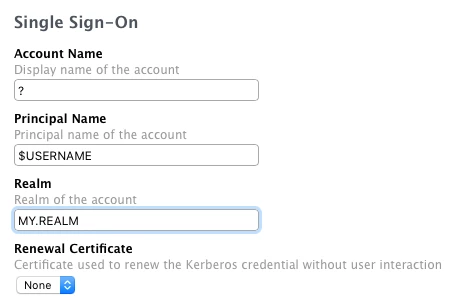
Has anyone got Single Sign-on (Kerberos) working in iOS 10? I swear I had it working previously (in iOS 9 perhaps), but I deleted the configuration profile and I can't recreate it. The biggest problem is setting the Principal name - if I try to set it to user@AD.EXAMPLE.COM, the profile fails to install with the error "The field “PrincipalName” contains an invalid value." If I just have the username in there, it doesn't work.

3 replies

Forum|alt.badge.img+3
  • Author
  • New Contributor
  • January 13, 2017

Worked it out - I had firewalled the AD server from the iPad network. Putting $USERNAME in the Principal Name field is correct.


dstranathan
Forum|alt.badge.img+19
  • Valued Contributor
  • February 1, 2017

On a related note...

1) What variable are you using in the "Account Name" ("Display Name") field?

2) What type of certificate payload are you using in the "Renewal Certificate" section? I assumed it would be my Root CA certificate (in .cer format) but my SSO profile isnt acknowledging that particular type of payload for some reason (the drop-down menu still shows "None")


Forum|alt.badge.img+3
  • Author
  • New Contributor
  • February 2, 2017

Account name is purely decorative I think, it appears as the title of the item in the MDM profile, I just put "$USERNAME kerberos"

I don't have anything for the renewal certificate, as we don't have an internal CA, so users would be prompted for a password. I imagine it would be a user certificate that can authenticate them to to the Kerberos server, so perhaps you'd need to configure SSO in the same profile as an SCEP payload?

I say would be as I haven't deployed it to any actual users; it's not quite useful enough yet and I haven't exposed Kerberos to the internet either.