Question

Issue with Apple Configurator


Forum|alt.badge.img+4

Hi there,

i have a strange issue with my Apple Configurator 2, its up to date on a macOS 27 Mac, and when i try to prepare an iPad, for exemple, i have an error telling: provisional enrollement failed without anymore explanations.

I’ve read this issue might be caused by ntework but i don’t have any problem to access to internet.

Is there something elese i can do?

 

9 replies

dletkeman
Forum|alt.badge.img+19
  • Jamf Heroes
  • October 6, 2026

What model of iPad is this?


dletkeman
Forum|alt.badge.img+19
  • Jamf Heroes
  • October 6, 2026

If it’s an older iPad see this thread on one way you get that error:

It also gives a solution on how to get it to work despite the error.  This has been working for me.


Forum|alt.badge.img+4
  • Author
  • Contributor
  • October 6, 2026

What model of iPad is this?

It’s an iPad 13” M5


dletkeman
Forum|alt.badge.img+19
  • Jamf Heroes
  • October 6, 2026

Strange.  I wouldn’t expect it on that.

You should still be able to follow the direction in the article given to supervise and enroll it.  Then flip it back to Automated Enrollment once it’s provisioned.  If it’s a one off that’s what I would do.  If it’s a lot more than that’s something else.


Forum|alt.badge.img+4
  • Author
  • Contributor
  • October 7, 2026

Ok i’ll try, thank you ​@dletkeman 


Jaykrishna1
Forum|alt.badge.img+8
  • Check Apple services: Make sure the Mac can reach Apple’s enrollment/MDM services. A proxy, firewall, VPN, or content filter can block them.

  • Disable VPN/proxy temporarily and try again.

  • Check date & time on the Mac — set them automatically.

  • Update Apple Configurator 2 and macOS if any updates are available.

  • Try another network, such as a phone hotspot. This is a good way to confirm whether the network is the cause.

  • If you're using Apple Business Manager/MDM, verify that the iPad is correctly assigned to your MDM server and that the enrollment configuration/token is still valid.


SulyvanMgo
Forum|alt.badge.img
  • New Contributor
  • October 7, 2026

Hello,

I am Mr ​@LaurentCh colleague and I was able to run further tests today to provide more details.

Please note that all the following tests were performed using an open Wi-Fi network and the official USB-C cable provided with the iPad. For the network, I also tried using a mobile hotspot. Additionally, I erased all content and settings multiple times between tests. My devices are set to the correct date/time, and I am running the latest versions of Apple Configurator and macOS.

To be sure, I started by adding another device to our DEP, and it worked—enrollment completed successfully, just like for all the devices we have been deploying since early September.

After that, I followed your advice and retried using the official enrollment procedure, but to no avail—I am still getting the exact same error.

Here are the subsequent tests I ran:

  • The iPad was delivered running iOS 26 when I first encountered the issue, so I updated the iPad, but the problem persists.

  • Removed and re-added the organization in Apple Configurator.

  • Supervised the iPad without enrolling it in ASM, and that worked.

  • Swapped the Mac used to configure it.

  • Performed a deployment without assigning a configuration profile at the end.

  • Attempted to enroll it in a different DEP account that we manage.

The error message remains identical: Provisional Enrollment failed.

The model number is MDYR4TY/A. At this point, I believe I have tried everything possible…

Could a factory defect be causing this issue?

Tanks for your time.


sharriston
Forum|alt.badge.img+10
  • Valued Contributor
  • October 7, 2026

I am wondering have you updated Configurator to the latest version. In the last version 3.20, we were unable to enroll devices as well, there was an error adding an enrollment Apple account. This was fixed in the version that came out this week 3.21. Just something additional to check. 


SulyvanMgo
Forum|alt.badge.img
  • New Contributor
  • October 9, 2026

Hello,

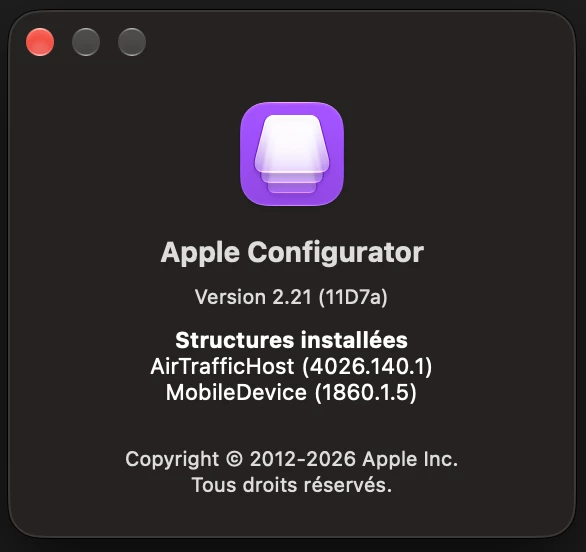
I can confirm I have the latest version of Apple Configurator, and all the Macs have the version I have included in the attachment.

Thank you, and have a good day.