Question

Issues with Conditional Access and User Enrolling with PSSO

  • August 25, 2026
  • 9 replies
  • 330 views

Ryan Mac
Forum|alt.badge.img+1

Hi,

Pretty new to Jamf and Mac MDM but seem to have the handle on the majority of stuff. 

I’m having a single issue with the users enrolling the devices into PSSO during the simplified set-up. 

I am pretty certain it’s a Conditional access policy we have set within our tenant that blocks access to any cloud resources from Uncompliant devices. 

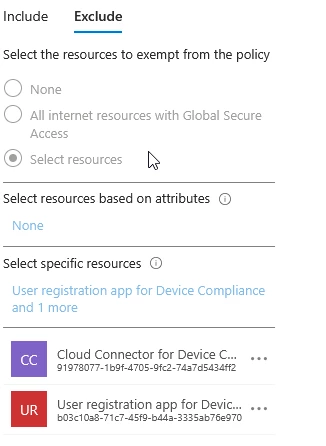
The guidelines suggest - “The User Registration app for Device Compliance created when you connected Jamf Pro to Intune must be added as an exclusion in any policy that may prevent users from registering their devices.”

And from the logs I can see this is the exact application that is getting blocked on the policy.

The problem, even if I add the exception for this application into this conditional access policy it will still get blocked.

If I add the user to an Exception group, the device enrols perfectly fine. 

Not sure if anyone else has had a similar issue? 

9 replies

mvu
Forum|alt.badge.img+22
  • Jamf Heroes
  • August 25, 2026

I think you have it narrowed down to your Microsoft Entra Conditional Access policy. Can you upload a couple of screenshots of how you have it configured?

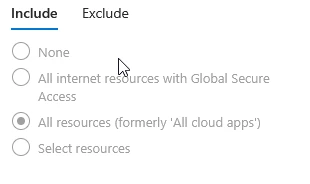
Do you happen to have policy target set to “All Cloud Apps” ?


Ryan Mac
Forum|alt.badge.img+1
  • Author
  • New Contributor
  • August 26, 2026

I think you have it narrowed down to your Microsoft Entra Conditional Access policy. Can you upload a couple of screenshots of how you have it configured?

Do you happen to have policy target set to “All Cloud Apps” ?

Yep, we target All Resources (All Cloud Apps) with this policy and specifically exclude the “User registration app” from it. The policy requires either the device to be marked as compliant or entra hybrid joined or access

to resources is denied. The exclusion should bypass this though I thought. 


mvu
Forum|alt.badge.img+22
  • Jamf Heroes
  • August 26, 2026

Responded earlier but it didn’t post.

Not the strongest on this side of the house, so maybe others can chime in.

• Have any conflicting Conditional Access Policies, or duplicates?

• If you select Office 365 apps or something else instead of All cloud apps, any difference? Maybe this gives you a clue.

• In addition to your specific resources, can you add the Jamf Entra Connector (or similar) and Microsoft Intune Connector (or similar)? Maybe give you a clue.


NickTeo
Forum|alt.badge.img+1
  • New Contributor
  • August 26, 2026

Hey Ryan,

I've chased almost this exact issue. The short version: the per-app exclusion isn't failing to save it's just not covering everything the PSSO registration flow touches, which is why a user-level exclusion group "fixes" it.

During simplified setup the device isn't compliant yet, so your "require compliant or hybrid joined" grant blocks the very traffic needed to become compliant. Excluding the User Registration app + Cloud Connector only helps if those are the sole resources the flow hits, and they're not, the registration also leans on broader Entra device-registration endpoints that "All resources" still catches.

I'd check the failed sign-in. Entra -- Sign-in logs -- find the blocked registration event -- the "Conditionally Access policies" tab. That tells you exact policy and grant control actually blocked it. If it's a different policy than the one you edited, that's very likely your answer. 


Ryan Mac
Forum|alt.badge.img+1
  • Author
  • New Contributor
  • August 27, 2026

Hey Ryan,

I've chased almost this exact issue. The short version: the per-app exclusion isn't failing to save it's just not covering everything the PSSO registration flow touches, which is why a user-level exclusion group "fixes" it.

During simplified setup the device isn't compliant yet, so your "require compliant or hybrid joined" grant blocks the very traffic needed to become compliant. Excluding the User Registration app + Cloud Connector only helps if those are the sole resources the flow hits, and they're not, the registration also leans on broader Entra device-registration endpoints that "All resources" still catches.

I'd check the failed sign-in. Entra -- Sign-in logs -- find the blocked registration event -- the "Conditionally Access policies" tab. That tells you exact policy and grant control actually blocked it. If it's a different policy than the one you edited, that's very likely your answer. 


Yep - this was my fear. that I would need to bypass something like graph. There is only one CA policy blocking unfortunately which is the “Require compliant or block” rule. I’ll play around some more.

Thanks.


Vlad Wa
  • New Contributor
  • August 27, 2026

Hello, same problem here. 

Our Jamf Device Compliance registration is blocked by one Conditional Access policy requiring a compliant device, even though the “User registration app for Device Compliance” is excluded.

The sign-in details show Microsoft Graph as the resource and Windows Azure Active Directory (00000002-0000-0000-c000-000000000000) as the Conditional Access audience.

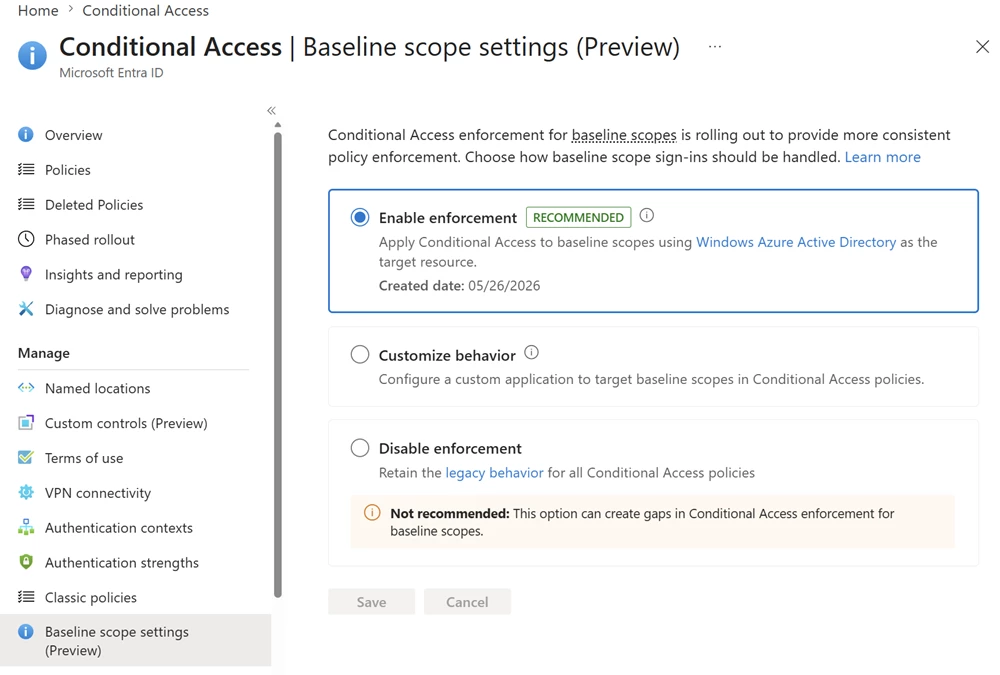
Could Microsoft’s documented “Customize behavior” solution for baseline scopes resolve this issue, and is this approach supported by Jamf?

https://learn.microsoft.com/en-us/entra/identity/conditional-access/concept-enforcement-resource-exclusions

regards


Ryan Mac
Forum|alt.badge.img+1
  • Author
  • New Contributor
  • August 27, 2026

Hello, same problem here. 

Our Jamf Device Compliance registration is blocked by one Conditional Access policy requiring a compliant device, even though the “User registration app for Device Compliance” is excluded.

The sign-in details show Microsoft Graph as the resource and Windows Azure Active Directory (00000002-0000-0000-c000-000000000000) as the Conditional Access audience.

Could Microsoft’s documented “Customize behavior” solution for baseline scopes resolve this issue, and is this approach supported by Jamf?

https://learn.microsoft.com/en-us/entra/identity/conditional-access/concept-enforcement-resource-exclusions

regards


Yes, exactly the same problem here. I’m very hesitant in opening this single rule up to a bunch of other applications which in reality shouldn’t be needed. (Enrolment works on iOS and also Intune enrollment is fine) 


Achile
Forum|alt.badge.img
  • New Contributor
  • September 4, 2026

Hello All,

we juste start having this issue after enabling the enforcement regarding new CA managment that microsoft intrdouce. 


same thing, the User registration app for Device Compliance is excluded but we can see that the CA bloqking non compliante and non intune managed device is applyed with the ID of the APP.


Next step next week is to customise behaviour in baseline scope settings and exclude User registration app for Device Compliance. 


Achile
Forum|alt.badge.img
  • New Contributor
  • September 7, 2026

Hello everyone, 


i had the answer from Jamf support: 


Full steps are documented here: https://learn.jamf.com/r/en-US/technical-articles/Configuring_Jamf_Pro_Device_Compliance_for_Microsofts_Baseline_Scope_Enforcement_1


Step 1 — Grant admin consent in Entra ID

1. Log in to your Microsoft Entra admin center.

2. Navigate to Enterprise applications > User Registration app for Device Compliance.

3. Click Permissions.

4. Click Grant admin consent for [your organization].


Step 2 — Deploy a configuration profile in Jamf Pro (see the link )

1. In Jamf Pro, go to Computers > Configuration Profiles > New.

2. Click the Application & Custom Settings payload and select Upload.

3. In the Preference Domain field, enter: com.jamf.management.jamfAAD

4. In the Property List field, enter the appropriate plist for your environment:


Step 3 — Exclude the User Registration App from affected CA policies

Identify every CA policy that meets both of the following criteria:

- Cloud apps or actions scope is set to "All Cloud Apps"

- Grant controls include a device compliance or device management requirement (e.g. "Require device to be marked as compliant")


On each of those policies, add "User Registration App for Device Compliance" to the Exclusions list.


Note: This workflow currently supports macOS user registration only. Support for mobile devices (Self Service+) will be added in an upcoming release.