Question

JAMF Cloud and Time

  • Jul 22, 2025 3:27 PM UTC
  • 5 replies
  • 257 views

Forum|alt.badge.img

Since moving to JAMF Cloud, we’ve noticed that some time appears to be off. 

For example, I ran an Inventory Update manually on a computer, and the record in JAMF console shows that it was run 1 hour earlier than it actually was.

Also, with Apple TVs we have records that say that the Inventory Update occurred up to an hour in the future.

I’m not sure that this is causing an actual problem yet, but concerned that it could.  Are there time zone settings we should see or anything?  All of our client devices are in the same time zone (unless a client goes on a temproary trip or something).

 

5 replies

mvu
Forum|alt.badge.img+25
  • Jamf Heroes
  • Jul 22, 2025 3:50 PM UTC

Might be worth putting a ticket in with Jamf to check your instance and UTC time. Maybe a bug? Or an update pending?


atomczynski11
Forum|alt.badge.img+19

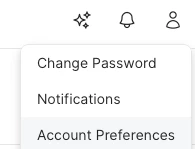
In the Jamf Pro console on the top right select the person avatar.
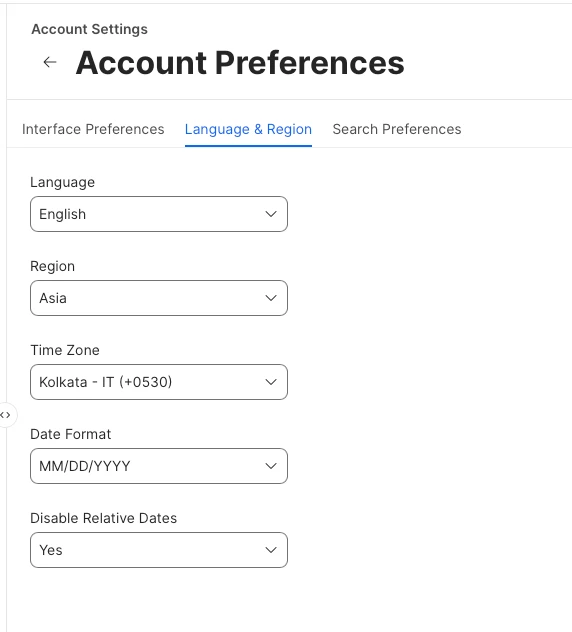
Select Account Preferences, Language & Region.

Set Time Zone
Disable Relative Dates: Yes
Save


Shyamsundar
Forum|alt.badge.img+14
  • Jamf Heroes
  • Jul 23, 2025 4:49 PM UTC

Select  Account Preferences 


Select Language And Region set your time zone and Disable Relative Date set as Yes


mattjerome
Forum|alt.badge.img+16
  • Jamf Heroes
  • Jul 23, 2025 8:09 PM UTC

This^ I always tell my new techs to change those settings.


JakobHansen
Forum|alt.badge.img
  • New Contributor
  • Jul 25, 2025 7:47 AM UTC

It sounds like the issue you're experiencing is related to a time zone mismatch between your JAMF Cloud instance and your client devices.