Question

Jamf Connect, Kerberos Error 4, and Password Expires in X days not updating

  • May 11, 2026
  • 17 replies
  • 306 views

FerrisBNA
Forum|alt.badge.img+5

Happy Monday! 

So I just came across this issue.  When a user tries to change their password using Jamf Connect, they get this Kereberos error 4.
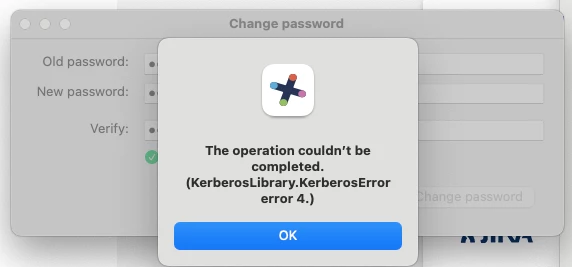
So they go into Okta and change it there.  Later Jamf prompts them that the Local Password and Network password don’t match.  They are able to enter the old and new passwords and get the local mac password changed to match.  

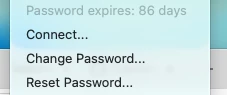
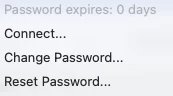
But Jamf still shows “password expires in 0 days”.
I didn’t do the Jamf Connect setup, it was here when I joined the company, so I’m not sure exactly how to start fixing this.  I’m hoping you have some tips, maybe someone has seen this before, really anything.  I’ll keep doing my research, but It’s always nice to get some expert advice.

-Pat

17 replies

mm2270
Forum|alt.badge.img+24
  • Legendary Contributor
  • May 12, 2026

I’ve run across this issue as well, but in our case we use Microsoft Entra. In talking with someone in Jamf Support, they gave me a command to run that will update that Self Service tile.

open jamfconnect://gettickets

But this command needs to be run as the logged in user to work, so if it was something you planned to do from a policy, you’ll need to use the launchctl asuser method to do it. Or, users can run this themselves in Terminal if they are comfortable with that.

It sometimes works also by clicking the Refresh link in the Kerberos tile in Self Service.


FerrisBNA
Forum|alt.badge.img+5
  • Author
  • Contributor
  • May 12, 2026

This is very weird, the password expires in the menubar updated on its own today.  I did not make any changes to our Jamf configuration or the endpoints.  

I’ll need to check if I can reset my password successfully now.

One thing I haven’t found the answer for yet…

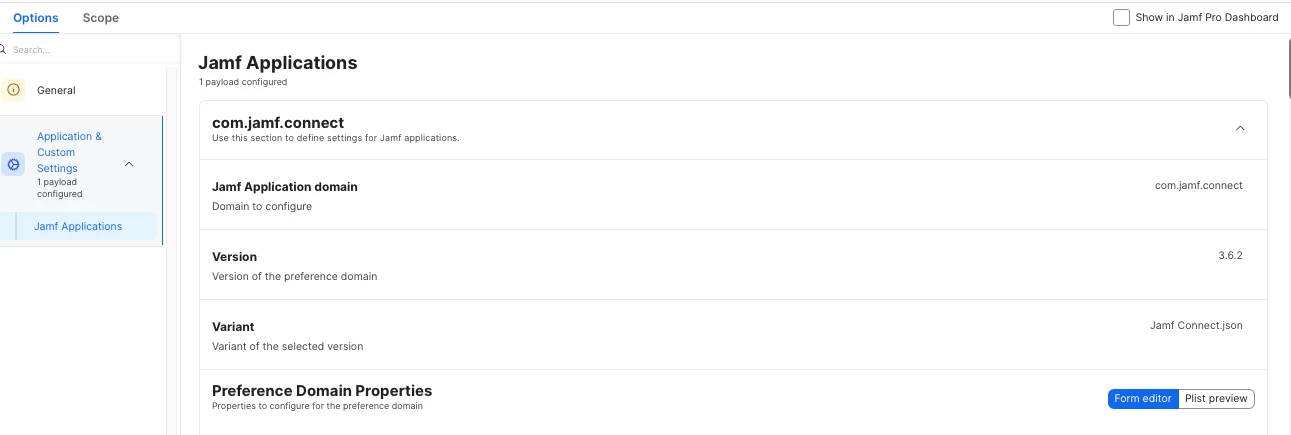
In the configuration profile for Jamf Connect, The Application Setting Payload has a field for “Version”.  Should I be updating this as new releases of Jamf Connect come out?

Thanks in advance.


Forum|alt.badge.img+18
  • Valued Contributor
  • May 14, 2026

We have started to see this issue. We have been getting a few calls per day over the past week. 


jon.teixeira
  • New Contributor
  • May 15, 2026

We have also started to see this at our org. 


junjishimazaki
Forum|alt.badge.img+10

hi ​@FerrisBNA , in the Jamf Connect config profile what do you have for the PasswordChangeWorkflow key? Is it set for web or kerberos? My org also uses Okta so the key is set to web so it will use the Okta to update the password.

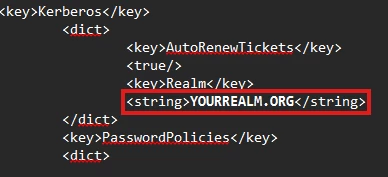
As for the password not updating the countdown, well, it’s obvious its not updating the kerberos ticket. Do you have the Kerberos key set to autorenew?


lukegackle
Forum|alt.badge.img
  • New Contributor
  • May 22, 2026

I’m also seeing this issue in our org, no changes to our config and things were previously working and suddenly not working 🤔

Have contacted support.


mvu
Forum|alt.badge.img+22
  • Jamf Heroes
  • May 22, 2026

Just curious, did this start with macOS 26.5 update? We don’t use Jamf Connect, but see a oddness with Apple Kerberos starting with the 26.5 update.


lukegackle
Forum|alt.badge.img
  • New Contributor
  • May 26, 2026

I’m on 26.2 and I have the issue on my test mac so not to sure if its related to OS update or not


jason533
Forum|alt.badge.img
  • New Contributor
  • May 26, 2026

Based on the community discussion, Kerberos Error 4 typically occurs when Jamf Connect attempts a password change workflow using Kerberos instead of relying on your identity provider's cloud portal. To resolve this, verify your configuration profile and ensure that the key is explicitly set to web  rather than Kerberos


lukegackle
Forum|alt.badge.img
  • New Contributor
  • May 26, 2026

Based on the community discussion, Kerberos Error 4 typically occurs when Jamf Connect attempts a password change workflow using Kerberos instead of relying on your identity provider's cloud portal. To resolve this, verify your configuration profile and ensure that the key is explicitly set to web  rather than Kerberos

You should still be able to do a change password process through Kerberos and thats what’s nolonger working, so something has changed, my JAMF Support case has just been escalated so I’ll see what they say.


Low73
Forum|alt.badge.img
  • New Contributor
  • May 26, 2026

Based on the community discussion, Kerberos Error 4 typically occurs when Jamf Connect attempts a password change workflow using Kerberos instead of relying on your identity provider's cloud portal. To resolve this, verify your configuration profile and ensure that the key is explicitly set to web  rather than Kerberos

You should still be able to do a change password process through Kerberos and thats what’s nolonger working, so something has changed, my JAMF Support case has just been escalated so I’ll see what they say.

Hey all !

i was about to answer the same, we need, for now, to use Kerberos to change password.

i’ve just open a ticket too.

chatting with the AI of Jamf pro it said to me “private relay” can cause kerberos error so i’ve made a configuration profile where it’s deactivated, wait and see…

have a great day y’all :) 


easyedc
Forum|alt.badge.img+16
  • Esteemed Contributor
  • May 27, 2026

Just dropping a “This is affecting us too” line.  I have had success with doing a log out/log in with users and then having the perform a kerberos refresh in self service. Seems to ensure that passwords are in sync and has cleared it for most of my users within 15 min or so.


Low73
Forum|alt.badge.img
  • New Contributor
  • May 27, 2026

Just dropping a “This is affecting us too” line.  I have had success with doing a log out/log in with users and then having the perform a kerberos refresh in self service. Seems to ensure that passwords are in sync and has cleared it for most of my users within 15 min or so.

Hey thank you for your tip 

just to be sure 

you log out your user then log back in from session right (not in self service) 
refresh kerberos first
then change password ?


easyedc
Forum|alt.badge.img+16
  • Esteemed Contributor
  • May 27, 2026

So in our situation users have performed successful password changes, but are still being prompted with the alert that their password will expire in X days (as mentioned in the title). So Jamf connect has the current/correct updated password, but hasn’t updated the expiry. The log out (Apple Menu > log out username) is done AFTER password change and done with the new password credentials.


Low73
Forum|alt.badge.img
  • New Contributor
  • May 27, 2026

So in our situation users have performed successful password changes, but are still being prompted with the alert that their password will expire in X days (as mentioned in the title). So Jamf connect has the current/correct updated password, but hasn’t updated the expiry. The log out (Apple Menu > log out username) is done AFTER password change and done with the new password credentials.

Ha ok it’s not our issue (for me at least) 

i have the exact same issue as the first post of this thread 


Forum|alt.badge.img+7
  • Contributor
  • May 28, 2026

We use hybrid AD + Entra ID, I was able to resolve this by having one of the user to come up with a brand new complex password. The problem comes from password policies in Entra. The Windows admin banned 5 words and 24 previous passwords in Entra and in sync with AD, so anyone’s password containing the banned password patterns, even Jamf Connect password checks are all green, the user will get the Preauthentication Error.


To log this issues. Here’s what Jamf Support sent me to get more clarity on the AD side:


To narrow down the root cause, we need two things from an affected user’s Mac:

  1. A manual kpasswd test

  2. Heimdal unified logs with Apple private data logging enabled during reproduction

The kpasswd test exercises the same underlying Kerberos password change mechanism used by Jamf Connect.

  • If kpasswd succeeds, the issue is likely specific to how Jamf Connect is constructing the Kerberos principal.

  • If kpasswd fails with the same error, the rejection is occurring at the KDC level, which significantly narrows the AD-side investigation.

The Heimdal logs (with private data enabled) will show the exact username and principal being passed during the password change request, which is the primary unknown at this stage.

Step-by-step instructions

Step 1: Install the Apple private data debug profile

Install the profile on one affected user’s Mac:

Step 2: Start the unified log stream

On the affected Mac, open Terminal and run the following command. Leave this window open during testing:

log stream --style compact --predicate "subsystem == 'com.jamf.connect' OR subsystem == 'com.apple.Heimdal' OR subsystem == 'menu.nomad.login.ad'" --debug

Step 3: Run a manual kpasswd test

Open a second Terminal window and perform the following:

  1. Verify that a Kerberos ticket exists:

klist
  1. If no ticket is present, obtain one:

kinit <sAMAccountName>@CONTOSO.COM
  1. Attempt the password change manually:

kpasswd <sAMAccountName>@CONTOSO.COM
  1. Record the exact result:

  • Success

  • Or the full error message returned

Step 4: Reproduce the issue in Jamf Connect

While the log stream from Step 2 is still running, reproduce the password change failure through Jamf Connect using the user’s normal workflow.


There will be additional logs generated during password change in Jamf Connect, it should provide the information ones need to troubleshoot this.


Forum|alt.badge.img+7
  • Contributor
  • May 28, 2026

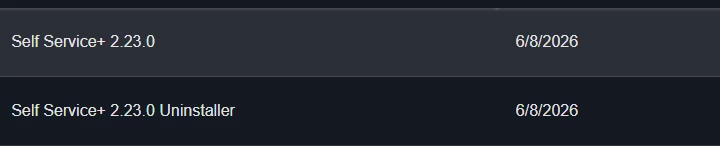
For password expiry not updating or any random kerberos issues due to connectivity between Mac and DC, a complete shut down of the Mac tend to work for us. Sometimes help desk would instruct the users to refresh Kerberos in Self Service+. I also have a Self Service policy to fully uninstall and reinstall Jamf Connect Login, Self Service+ if needed. Once the users are prompted to reauthenticate in Jamf Connect, I will be able to find out what’s going on with Kerberos.