Question

"Jamf Connect Keychain " issue after JC 3.5?

  • March 9, 2026
  • 13 replies
  • 394 views

afnpw
Forum|alt.badge.img+8

Hello all, 


Today and last week Friday, we’ve been seen users get the Jamf Connect Keychain pop up. Computer will show JC 3.5 is installed and it’s getting the latest Self Service + and the popup reoccurs on restart. 


I’ve opened a ticket but wanted to reach out here and see if something clear and apparent is happening.

13 replies

Frank Sinatra
  • New Contributor
  • March 10, 2026

We have been experiencing this since mid-January. Very confusing since staff have been migrated to 3.0+ since it was first launched. After ~30 staff reached out mentioning this, and pushing the latest Jamf Connect package from Jamf Account to each machine, I got approval yesterday to push out the package to the remaining staff with a notification to check-in and restart. 


So far, the logs show the package has installed and no one has reached out.


Forum|alt.badge.img+2
  • New Contributor
  • March 11, 2026

I’ve seen that “Jamf Connect Keychain” prompt pop up when the user’s login password and their login keychain password get out of sync (often after a password change / sync event). One low-impact thing to try is having the user update the login keychain password to match their current macOS password, then reboot and see if the prompt stops.

Steps + screenshots here: Change your keychain password to match with your login password

If it keeps coming back after the keychain is in sync, I’d also sanity-check whether the keychain is being reset/overwritten at login (Jamf Connect password sync settings) and whether the prompt is Self Service+/Jamf Connect trying to access a specific key.


Forum|alt.badge.img+2
  • New Contributor
  • March 11, 2026

I've seen that 'Jamf Connect Keychain' prompt when the user's login password and their login keychain password get out of sync (often after a password change/sync event). One low-impact thing to try is having the user update the login keychain password to match their current macOS password, then reboot.


Steps + screenshots here: Change your keychain password to match with your login password


If it keeps coming back after the keychain is in sync, I'd also sanity-check whether the keychain is being reset/overwritten at login (Jamf Connect password sync settings) and whether the prompt is Self Service+/Jamf Connect trying to access a specific key.


Forum|alt.badge.img+3

we encountered this issue after self service updated to v11.25.2 last week, keychain pops up after every restart/login despite keychain being in sync with users login password - we resolved it by updating the Jamf connect package from v3.5 to v3.7. 


Andy.Alexander

we encountered this issue after self service updated to v11.25.2 last week, keychain pops up after every restart/login despite keychain being in sync with users login password - we resolved it by updating the Jamf connect package from v3.5 to v3.7. 

We had exactly this and 3.7 resolved the keychain prompt. However, a day later it started prompting users to sync their local password on login even though it hadn’t changed. Entering the same password again allows it to continue to the desktop.


Forum|alt.badge.img+26
  • Honored Contributor
  • March 12, 2026

Us too for this...My choices are 3.5 or upgrade to something else and watch either keychain issues or password issues on login. The only reason 3.5 is working for us is because after 11.25.2 update, we went into the custom branding and changed the app name back to Self Service+.app The update changed it to Self Server.app


Forum|alt.badge.img+7
  • Contributor
  • March 12, 2026

Since Self Service+ and Jamf Connect are connected, I built a policy for Help Desk that runs the uninstaller for Jamf Connect + Self Service+, then reinstall them.

By using the uninstaller, the respective entries for the apps are removed from the Keychain.

I tried troubleshooting with a user by just uninstalling Self Service+, prompt came back. Uninstalling both Jamf Connect and Self Service seems to address the problem for now. For the edge cases I am getting, I just have the user to click “Always Allow” and enter the password.


Forum|alt.badge.img+26
  • Honored Contributor
  • March 12, 2026

Yep...getting quite friendly with that uninstaller. Sighs...what I really dream of is a current production version of Self Service+ and a current production installer for Jamf Connect login that does not result in keychain errors or password verification needed.


Forum|alt.badge.img+7
  • Contributor
  • March 12, 2026

Yep...getting quite friendly with that uninstaller. Sighs...what I really dream of is a current production version of Self Service+ and a current production installer for Jamf Connect login that does not result in keychain errors or password verification needed.

I leverage Patch Management to deploy Self Service+ and Jamf Connect, however there are times where a complete uninstall is required because the upgrades carry over undesired settings or fixing keychain conflicts.

I am waiting to Apple’s pSSO to have Jamf Connect functionality.


Forum|alt.badge.img+2
  • New Contributor
  • March 20, 2026

Can someone please share a sample policy that fixes this issue? Does the policy uninstall both JC and SS+ and install the latest versions within the same policy?


Thank you!


Forum|alt.badge.img+7
  • Contributor
  • March 20, 2026

Can someone please share a sample policy that fixes this issue? Does the policy uninstall both JC and SS+ and install the latest versions within the same policy?


Thank you!


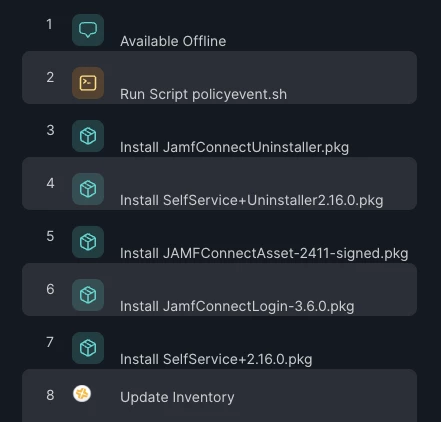
In Packages - give uninstallers high priority so they run first.


Forum|alt.badge.img+2
  • New Contributor
  • March 21, 2026

We’ve seen this pop up when the login keychain password gets out of sync with the current account password (often after a Jamf Connect / Self Service+ update or an IdP password change).


What I’d try first:

1) Confirm the user can log in locally with their current password.

2) In Keychain Access, set the “login” keychain password to match the current account password (or, if needed, create a new login keychain).


Steps here (incl. the “create a new login keychain” path): Change your keychain password to match with your login password


If the keychain is definitely in sync and the prompt still reappears every reboot, we’ve also had good luck doing a clean uninstall/reinstall and moving off JC 3.5 (several folks in this thread mentioned 3.7 resolved it).


Forum|alt.badge.img+2
  • New Contributor
  • March 22, 2026

One thing I’ve seen with the recurring “Jamf Connect Keychain” prompts is that it’s not always a Jamf Connect bug by itself — it can also happen when the user’s login password and the login keychain password have drifted (common after password sync / migrations).

Quick sanity check on an affected Mac:

  • Open Keychain Access → see if it prompts to “Update Keychain Password” / can’t unlock the login keychain
  • If it’s out of sync, resetting the login keychain password to match the current login password usually stops the endless prompts.

This walkthrough is a decent checklist for that flow: Change your keychain password to match with your login password

If keychain is definitely in sync already, then +1 to what others said about testing newer JC/SS+ builds — I’ve also seen the prompt frequency change depending on the Self Service+/JC combo.