Question

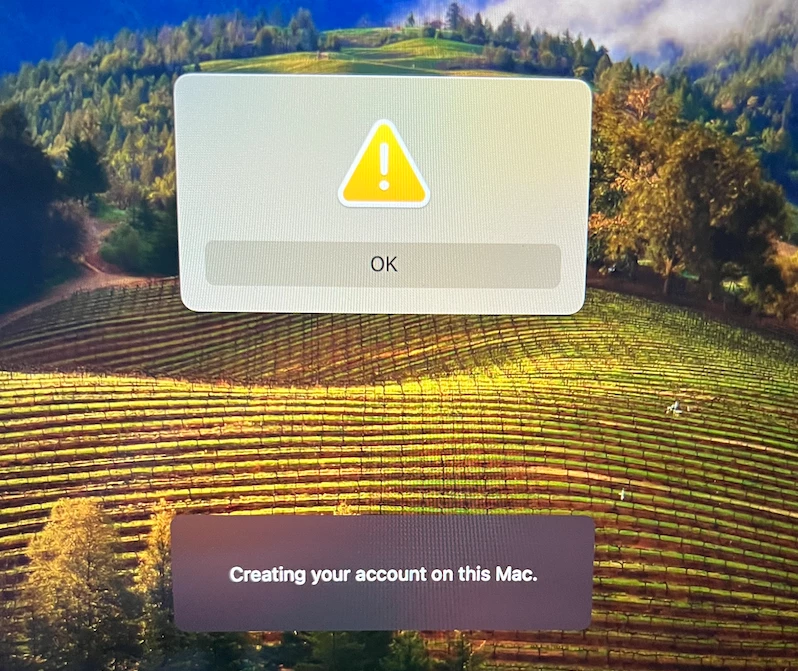
Jamf Connect - Yellow Caution Error Message.

  • January 23, 2024
  • 6 replies
  • 25 views

Forum|alt.badge.img+3

Hello, I keep running into issues when logging in with Jamf Connect. I get a caution sign with an exclamation point in the middle with the option to click on "Okay". When I click okay it takes me back to the log-in screen. I'm not sure what is causing this and cannot get past that screen. Has anyone encountered this issue before? I already have an open case with Jamf but I'm not so sure if they even know to fix it. 

6 replies

AJPinto
Forum|alt.badge.img+26
  • Legendary Contributor
  • January 23, 2024

Does the exclamation say anything when you click or highlight over it?


Forum|alt.badge.img+3
  • Author
  • New Contributor
  • January 26, 2024

Does the exclamation say anything when you click or highlight over it?


It just say “okay”


MikePh
Forum|alt.badge.img+4
  • Employee
  • February 9, 2024

A picture may help but sounds like it may be a Jamf Helper window of some sort? Hard to say what is flagging it or what it's doing. You could try trigging the issue and then go into the device in Jamf Pro and look at policy logs to see if there's a policy that's firing off and go from there. 


Forum|alt.badge.img+1
  • New Contributor
  • April 11, 2024

Did you ever resolve this? I'm having the same issue and I've tried 3 different Connect versions since I have seen this in the past after OS Upgrades but this time I cant get past it. Attaching a pic. I have a JAMF case open but it's been 24 hours with no response and im on a tight deadline to get this deployed. 


Forum|alt.badge.img

Did you ever resolve this? I'm having the same issue and I've tried 3 different Connect versions since I have seen this in the past after OS Upgrades but this time I cant get past it. Attaching a pic. I have a JAMF case open but it's been 24 hours with no response and im on a tight deadline to get this deployed. 


Did you find a resolution for this? I am experiencing the same issue. 


Forum|alt.badge.img+1
  • New Contributor
  • April 16, 2024

Did you find a resolution for this? I am experiencing the same issue. 


Yes I did! After talking with JAMF support I removed/disabled the "Login Window" configuration profile I had setup and that fixed it. I still have the case open and asked JAMF to provide more info on if they knew what exact setting in the login window caused the issue or if they had plans to fix but nothing back yet. If I get more info I'll provide here. 


Short answer: Disable Login Window Config Profile if you have one. That fixed my problem.