Question

JAMF Enrollment Issue

  • February 2, 2026
  • 3 replies
  • 72 views

Gurushankar.T
Forum|alt.badge.img

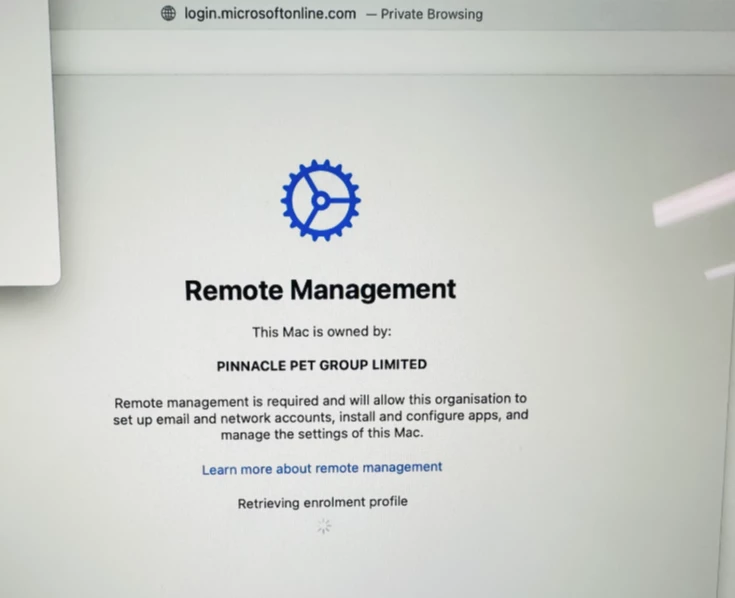
Hi ,i am new to JAMF, the JAMF implementation was done by a third-party resource. it was all fine till last week, suddenly when i try to enrol a device after the SSO login its got stuck in blank screen, pls guide me on how to check the logs and errors

3 replies

h1431532403240
Forum|alt.badge.img+6

To troubleshoot SSO enrollment issues with a blank screen, check these logs:

1. Jamf Pro Server Log:

  • Go to Settings > Information > Jamf Pro Server Logs
  • Enable debug mode, then reproduce the issue
  • Look for errors containing AuthenticationServiceExceptionCredentialsExpiredException, or SAMLException
  • Click Download to get the full JAMFSoftwareServer.log

2. Common Causes for Blank Screen After SSO:

  • Expired or invalid signing certificate from IdP
  • Session lifetime mismatch between IdP and Jamf Pro
  • SAML assertion not properly signed
  • User/group mapping not configured correctly in Jamf Pro

3. Quick Checks:

  • Verify your IdP signing certificate is valid and not expired
  • Confirm user exists in Jamf Pro with proper group mapping
  • Test SSO login to Jamf Pro web console first (outside of enrollment) to isolate the issue

Since this worked until last week, check if any certificates expired recently or if changes were made to your IdP configuration.

References:


Gurushankar.T
Forum|alt.badge.img
  • Author
  • New Contributor
  • February 3, 2026

Hi, thanks for your reply, i have download and checked the logs, there is no error doe the credential/Authentication/SAML.


have validated all the certificate, all are active


SSO is working for the JAMF portal login and other devices.. its only issue during the enrolment.


the Remote management page is stuck in Retrieving Enrolment Profile.


jt-LJG
  • New Contributor
  • February 5, 2026

We started experiencing this same exact issue withing the last week or so as well.