Question

Jamf Pro 10.44.1 - New OS Update Reporting features

  • March 4, 2023
  • 5 replies
  • 43 views

Forum|alt.badge.img+10

Glad to see they we can finally have some insight into what is going on when we push MDM commands to attempt to enforce macOS updates. Disappointed to see that apparently none of this info can be used in a Smart Group, Advanced Search, etc for tracking and reporting. Baby steps I guess.

5 replies

AJPinto
Forum|alt.badge.img+26
  • Legendary Contributor
  • March 6, 2023

Did you really think JAMF would give us something meaningful involving OS updates?


Forum|alt.badge.img+10
  • Author
  • Valued Contributor
  • March 6, 2023

Did you really think JAMF would give us something meaningful involving OS updates?


Well, to be honest, who is actually to blame? Apple or Jamf? 


AJPinto
Forum|alt.badge.img+26
  • Legendary Contributor
  • March 6, 2023

Well, to be honest, who is actually to blame? Apple or Jamf? 


  • Apple for releasing a half backed function to handle OS updates and removing all other ability to deploy OS updates.
  • JAMF for half butting any effort at doing anything of OS updates as long as JAMF/Casper has been a thing. It has taken JAMF 2 years since the MDM commands were added to report on OS update status for them to be visible to us.


I am still waiting for a policy to be able to deploy OS updates which was teased as a potential functionality net add in October of 2021. 


Managed Software Updates - using deferrals via a m... - Jamf Nation Community - 249821

Example mass action/remote command workflows moving forward:

  • (Existing) Admins can issue a remote command to a set of devices to download and install to an upgraded version of macOS ASAP, restarting end-user machines as necessary
  • (Existing) Admins can issue a remote command to a set of devices to download to an upgraded version of macOS and notify the end user
  • (Upcoming, net new) Admins can issue a remote command to a set of devices to download to an upgraded version of macOS and notify the end user, and input a MaxUserDeferrals integer between 1-90, which will allow the end users to snooze a software between 1-90 days
  • Potential future functionality:
    • Ability to issue these commands via API
    • Ability to schedule these commands
    • Ability to issue these commands via policy


Forum|alt.badge.img+10
  • Author
  • Valued Contributor
  • March 14, 2023

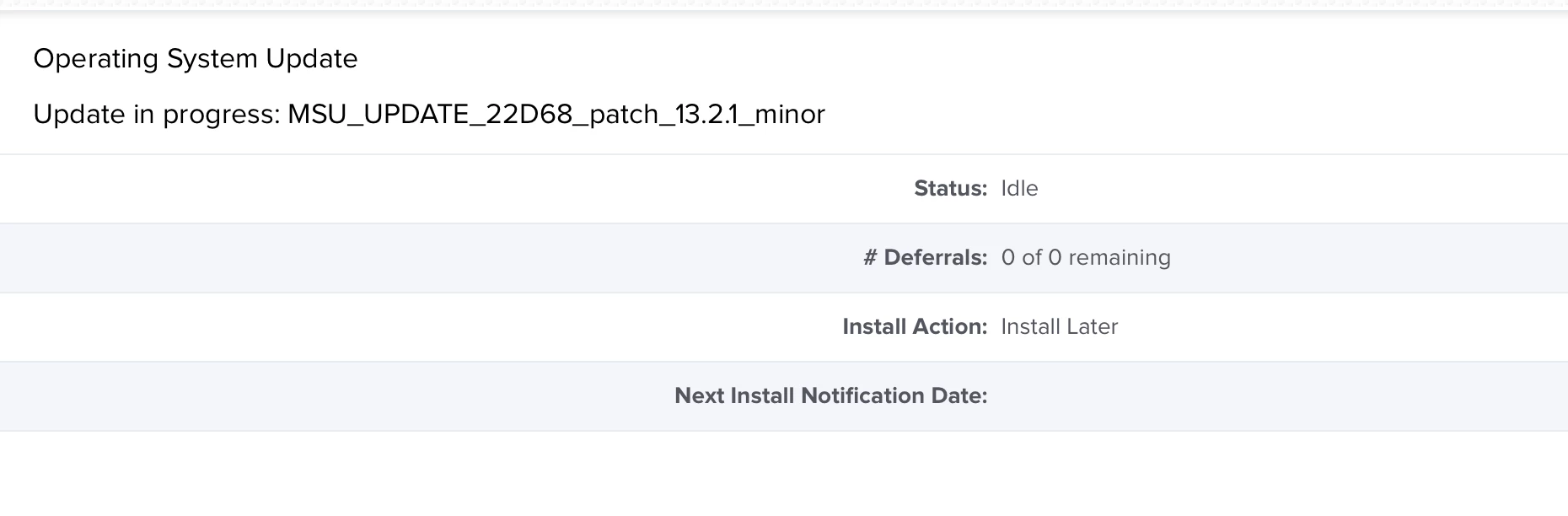
After monitoring for a while, it appears that the info in the computers record, Management>Operating System and History>Operating System History are in no way correct. For instance, my own Mac is fully up to date and OS build is 22D68, but Management>Operating System shows "Update in progress: MSU_UPDATE_22D68_patch_13.2.1_minor" even though this update was applied weeks ago.


Forum|alt.badge.img+3
  • New Contributor
  • May 23, 2023

After monitoring for a while, it appears that the info in the computers record, Management>Operating System and History>Operating System History are in no way correct. For instance, my own Mac is fully up to date and OS build is 22D68, but Management>Operating System shows "Update in progress: MSU_UPDATE_22D68_patch_13.2.1_minor" even though this update was applied weeks ago.


Is there an update to this? Was this a bug that's been fixed?