Question

Jamf Pro 11.1.0 Beta Now Available!

  • October 23, 2023
  • 13 replies
  • 51 views

ianhansen
Forum|alt.badge.img+19

Hello Jamf Nation!
Jamf Pro 11.1.0 Beta is now released
We're excited to announce that this beta includes Remote Assist and macOS Self Service Onboarding along with many other features and fixes. 
How to join the beta: Enroll in the Beta Program under Product Feedback at account.jamf.com. Once you enroll you'll receive an invitation to join the Beta Forum, click "Join this group Hub" to gain access. Email beta@jamf.com with questions.
The beta program is covered by the Jamf non-disclosure agreement; please do not share any information regarding your testing on any public forum, including the non-beta areas of Jamf Nation. Use the Jamf Nation Beta Forum or contact Jamf via beta@jamf.com with any questions. Thank you to all who participate in this program!

13 replies

SteveWalker
Forum|alt.badge.img+4
  • Contributor
  • October 25, 2023

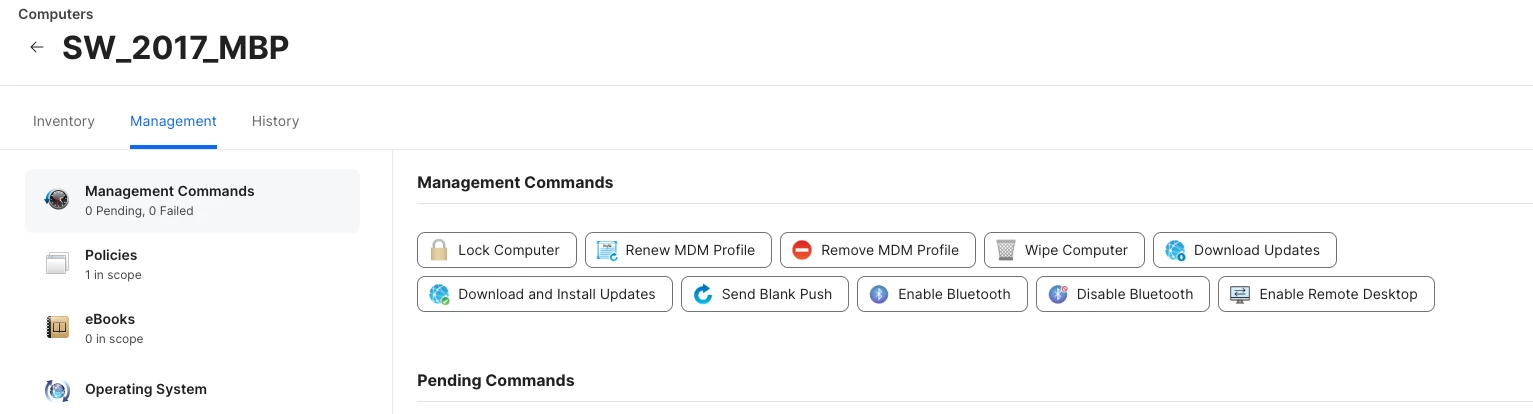
Does the Remote Assist feature have to be enabled somewhere? I don't see it. I tried 'enable remote desktop' but no dice.


Forum|alt.badge.img+8
  • Contributor
  • October 25, 2023

Does the Remote Assist feature have to be enabled somewhere? I don't see it. I tried 'enable remote desktop' but no dice.


Yeah you have to turn it on. Go to Settings > Computer Management > Security, there's a box to check for Remote assist there and then save. 


SteveWalker
Forum|alt.badge.img+4
  • Contributor
  • October 25, 2023

Yeah you have to turn it on. Go to Settings > Computer Management > Security, there's a box to check for Remote assist there and then save. 


Thank you, that worked a treat!


Forum|alt.badge.img+1
  • New Contributor
  • October 26, 2023

Does remote assist have an additional licensing cost?


Person
Forum|alt.badge.img+9
  • Jamf Heroes
  • October 31, 2023

Does remote assist have an additional licensing cost?


No additional costs according to the Q&A

https://www.jamf.com/blog/meet-jamf-remote-assist/


Forum|alt.badge.img+1
  • New Contributor
  • November 2, 2023

Good morning,
It's been 4 times I registered for the beta program but I never see my instance updated until the final release.
Did I miss something ?


Msten
Forum|alt.badge.img+1
  • New Contributor
  • November 14, 2023

Is the user prompted to allow remote control before a remote session?


SteveWalker
Forum|alt.badge.img+4
  • Contributor
  • November 14, 2023

Is the user prompted to allow remote control before a remote session?


Yes, they are.


Forum|alt.badge.img+5
  • Contributor
  • November 17, 2023

Yes, they are.


So this won't help me log into a lab machine on my other campus?  There are use cases like mine that need the ability to get on the machine without a remote user accepting the connection. I'm more than happy with them somehow flashing warnings and notifications that the machine is being observed/controlled, but if this goes live as is, then it's mostly useless for me. 


Forum|alt.badge.img+1
  • New Contributor
  • November 20, 2023

So this won't help me log into a lab machine on my other campus?  There are use cases like mine that need the ability to get on the machine without a remote user accepting the connection. I'm more than happy with them somehow flashing warnings and notifications that the machine is being observed/controlled, but if this goes live as is, then it's mostly useless for me. 


from here https://www.jamf.com/blog/meet-jamf-remote-assist/

If the end user is not logged into their computer, the remote screen sharing session will start as an unattended session if the admin is able to provide local account credentials


Forum|alt.badge.img+2
  • New Contributor
  • November 21, 2023

Does the Remote Assist feature have to be enabled somewhere? I don't see it. I tried 'enable remote desktop' but no dice.


You need to enable that in the settings 

Settings > Computer Management > Security > then tick Jamf Remote Assist


n_lecchi
Forum|alt.badge.img+12
  • Contributor
  • November 27, 2023

We encountered some problems with JRA:
1. if screenshot shortcuts are disabled, JRA does not work.
2. with the shottr app enabled, user has multiple screenshots on the monitor.
3. The end user cannot stop screen sharing if the operator forgets the open session.


Forum|alt.badge.img
  • New Contributor
  • December 8, 2023

I can't see Remote Assist in our instance in Jamf Pro under Settings > Computer Management > Security, I'm an admin too?