Question

JAMF school and SCEP?

  • August 15, 2022
  • 3 replies
  • 49 views

Forum|alt.badge.img+2

Our goal is to distribute (wifi)certs  to about a couple of thousands of iPads, and we have Microsoft and NDES as our infrastructure. Seems to be impossible to find information about how to assign SCEP in JAMF School, especially how to configure Challenge. Does anybody here know how to use the SCEP section? Have done some trials and, all, errors...

3 replies

Forum|alt.badge.img
  • New Contributor
  • September 4, 2023

Hi,

same here, have you been able to solve the problem in the meantime?

Thanks for some hints!


Forum|alt.badge.img+2
  • Author
  • New Contributor
  • September 4, 2023

Hi,

same here, have you been able to solve the problem in the meantime?

Thanks for some hints!


No, there were three alternatives; starting a certificate server (SCEPman); migrating to JAMF Pro, or, in our case, the service provider for all our services, offered VMware. Not too happy about it, but there were other factors involved also.


AlMa
Forum|alt.badge.img
  • New Contributor
  • March 30, 2026

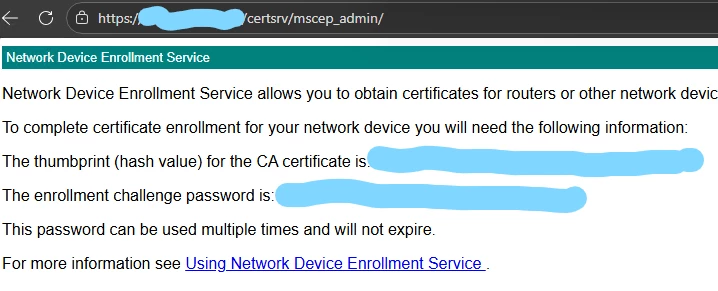
Hello, if you have Microsoft PKI environment, here is where to take your Challenge and your Fingerprint required in Jamf School SCEP profile.


1- Go to your NDES server, start a webbrowser in private mode

2- Go to https://yourserver.com/certsrv/mscep_admin

3- Login with your service account used for NDES

You will see a screen like that:

Your Challenge is “The enrollment challenge password” without space.

Your Fingerprint is “The thumbprint (hash value) for the CA certificate” without space.


Hope it will help someone.

Have a nice day