Question

Jamf School Teacher - Classes keep disappearing

  • May 12, 2026
  • 8 replies
  • 102 views

spicybeeftaco
Forum|alt.badge.img+1

Hi guys, I’m the IT guy in my school and have been encountering this issue that happens to 2 of my IT Colleagues. Their classes disappear in JamF Teacher from time to time. However on my Teacher account that I am using for testing, it stays. Not too sure what is the cause of this. 


I have been retagging them back to their classes and this has put a hold for us to integrate in our School. Anyone else has encountered this before and has a solution? 

8 replies

dletkeman
Forum|alt.badge.img+17
  • Jamf Heroes
  • May 13, 2026

I’m sorry but I am not currently tracking anything like this.  Hasn’t came up for me.  That would be very frustrating to have happen.


GregBobbett
Forum|alt.badge.img+12
  • Jamf Heroes
  • May 13, 2026

Just want to verify something. When you are testing, do you ever drop the two colleagues into another class as a student? I had this happen to one of my teacher test accounts recently. I went and cleared them all out of any ‘student’ user groups and out of any Classes as a student. 

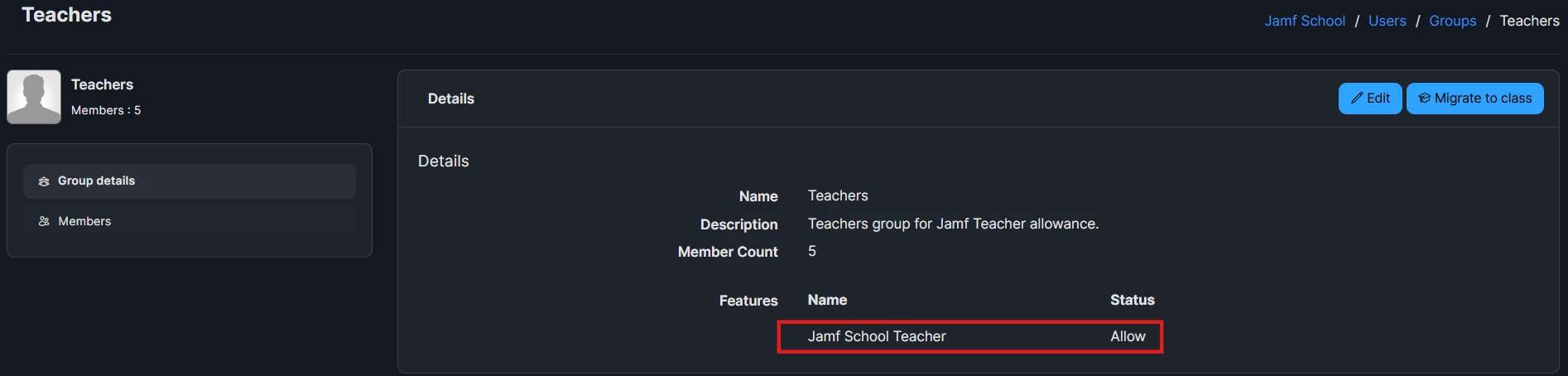
Then make sure they are in a User group for Teachers that has “Jamf School Teacher” set to ‘Allow’. If they are moved out of any group that is set to ‘allow’ and any other User group they are in is set at the default ‘Inherit or set to ‘Deny’ they will not be able to see the classes they are teachers in anymore.

I’m hoping this helps. I can dig a bit more if you’re still having issues, but I just tested the User Group setting above and it was the issue for me.


dletkeman
Forum|alt.badge.img+17
  • Jamf Heroes
  • May 13, 2026

Also I would suggest putting in a help ticket with Jamf if you haven’t already.  They are great at narrowing down the issue.


spicybeeftaco
Forum|alt.badge.img+1
  • Author
  • New Contributor
  • May 18, 2026

Just want to verify something. When you are testing, do you ever drop the two colleagues into another class as a student? I had this happen to one of my teacher test accounts recently. I went and cleared them all out of any ‘student’ user groups and out of any Classes as a student. 

Then make sure they are in a User group for Teachers that has “Jamf School Teacher” set to ‘Allow’. If they are moved out of any group that is set to ‘allow’ and any other User group they are in is set at the default ‘Inherit or set to ‘Deny’ they will not be able to see the classes they are teachers in anymore.

I’m hoping this helps. I can dig a bit more if you’re still having issues, but I just tested the User Group setting above and it was the issue for me.

Hey Greg, Thank you for your reply. No, I have always placed them under the Teachers User Group with JAMF Teacher allowed and they are not in any other User Group. I’m stumped… My ICT Colleagues who are teachers are facing this issue with their classes but my test iPad that I use to mess about with is not affected. Thank you for reaching out!


spicybeeftaco
Forum|alt.badge.img+1
  • Author
  • New Contributor
  • May 18, 2026

I’m sorry but I am not currently tracking anything like this.  Hasn’t came up for me.  That would be very frustrating to have happen.

It’s no worries! Thank you for the engagement though! It helps to see users active in here so I don’t lose hope! hahahaha!


spicybeeftaco
Forum|alt.badge.img+1
  • Author
  • New Contributor
  • May 18, 2026

I’m sorry but I am not currently tracking anything like this.  Hasn’t came up for me.  That would be very frustrating to have happen.

It’s no worries! Thank you for the engagement though! It helps to see users active in here so I don’t lose hope! hahahaha!

Also I would suggest putting in a help ticket with Jamf if you haven’t already.  They are great at narrowing down the issue.

That is true.. Do you happen to know the email address of whom I can reach to? 


GregBobbett
Forum|alt.badge.img+12
  • Jamf Heroes
  • May 18, 2026

@spicybeeftaco For support you need to log onto your Jamf Account Portal and click the ‘Contact Support’ button top right. That opens the chat window and there you select Contact Support and chat with the AI until it lets you either open a ticket or contact a human.

You can get to the same chat by going to https://support.jamf.com/ and clicking the Jamf logo in the lower right (yeah, not very obvious.) and do the same thing as above to get either a ticket or get to a human. The support page does have a number of Q&A that I’ve found a little helpful.


Logo to click for chat


spicybeeftaco
Forum|alt.badge.img+1
  • Author
  • New Contributor
  • May 19, 2026

@spicybeeftaco For support you need to log onto your Jamf Account Portal and click the ‘Contact Support’ button top right. That opens the chat window and there you select Contact Support and chat with the AI until it lets you either open a ticket or contact a human.

You can get to the same chat by going to https://support.jamf.com/ and clicking the Jamf logo in the lower right (yeah, not very obvious.) and do the same thing as above to get either a ticket or get to a human. The support page does have a number of Q&A that I’ve found a little helpful.


Logo to click for chat


Hey Greg, Thank you for hooking me up! I have been trying to look for their support email for the longest time! Hahahah Cheers buddy!