Question

Join domain in JAMF

  • February 9, 2021
  • 3 replies
  • 119 views

Forum|alt.badge.img+1

I want to have 31 iMacs join our local domain. I'm certain this is a config profile, but not 100% sure on how to configure this. Any insight is appreciated. Thanks!

3 replies

sdagley
Forum|alt.badge.img+25
  • Jamf Heroes
  • February 9, 2021

@inicholson1 You can do the AD binding via a Policy. Create a Directory Binding configuration in Settings->Computer Management->Directory Bindings first. Once that's done create a Policy with a Directory Bindings payload and add the configuration you added in the previous step to it. Scope the Policy as appropriate (and make sure the domain controller is reachable when the policy runs)


pramodmac
Forum|alt.badge.img+4
  • Contributor
  • February 10, 2021

Hello All,
I have the same question since I have never done it before and planning to do it in the coming days, to re-format all our Mac Fleet in Classrooms and Lab's, is there any documentation or link (other then Jamf Admin Guide) where the steps are stated clearely?
thanks in advance for any response.


Forum|alt.badge.img+7
  • Valued Contributor
  • October 11, 2023

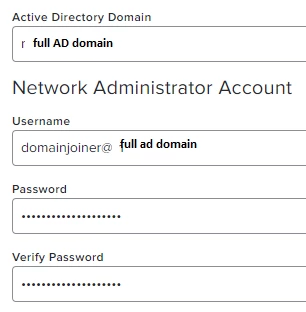
Took me a while to figure out why my macs would not auto join on my domain joiner account. The problem was the username syntax. I could only get it working by using USERNAME@domain in the field. domain/username and just username failed with an "invalid username or password" error in the jamf logs.

I also found i needed to have "create mobile account at logon" checked under the user experience tab.


hope it helps someone as i kept trying other username formats and this is the only one that worked.