Question

Kextpocalyse 2: The Remediation [Blog post by our own @franton)

  • December 26, 2017
  • 90 replies
  • 537 views

Show first post

90 replies

Forum|alt.badge.img+11
  • Valued Contributor
  • April 17, 2018

I've added the whitelist using purely the team ID, there's a long list here: https://docs.google.com/spreadsheets/d/1IWrbE8xiau4rU2mtXYji9vSPWDqb56luh0OhD5XS0AM/edit#gid=0

Once MDM has been user approved etc. it then applies and the nags go away.


Forum|alt.badge.img+8
  • Valued Contributor
  • April 17, 2018

@allanp81 sadly not, MDM is approved, and all is added by team ID only and it still nags.


Forum|alt.badge.img+11
  • Valued Contributor
  • April 17, 2018

And the profile is definitely applied to the machine? @HNTIT


Forum|alt.badge.img+8
  • Valued Contributor
  • April 17, 2018

@allanp81 yep definitely


Forum|alt.badge.img+7
  • Valued Contributor
  • April 17, 2018

@allanp81 this is awesome


Forum|alt.badge.img+11
  • Valued Contributor
  • April 17, 2018

@jalcorn what is?


Forum|alt.badge.img+7
  • Valued Contributor
  • April 17, 2018

@allanp81 the google doc you just posted


Forum|alt.badge.img+8
  • Valued Contributor
  • April 17, 2018

Very handy, but sadly not comprehensive, the one I am trying to get working is not listed.

:(


bpavlov
Forum|alt.badge.img+18
  • Esteemed Contributor
  • April 17, 2018

@HNTIT It's a community based list. If you have vendors/software KEXT that are not on the list then contribute to it. Pay it forward!


Forum|alt.badge.img+8
  • Valued Contributor
  • April 17, 2018

@bpavlov DOH !!!! Total brain fart, didn't even spot that.

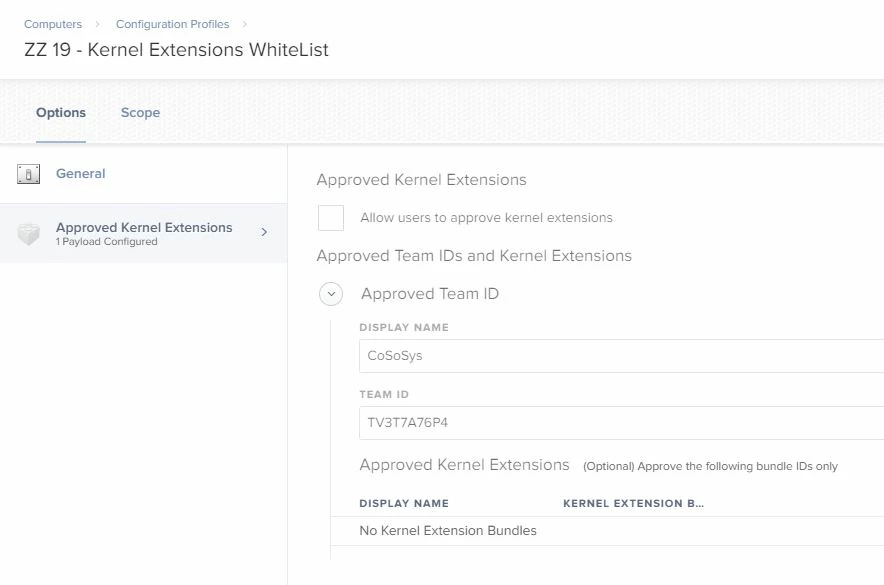
CoSoSys added to the list.


Forum|alt.badge.img+4
  • Contributor
  • April 17, 2018

@HNTIT

Still none the wiser as to what these 2 numbers mean, all I know is right now they are a 0 and a 4, and if I approve the extensions through thr user interface they both change to a 1, and then the prompts go away.

The third field (first number) will be either a 0 or 1, with 0 meaning not approved / off, and 1 meaning approved / on.

The fifth field (second number) is the flag field. I have no idea what the flags mean but I see the same behavior as you. Manually approving a kext will switch that fifth field to a 1. I've seen it be 4, 8, and 1.

I'd love to see some documentation on the fifth field digits.


Forum|alt.badge.img+8
  • Valued Contributor
  • April 18, 2018

It appears that policies are applying correctly to fresh built machines, but older ones appear confused when applying retrospectively.
Still testing


Forum|alt.badge.img+10
  • Contributor
  • April 27, 2018

Trying to sort out Crowdstrike and looks like some kexts are missed out if just running kextstat in Terminal (I only get one entry)
If I run "sqlite3 /var/db/SystemPolicyConfiguration/KextPolic"y and "SELECT * FROM kext_policy;"

X9E956P446|com.crowdstrike.sensor|1|CrowdStrike Inc.|8
X9E956P446|com.crowdstrike.sensor.CSAA|1|CrowdStrike Inc.|8
X9E956P446|com.crowdstrike.sensor.FileInfo|1|CrowdStrike Inc.|8
X9E956P446|com.crowdstrike.sensor.IOServices|1|CrowdStrike Inc.|8
X9E956P446|com.crowdstrike.sensor.Kauth|1|CrowdStrike Inc.|8
X9E956P446|com.crowdstrike.libreactos|1|CrowdStrike Inc.|8
X9E956P446|com.crowdstrike.sensor.Network|1|CrowdStrike Inc.|8
X9E956P446|com.crowdstrike.NMR|1|CrowdStrike Inc.|8
X9E956P446|com.crowdstrike.platform|1|CrowdStrike Inc.|8
X9E956P446|com.crowdstrike.TDB|1|CrowdStrike Inc.|8


Forum|alt.badge.img+9
  • Valued Contributor
  • May 17, 2018

Guys,
just got to JAMF 10.4.1 (from 9.101.4) getting acclimated with changes--

About to start with KEXT settings as we will need it for several products---

I know when it comes to MDM Config Profiles,
best practice is to break up settings as much as possible, best way to manage...

For KEXT approval, is it best to put them all in one, or split by product?
(I'm not sure how well the union of multiple KEXT profiles works, or if it)

What's your experience?
ks


Forum|alt.badge.img+9
  • Valued Contributor
  • May 21, 2018

(disregard my last post)


Forum|alt.badge.img+4
  • Contributor
  • May 30, 2018

@donmontalvo and @franton ,

I am in day 1 of learning kexts.

When I run < sqlite3 /var/db/SystemPolicyConfiguration/KextPolicy > and then run < SELECT * FROM kext_policy; > I get an error, "Unable to open database" in terminal.

I have spent some time using Google to research the sqlite error, but to no real success. Do you have any suggestions?

I am running the command on macOS 10.12.6, does this make a difference? I currently don't have access to a 10.13.x machine, I plan on imaging one this week, I am just trying to provision what I can before getting one spun up.

Any help is appreciated, thank you.


Forum|alt.badge.img
  • New Contributor
  • June 21, 2018

Thank you for this!


Forum|alt.badge.img+1
  • New Contributor
  • July 5, 2018

Has anyone had recent success with the script posted by @franton ? It appears to be a great script that generates a PList, however there's no instructions. Are we to prepare our baseline device by installing and manually authorizing the KEXTs, and then run the script?

I ran the script on a baseline 10.13.5 device, did not manually authorize the KEXTs before running the script. Thus far the generated PList isn't working on my sample devices.

Thanks!


Forum|alt.badge.img+10
  • Contributor
  • July 6, 2018

@cdinsight You want to run the script after everything is setup and installed. The script then produces a plist file which you roll out via a config policy. We use both this one and one with manual entries. One thing to keep in mind is that the kext exclusion policy (at least with Sophos) needs to be present before any software that requires the approval (unless already installed) . The kext policy also needs to be installed after the jamf mdm profile has been approved (unless it's DEP) so requires some tinkering with the policies and smart groups to make it work.


Forum|alt.badge.img+1
  • New Contributor
  • July 8, 2018

Thanks @tjhall. To confirm: you're using both the @franton's script in a Custom Payload, and the 'Approved Kernal Extension' Payload with Team IDs?


Forum|alt.badge.img+10
  • Contributor
  • July 9, 2018

@cdinsight Yes, Franton's script is on the base build, then a manual one as well. It might be overkill but provides flexibility and I've seen some instances where the script hasn't picked up all the kexts (Crowdstrike being one example).


Forum|alt.badge.img+13
  • Contributor
  • July 13, 2018

I ran the script on a new build after all the applications are installed. Took the plist and uploaded to config profile. I can see that the Macbook received the profile on another new laptop. The nagging stopped but when I check with sqlite command, the app isn't approved. It shows 0 on the 3rd field and a 4 on the last field. This is for the Epson projector software. (When you run the epson EasyMP software, it throw an error stating "you need to restart your computer to enable audio output". The error is misleading and has nothing to do with a reboot).

I'm running 10.13.5 with DEP. Did I miss something?

Thanks in advance!


Forum|alt.badge.img+4
  • Contributor
  • August 3, 2018

I have a bundle_id without a team_id.

Using @AVmcclint 's post, as well as @donmontalvo's many posts for quidance, I continuously get the following result:

6HB5Y2QTA3 | com.hp.kext.io.enabler.compound | Hewlett Packard | (blah blah blah...)
| com.ni.Fantom.nxtFwdl | 1 | Legacy Developer: N1 | 1

It's for the LEGO Mindstorm NXT software, which is old.

JAMF requires a team_id be input, and I cannot leave it blank. Does anyone have any thoughts?


FutureFacinLuke
Forum|alt.badge.img+8
  • Valued Contributor
  • September 20, 2018

Thanks for this, my custom triggered Lab Builds were throwing these up all over the place.

The Script works great for capturing stuff that isn't in https://docs.google.com/spreadsheets/d/1IWrbE8xiau4rU2mtXYji9vSPWDqb56luh0OhD5XS0AM/edit#gid=0


Forum|alt.badge.img+4
  • Contributor
  • October 3, 2018

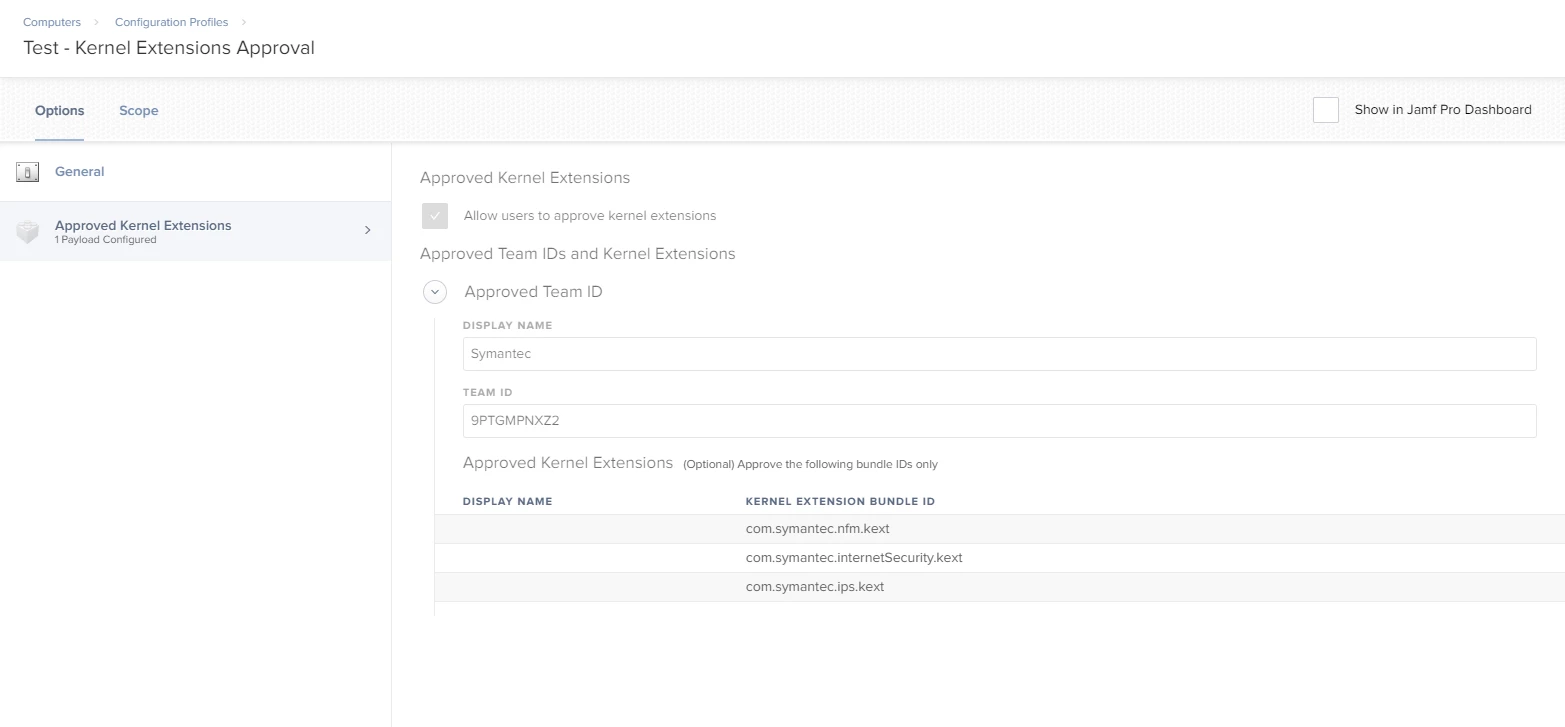
Here's what I'm getting for Symantec 1401 MP2 under sqlite3 as posted above:

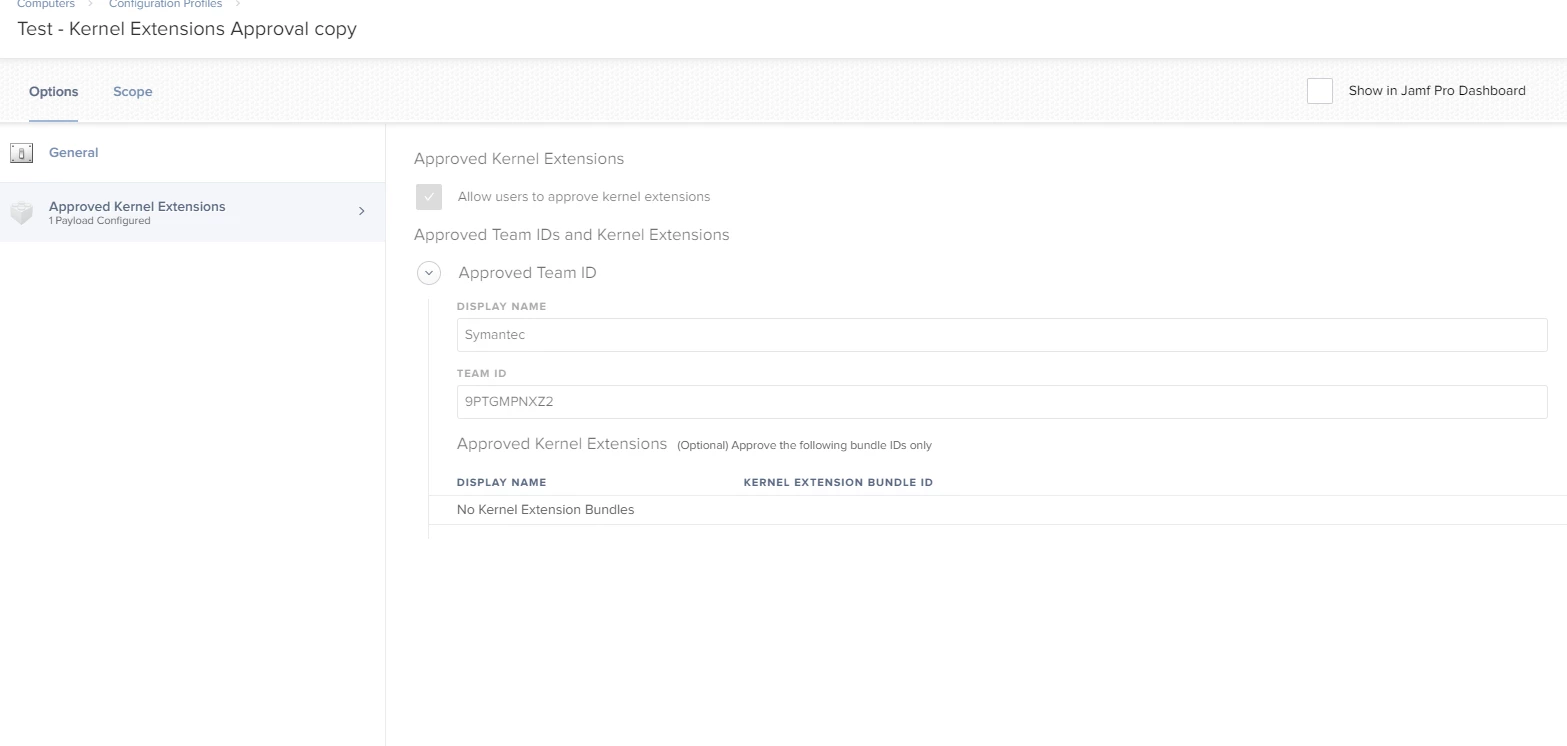
9PTGMPNXZ2|com.symantec.ips.kext|0|Symantec|4
9PTGMPNXZ2|com.symantec.internetSecurity.kext|0|Symantec|4
9PTGMPNXZ2|com.symantec.nfm.kext|0|Symantec|4

I have tried both profiles below separately and together just to test. I tried resetting the NRAM after each too. I still see this: "System software from developer "Symantec" was blocked from loading." under security & privacy > general

Any sage advice to assist on this? Anything I'm doing incorrectly?