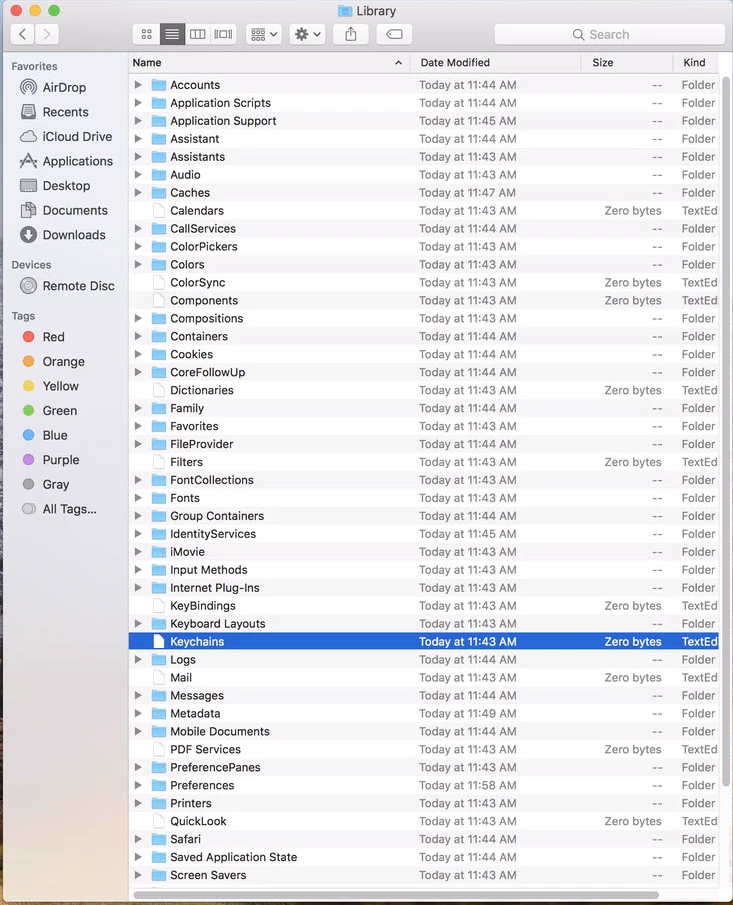
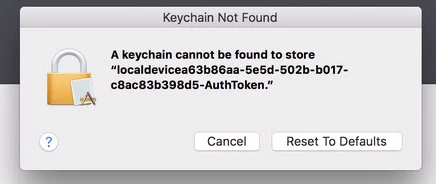
Hello all, first post here. Using casper imaging to deploy 10.8.2 and running into a slight problem. Computers image successfully and Bind to AD. If I login with Local Admin account all is fine. When I login with an AD account, I get a Login Keychain error and it asks to reset Keychain. If I do so the error goes away, only to return soon after. Now I have found the Keychain folder never seems to get created properly upon first login. It just shows as a white keychain file icon. If I delete it and log off and back on, the folder is then created correctly and properly contains the login.keychain. Running Casper Suite 8.62. Image created with Composer.

Solved
Keychain Folder not properly created.
 +7
+7Best answer by Kprice
BMweeks thanks again for your thoughts. Here's what I found, Mrector this might apply to your issue. After going round and round with this, I figured the only way it was working was when I install and bind alone to test with no other software installs. I went through my installers one by one and found the culprit. iWork was checked in Casper Admin to FUT (Fill User Templete). I unchecked it, ran through my installs and everything is as it should be. Though I am still not 100% clear on when to use FUT and FEU, I figured this makes a great deal of sense. Mrector, maybe something you've added to install has the same properties set.





Enter your E-mail address. We'll send you an e-mail with instructions to reset your password.