
Solved

Lock Desktop Picture Configuration Broken MacOS 15.5

  • Jun 13, 2025 3:46 PM UTC
  • 4 replies
  • 234 views

Forum|alt.badge.img+6

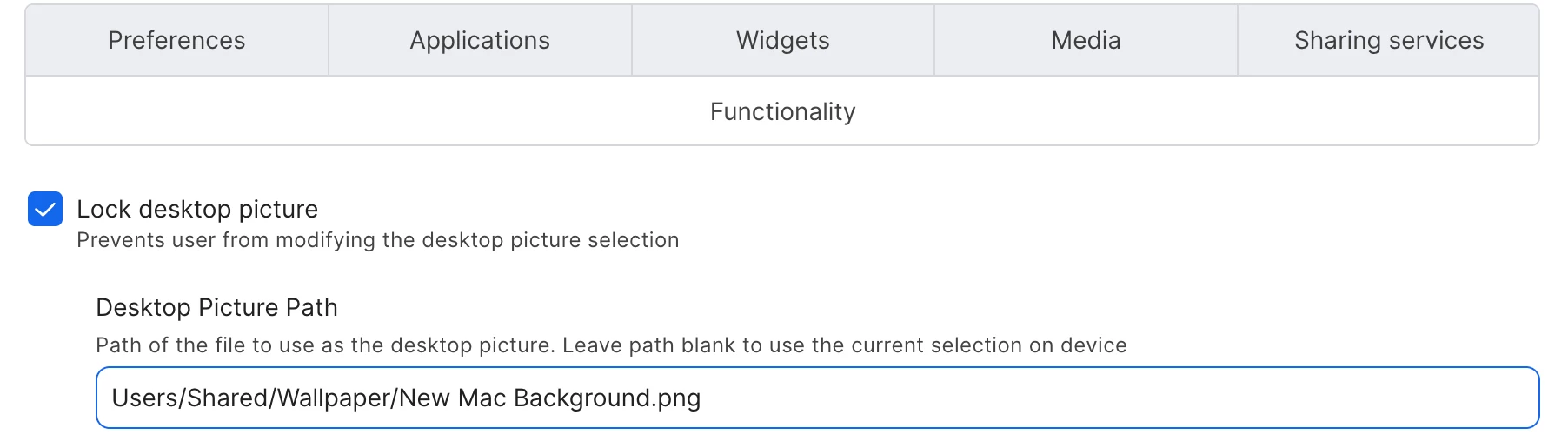
Is anyone else experiencing issues with the "Lock Desktop Picture" configuration with MacOS 15? I recently updated our fleet from 14 to 15.5 and it seems to have broken our branded desktop picture. Not only has it reset the wallpaper to the default, but it has also broken the functionality setting. I am also open to just making a policy that sets and locks the desktop if that is a better process. 
 

Best answer by AJPinto

The filepath in the screenshot is not valid. You are missing the "/" before Users. 


I have seen the desktop wallpaper configuration completely corrupt before requiring me to make a new configuration profile and delete the old one.

View original

4 replies

AJPinto
Forum|alt.badge.img+26
  • Legendary Contributor
  • Answer
  • Jun 13, 2025 5:42 PM UTC

The filepath in the screenshot is not valid. You are missing the "/" before Users. 


I have seen the desktop wallpaper configuration completely corrupt before requiring me to make a new configuration profile and delete the old one.


Forum|alt.badge.img+6
  • Author
  • Contributor
  • Jun 13, 2025 7:01 PM UTC

Sometimes the easiest solution is staring you right in the face. Thanks for the eyes! Not sure how the forward slash got deleted... but everything seems to be in working order now.


AJPinto
Forum|alt.badge.img+26
  • Legendary Contributor
  • Jun 15, 2025 11:06 PM UTC

Sometimes the easiest solution is staring you right in the face. Thanks for the eyes! Not sure how the forward slash got deleted... but everything seems to be in working order now.


We have all been there my friend, sometimes all you need is a second set of eyes. :)


Cheers.


Forum|alt.badge.img
  • New Contributor
  • Aug 16, 2025 6:51 PM UTC

I had this same exact issue. Putting in the / was the solution. For what it’s worth, the file path was missing the slash for the last 4 or 5 years that I’ve had this profile. It worked fine up until this update. Thanks for the fix, I don’t care why the update needed the slash but I’m grateful that I don’t have to rework a new profile or repackage a graphic. Thanks!
