Question

Lost Mode - A Smart Group

  • April 17, 2024
  • 11 replies
  • 48 views

Forum|alt.badge.img+3

It would be nice if we were able to have a smart group of all lost mode devices to make it easier to follow up on.


I don't see a way to do this.

11 replies

Forum|alt.badge.img+14
  • Honored Contributor
  • April 17, 2024

Hello,

It should be there. When you are creating your Mobile Device Smart Group, on the Criteria tab, click 'Show Advanced Criteria'. The field you want is 'Lost Mode Enabled'.

thanks,

chris


Forum|alt.badge.img+3
  • Author
  • New Contributor
  • April 17, 2024

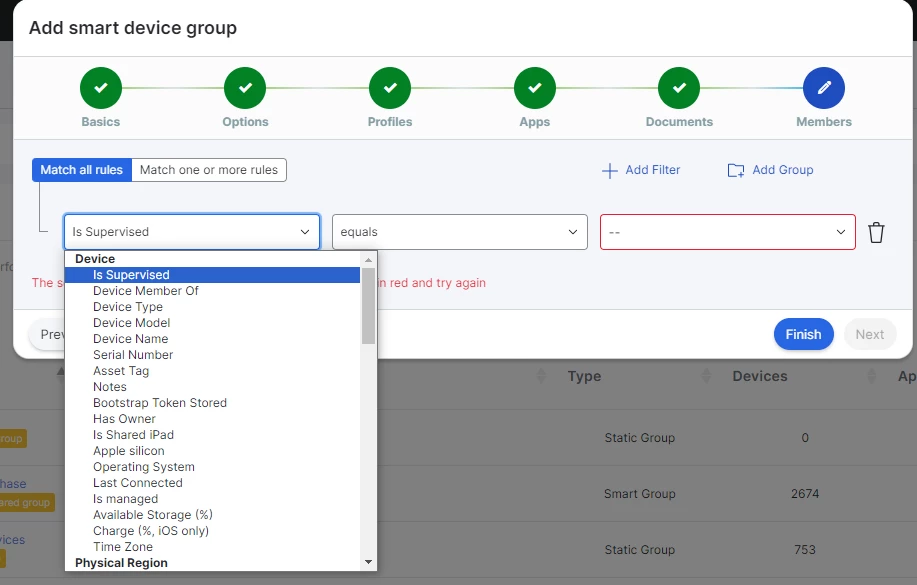
There is no "Criteria" Tab. This is in Jamf School.


Forum|alt.badge.img+14
  • Honored Contributor
  • April 17, 2024

There is no "Criteria" Tab. This is in Jamf School.


I’m apologize, I did not notice that. 


Forum|alt.badge.img+8
  • Valued Contributor
  • April 18, 2024

I did the following , perhap sit will help:

1. Create a pop-up EA with the following list ie: Lost  Stolen Legal  Hold

2. create a smart group that points to the EA choice

3. when you get a device choose the drop down and it will be pulled into the smart group


Forum|alt.badge.img+3
  • Author
  • New Contributor
  • April 19, 2024

What is a popup EA?


Forum|alt.badge.img+14
  • Honored Contributor
  • April 19, 2024

I did the following , perhap sit will help:

1. Create a pop-up EA with the following list ie: Lost  Stolen Legal  Hold

2. create a smart group that points to the EA choice

3. when you get a device choose the drop down and it will be pulled into the smart group


Manual, but nice workaround.


JamFm
Forum|alt.badge.img+8
  • Contributor
  • May 24, 2024

Where can I create a pop-up EA in the Jamf School?


JamFm
Forum|alt.badge.img+8
  • Contributor
  • May 24, 2024

I did the following , perhap sit will help:

1. Create a pop-up EA with the following list ie: Lost  Stolen Legal  Hold

2. create a smart group that points to the EA choice

3. when you get a device choose the drop down and it will be pulled into the smart group


Where can I create a pop-up EA in the Jamf School? Or is it only possible in the Jamf Pro ?


JamFm
Forum|alt.badge.img+8
  • Contributor
  • May 24, 2024

Hello,

It should be there. When you are creating your Mobile Device Smart Group, on the Criteria tab, click 'Show Advanced Criteria'. The field you want is 'Lost Mode Enabled'.

thanks,

chris


Can you upload an screenshot from the criteria. I could't find that. 


Forum|alt.badge.img+8
  • Valued Contributor
  • May 24, 2024

I have not seen JAMF School, so this assumes that EA are available to create. Please see attached.


KuiperJack
Forum|alt.badge.img+3
  • New Contributor
  • July 25, 2024

You can go into devices > devices and set the filter accordingly.

What did you want to d with the devices that would require a group?