
Solved

Mac OS X - Configuration Profiles > Passcode. How to configure and test?

  • June 8, 2016
  • 2 replies
  • 20 views

Forum|alt.badge.img+10

Hi,

Anyone got experience with setting up password enforcement from Casper to a Macbook?

I am going into casper > Configuration Profiles > Passcode. Would this be correct? Then I setup some constraints like require alphanumeric values and maximun passcode age.

I have set this up with maximum age of 1 day. So by tomorrow my Macbook should be asking me to change password? would that be right? What if I want to test this more often? How do I get this Config policy to trigger whenever I want?
Best answer by Bernard_Huang

Matt Taylor from JAMF Support has helped me with this. Thanks Matt :)

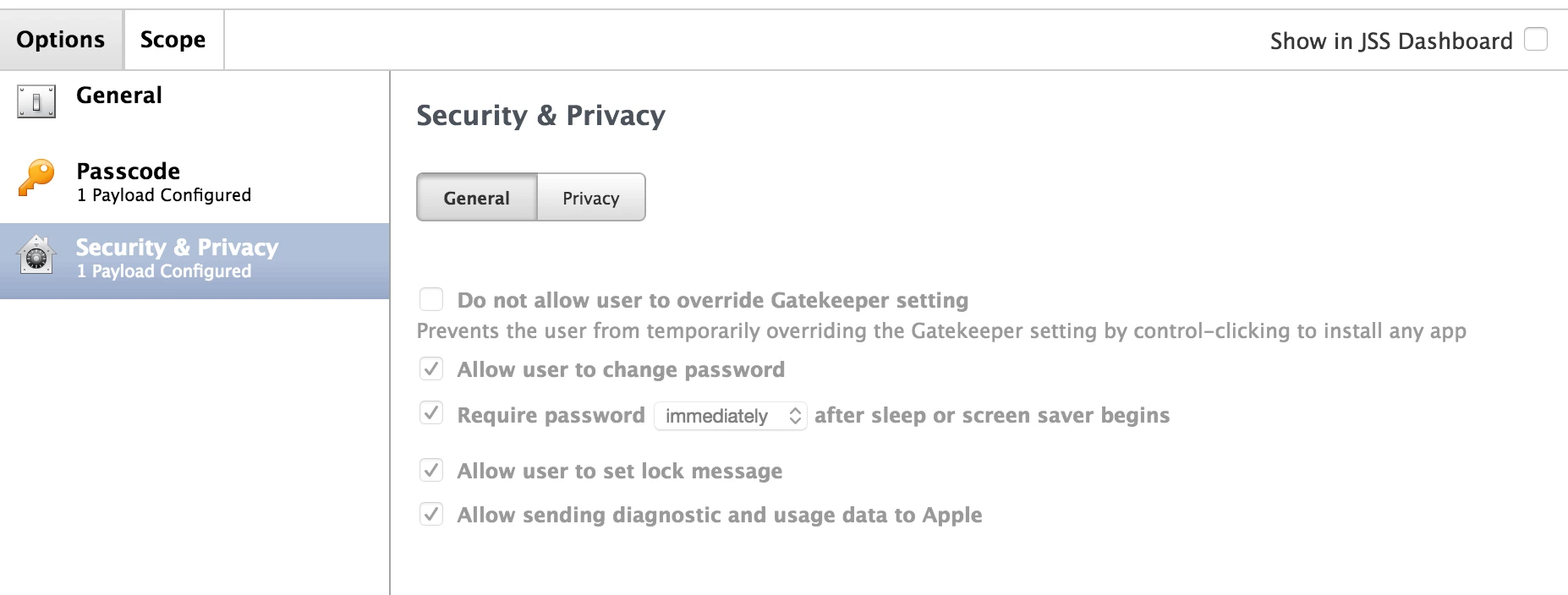
Apart from setting up a Passcode Profile, Within the same Configuration Profile, there also needs a "Security and Privacy" Setting as well in order for it to recognise the change in password (passcode).

If both Passcode and Security and Privacy profile don't exist within the same Profile, then the Passcode enforcement will not take affect. I don't know if it's by design or a bug within Casper.
Please see screenshot.

2 replies

Forum|alt.badge.img+10
  • Author
  • Valued Contributor
  • 143 replies
  • Answer
  • July 4, 2016

Matt Taylor from JAMF Support has helped me with this. Thanks Matt :)

Apart from setting up a Passcode Profile, Within the same Configuration Profile, there also needs a "Security and Privacy" Setting as well in order for it to recognise the change in password (passcode).

If both Passcode and Security and Privacy profile don't exist within the same Profile, then the Passcode enforcement will not take affect. I don't know if it's by design or a bug within Casper.
Please see screenshot.


Forum|alt.badge.img+5
  • Contributor
  • 26 replies
  • July 5, 2016

When working with Config Profiles it's always good to consult the Apple best practice since some payloads should be together with others.