
Answer

mac Printer - Allow more paper size in selection?

  • April 16, 2019
  • 2 replies
  • 149 views

Forum|alt.badge.img+10

Hi all,

I have successfully setup our company's network printer and our Macbook fleet can successfully send to printer queue.

Obviously, there will always be a group of uses that are not satisfied with the outcome.
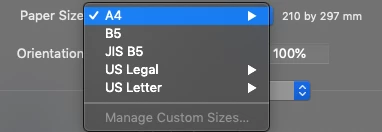
Some users are complaining they can't select A3 size paper when printing.

I am using generic PPD file when setting up printer within JAMF Pro.
Does anyone know where (or if it's possible) to add in paper sizes available when selecting printing?


Best answer by Bernard_Huang

Found my solution.

I don't know how generic it is, but there are 2 ppd files readily available within every Macbook.
/System/Library/Frameworks/ApplicationServices.framework/Versions/A/Frameworks/PrintCore.framework/Resources/Generic.ppd
/System/Library/Frameworks/ApplicationServices.framework/Versions/A/Frameworks/PrintCore.framework/Resources/GenericPrinter.ppd

Generic.ppd has the basic setup, therefore no A3 paper option.
GenericPrinter.ppd has more options, and A3 is available.

Now that I changed this within my JAMF Pro printer settings, I can now select A3 paper to print.

Hopefully this information can be of help to someone :)

2 replies

mark_mahabir
Forum|alt.badge.img+15
  • Jamf Heroes
  • April 16, 2019

What make/models of printer do you utilise? You probably want a model specific PPD which will be more fully featured.

We use a fleet of HP MFP's in my shop and we deploy a PPD for the model we have more units of (an M775), and most folks seem satisfied with that. Your manufacturer may have a universal PPD available for download?


Forum|alt.badge.img+10
  • Author
  • Valued Contributor
  • Answer
  • May 7, 2019

Found my solution.

I don't know how generic it is, but there are 2 ppd files readily available within every Macbook.
/System/Library/Frameworks/ApplicationServices.framework/Versions/A/Frameworks/PrintCore.framework/Resources/Generic.ppd
/System/Library/Frameworks/ApplicationServices.framework/Versions/A/Frameworks/PrintCore.framework/Resources/GenericPrinter.ppd

Generic.ppd has the basic setup, therefore no A3 paper option.
GenericPrinter.ppd has more options, and A3 is available.

Now that I changed this within my JAMF Pro printer settings, I can now select A3 paper to print.

Hopefully this information can be of help to someone :)