
Solved

Macbook USB ports read only instead of locking it all out

  • May 12, 2017
  • 3 replies
  • 21 views

Forum|alt.badge.img+10

Hi,

Anyone have better idea regarding the following? We are wanting to restrict the access of Macbook's USB ports, so no users can steal company data. We are wanting the USB ports to be read only, so users can still copy some things, but not write out to USB port.

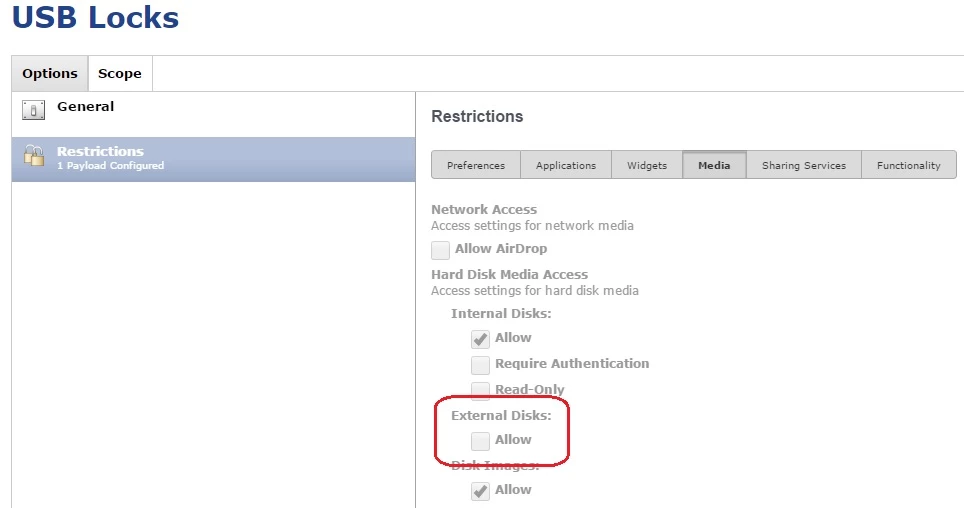
When looking into Casper configuration Profiles, the external Disks is either "Allow" or not. I have try this setting, and indeed the Macbook that I tested can no longer see any USB drive detected.

So, is there anyway to have a read-only option for USB ports?

Best answer by andymcp

I ran into the same issue recently! You need to check "Allow" for the read-only option to be visible.

3 replies

rqomsiya
Forum|alt.badge.img+12
  • Honored Contributor
  • May 12, 2017

What version of the JSS are you on? The later versions have a "read-only" check box.


Forum|alt.badge.img+14
  • Contributor
  • Answer
  • May 12, 2017

I ran into the same issue recently! You need to check "Allow" for the read-only option to be visible.


Forum|alt.badge.img+10
  • Author
  • Valued Contributor
  • May 14, 2017

Yes, it is as easily solved as clicking on "Allow"
After allowed, the "Read-Only" option showed up.

We're running JSS 9.96, btw. Don't think v9.98 would be that much of a leap. We're all waiting for JAMF Pro 10!