Question

MacOS updates installed, 5 mins force reboot

  • January 22, 2019
  • 34 replies
  • 254 views

Forum|alt.badge.img+4

Hi All,

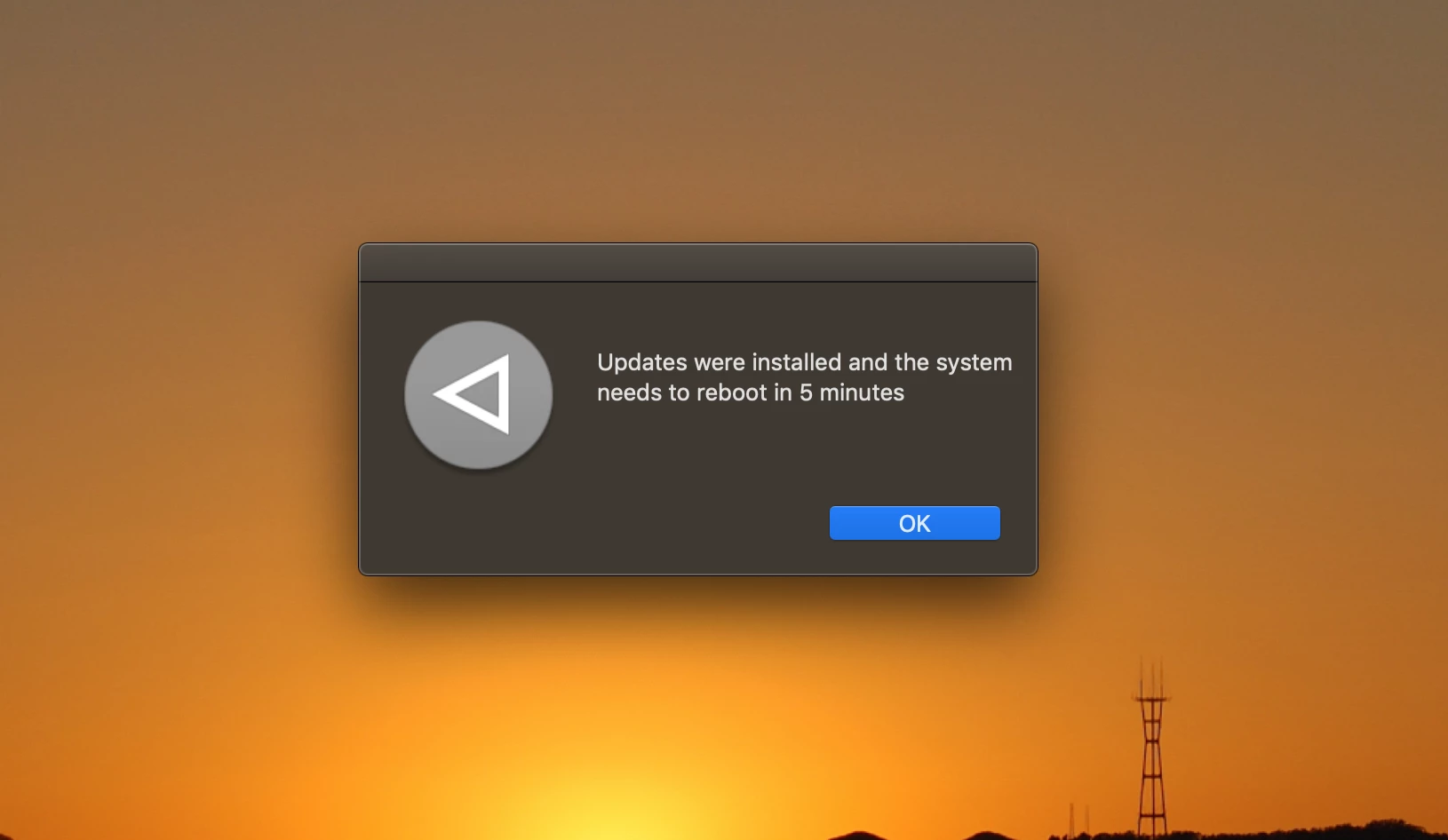
Our Macs all reboot when a new MacOS patch comes out. We've had JAMF pro for over a year and I don't think this started till 10.14.1. Our users get a pop up saying 'Updates were installed and the system needs to reboot in 5 minutes'. Oddly enough my machine got the pop up and it didn't install the update.

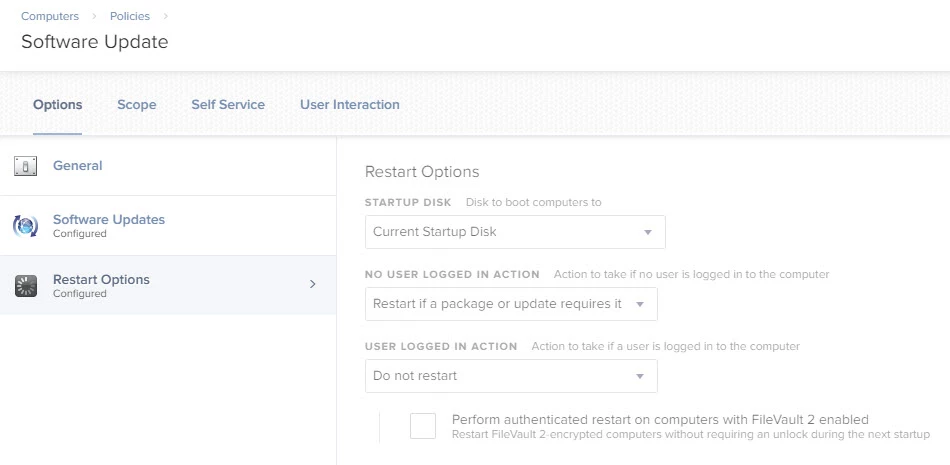
After talking with JAMF support when this happened on 10.14.2 we added restart options to NOT reboot if a user was logged in. That apparently did nothing.

Any other suggestions?

34 replies

Forum|alt.badge.img+11
  • Contributor
  • January 25, 2019

We are also looking for an answer to this one.


Forum|alt.badge.img+1
  • New Contributor
  • January 25, 2019

Ran into this issue with Mojave update that was released this week. Policy in place gives a 240 min delay but users were warned that they were going to have to reboot in only 5 mins.


Forum|alt.badge.img+15
  • Valued Contributor
  • January 25, 2019

@nategraham Do these happen to be newer Macs with the T2 chip? There was some chatter in the #mojave MacAdmin Slack about this when 10.14.3 was released. Apparently, if there is an update for BridgeOS on the chip it doesn't play well with restart commands or prompts following an update. Some users may even receive a message to fully shut down their Mac if you run softwareupdate -i -a vs just a restart.

There's a similar bug/quirk in the normal GUI, too. If you have a MBP with Touch Bar (T1 or T2 chip) and click "Download and Update" from System Preferences, the 10.14.3 update downloads, but there is no prompt to reboot. You have to manually click the Install/Update button again in System Preferences, and then the Notification Center alert appears saying an update will restart the Mac with a 60 second countdown.


Forum|alt.badge.img+4
  • Author
  • New Contributor
  • January 25, 2019

According to JAMF support, it's a known bug:
"PI-006540 Deploying a software update policy to a macOS computer reboots the computer even if "Do Not Restart" is selected from the Restart Options pop-up menu."

It's listed here as well: https://www.jamf.com/jamf-nation/my/products/known-issues


Forum|alt.badge.img+4
  • Author
  • New Contributor
  • January 25, 2019

@sshort It's happening to all of our Macs, not just recent ones.


Forum|alt.badge.img+1
  • New Contributor
  • January 28, 2019

@sshort Also happening to us with older Macs (pre-T2) as well as new ones.


Forum|alt.badge.img+4
  • New Contributor
  • January 28, 2019

We got that as well... Unfortunately it was at the exact same time as we pushed a corporate wide update policy that rebooted the entire company in the middle of the day...

Jamf support got a blast from us that day.

After all the investigations and back and forth with support they just eventually created the known issue article that you see above and called it a day.

I'd LOVE some update on that if anyone from Jamf is reading this. It's keeping me from executing the update policy I want and forcing all our updates to be manual which is a MASSIVE pain.


Forum|alt.badge.img+5
  • Contributor
  • February 7, 2019

Doesn't appear to be fixed in JSS 10.9.0. PI-006540 impacts us as well as we cannot keep our machines on the latest version without manual interaction.


Forum|alt.badge.img+6
  • Contributor
  • February 7, 2019

If you want to put in place a quick fix while this PI is solved, the problem is due to a LaunchDaemon that The JSS is not deleting after the restart.
Go to /Library/LaunchDaemons and delete the jamf reboot plist and that will fix the issue.
If it’s happening on a lot of machines you can create a script that deletes that file if it exists and stick it in a policy :)
Hope this helps!


Forum|alt.badge.img+9
  • Contributor
  • February 9, 2019

I'm having this issue as well at my company

https://www.jamf.com/jamf-nation/discussions/30759/macos-updates-installed-5-mins-force-reboot


Forum|alt.badge.img+5
  • Contributor
  • February 22, 2019

@ricardtolosa Could you clarify which plist in /Library/LaunchDaemon ? Looks like there are five of them in there related to JamF.


Forum|alt.badge.img+3
  • New Contributor
  • February 22, 2019

I have placed a 'softwareupdate' script in Self Service for my end users. We want to create an extension attribute that determines if there are any available software updates so we can create a smart group using that and narrow the scope down to just that group. Any thoughts?


Forum|alt.badge.img+6
  • Contributor
  • February 22, 2019

Hi @lmeinecke ,

The launch daemon name is this one: com.jamfsoftware.task.reboot.plist

Happened on several of our machines and the deletion of this plist + deleting the default reboot payloads from our policies have made the trick.

Let me know if you need any help :)


Forum|alt.badge.img+4
  • Author
  • New Contributor
  • March 25, 2019

And like clockwork, the monthly reboot cycle hit us again. Anyone else?


Forum|alt.badge.img+4
  • Author
  • New Contributor
  • March 26, 2019

Also, at least 2 of my users have rebooted 4 times.


Forum|alt.badge.img
  • New Contributor
  • April 1, 2019

Yep, us too. Very frustrating!


Forum|alt.badge.img+1
  • New Contributor
  • April 12, 2019

Is there any update on this....?


Forum|alt.badge.img+4
  • Author
  • New Contributor
  • April 15, 2019

@ekrizon Doesn't seem like it. It's still on their active known issues list.

We've put in a script to defer updates for now. If it happens again I'm gonna get chased by a mob with pitchforks. It's a bummer, because now people are asking 'Is JAMF really worth it?'


Forum|alt.badge.img
  • New Contributor
  • April 18, 2019

Has there been any movement on this? We are seeing a similar issue, the 5 min reboot pops up, and reboots the mac outside of our reboot window.
We even have the reboot payload set to 60minutes, but it always gives a 5min.
this is not affecting all users, we have about 200 macs but only a couple users seeing this issue.


Forum|alt.badge.img+12
  • Valued Contributor
  • May 15, 2019

any updated on this problem? we're seeing users complain of "reboots every 5 minutes" now that 10.14.5 update is here.


Forum|alt.badge.img
  • New Contributor
  • May 16, 2019

Our team is also experiencing this issue, users machines are being rebooted and seeing a 5 minute warning message, even when no reboot payload is configured in a policy. We've configured an explicit "Do not restart" in our policy, but the behaviour remains.

Are there any updates on a resolution for this issue, or workaround?

Thanks!


Forum|alt.badge.img+6
  • Contributor
  • May 19, 2019

Hi @slyall, In order to fix the restart loop you need to delete com.jamfsoftware.task.reboot.plist from /Library/LaunchDaemons. Hope this helps until the issue is fixed :)


Forum|alt.badge.img+5
  • Contributor
  • May 30, 2019

@ricardtolosa

My hosts that are impacted by this PI only have:

com.jamfsoftware.jamf.daemon.plist
com.jamfsoftware.startupItem.plist
com.jamfsoftware.task.1.plist

In their /Library/LaunchDaemons directory besides other non-JamF plists. I can't seem to find the one you reference with reboot in the filename.


Forum|alt.badge.img+4
  • New Contributor
  • July 30, 2019

Looks like this issue has finally been solved in 10.14!

https://docs.jamf.com/10.14.0/jamf-pro/release-notes/Bug_Fixes_and_Enhancements.html

"[PI-006540] Fixed an issue that caused a computer to reboot when running Software Update even if "Do Not Restart" is selected from the Restart Options pop-up menu."


Forum|alt.badge.img+4
  • Author
  • New Contributor
  • August 27, 2019

Yeah, we got an email saying it was fixed....

All my users just the 5 minute pop up again on the 10.14.6 supplemental update from yesterday.