
Question

Managed Dock for Adobe Apps

  • August 27, 2024
  • 13 replies
  • 50 views

Forum|alt.badge.img+5

Hi, I am trying to manage the dock apps via profile. However, I don't seem to be able to do it for any apps which is in the sub folder.

How can I add Adobe Photoshop for example.

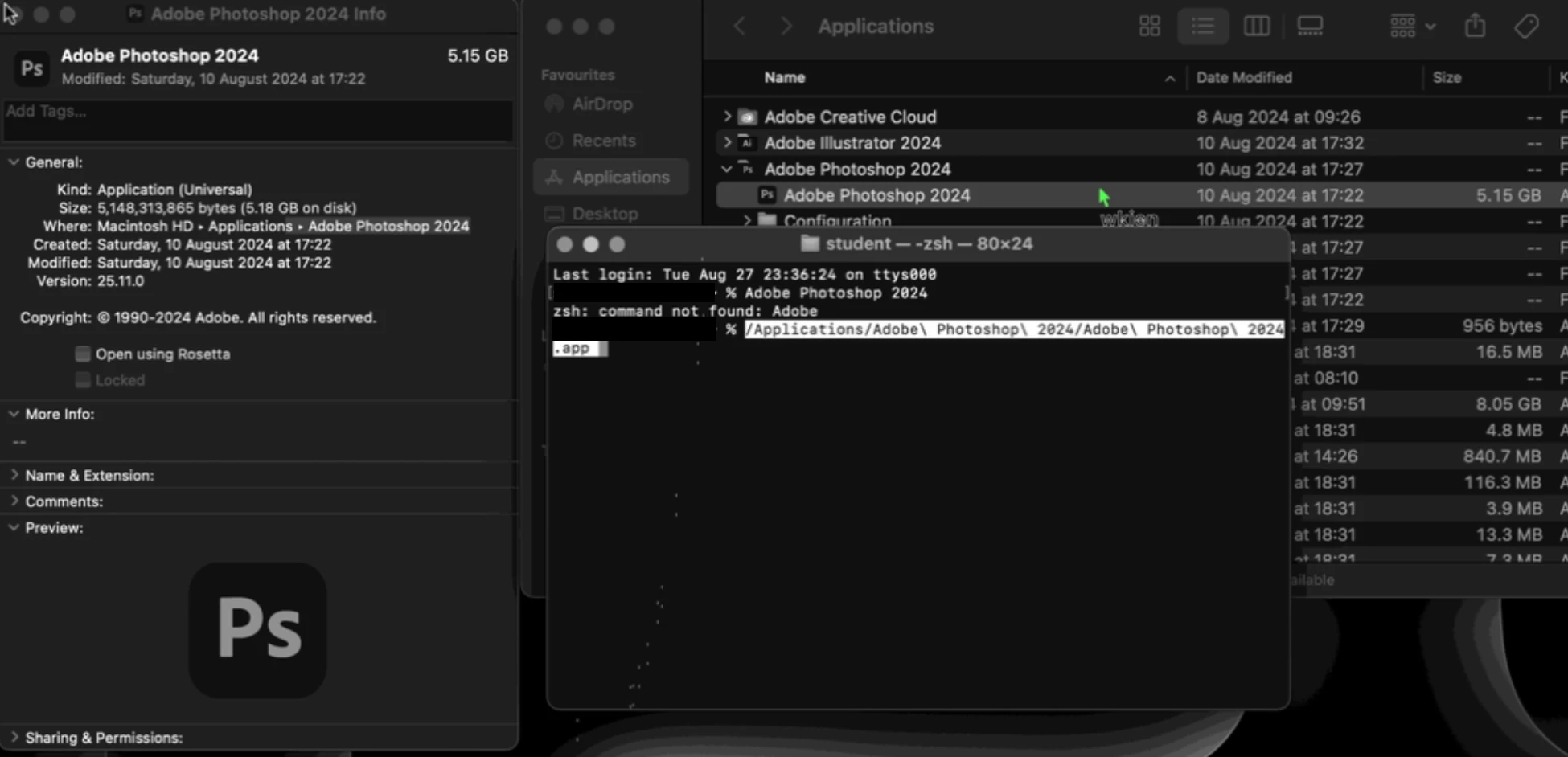
I have tried copying /Applications/Adobe\\ Photoshop\\ 2024/Adobe\\ Photoshop\\ 2024.app but it shows a question mark.

Thank you
 

13 replies

Forum|alt.badge.img+17
  • Valued Contributor
  • August 27, 2024

You're going to want to look at DockUtil if you haven't already. You can add/remove/move icons in the Dock easily enough.


pete_c
Forum|alt.badge.img+16
  • Honored Contributor
  • August 27, 2024

Dockutil is absolutely the best way to go, but if your org/environment won't let you use unapproved software, try this.

SketchUp installs by default into a subfolder, like /Applications/SketchUp 2024/SketchUp.app. Using Settings > Computer Management > Dock Items, if I add the path as: file:///Applications/SketchUp%202024/SketchUp.app/ then I can use a policy to add or remove that Dock item. Same will work for Adobe CC apps.


mvu
Forum|alt.badge.img+20
  • Jamf Heroes
  • August 27, 2024

I think for Photoshop 2024 it's this path:

file:///Applications/Adobe%20Photoshop%202024/Adobe%20Photoshop%202024.app/


Forum|alt.badge.img+17
  • Valued Contributor
  • August 27, 2024

Be careful of Adobe Illustrator as well. The GUI name doesn't match the name in the command line.

  • In the Finder its /Applications/Adobe Illustrator 2024/Adobe Illustrator 2024.app
    • or file:///Applications/Adobe%20Illustrator%202024/Adobe%20Illustrator%202024.app
  • In the CLI its /Applications/Adobe Illustrator 2024/Adobe Illustrator.app
    • or file:///Applications/Adobe%20Illustrator%202024/Adobe%20Illustrator.app

This seriously screwed with me when I had a script I was working on.


Forum|alt.badge.img+5
  • Author
  • Contributor
  • August 28, 2024

I think for Photoshop 2024 it's this path:

file:///Applications/Adobe%20Photoshop%202024/Adobe%20Photoshop%202024.app/


this didn't work.


Forum|alt.badge.img+5
  • Author
  • Contributor
  • August 28, 2024

Dockutil is absolutely the best way to go, but if your org/environment won't let you use unapproved software, try this.

SketchUp installs by default into a subfolder, like /Applications/SketchUp 2024/SketchUp.app. Using Settings > Computer Management > Dock Items, if I add the path as: file:///Applications/SketchUp%202024/SketchUp.app/ then I can use a policy to add or remove that Dock item. Same will work for Adobe CC apps.


I tried this but it didn't work.


file:///Applications/Adobe%20Photoshop%202024/Adobe%20Photoshop%202024.app/


Forum|alt.badge.img+5
  • Author
  • Contributor
  • August 28, 2024

You're going to want to look at DockUtil if you haven't already. You can add/remove/move icons in the Dock easily enough.


Hi, 

I downloaded and run ./dockutil-main % ./build.sh

This is the error. I have not install anything from Github. Please do guide me along. Thank you 
warning: could not determine XCTest paths: terminated(1): /usr/bin/xcrun --sdk macosx --show-sdk-platform-path output:
xcrun: error: unable to lookup item 'PlatformPath' from command line tools installation
xcrun: error: unable to lookup item 'PlatformPath' in SDK '/Library/Developer/CommandLineTools/SDKs/MacOSX.sdk'


Forum|alt.badge.img+11
  • Contributor
  • August 28, 2024

Dockutil does work well; and i'd recommend that as well. However what i do in 99% of cases, I just have a simple profile that adds /Applications and ~/Downloads to the dock. This causes the dock to act very similar to the start menu and users can find new apps, by checking out the /Applications folder in the dock, without the administrator changing anything. 

That said dockutil works with minimal effort, but to me, no effort, beats minimal.

M


Forum|alt.badge.img+17
  • Valued Contributor
  • August 28, 2024

Hi, 

I downloaded and run ./dockutil-main % ./build.sh

This is the error. I have not install anything from Github. Please do guide me along. Thank you 
warning: could not determine XCTest paths: terminated(1): /usr/bin/xcrun --sdk macosx --show-sdk-platform-path output:
xcrun: error: unable to lookup item 'PlatformPath' from command line tools installation
xcrun: error: unable to lookup item 'PlatformPath' in SDK '/Library/Developer/CommandLineTools/SDKs/MacOSX.sdk'


You don't need to compile it. There's a pre-built version you can download and use.
https://github.com/kcrawford/dockutil/releases/tag/3.1.3


Forum|alt.badge.img+5
  • Author
  • Contributor
  • August 28, 2024

You don't need to compile it. There's a pre-built version you can download and use.
https://github.com/kcrawford/dockutil/releases/tag/3.1.3


Thank you. Will try it out later.


Forum|alt.badge.img+5
  • Author
  • Contributor
  • August 31, 2024

Thank you. Will try it out later.


I downloaded dockutil on my personal computer and it works but my enviroment doesn't allow me to install.  Copying the applications path from dockutil to my JAMF profile works perfect for me now.

Then only setback is I got to apply twice in JAMF school in order to have it "applied" 


Forum|alt.badge.img+2

 Hi is there a step by step guide for dock util somwhere? 


Forum|alt.badge.img+5
  • Author
  • Contributor
  • October 1, 2024

 Hi is there a step by step guide for dock util somwhere? 


Scroll all the way down and check their examples

https://github.com/kcrawford/dockutil

