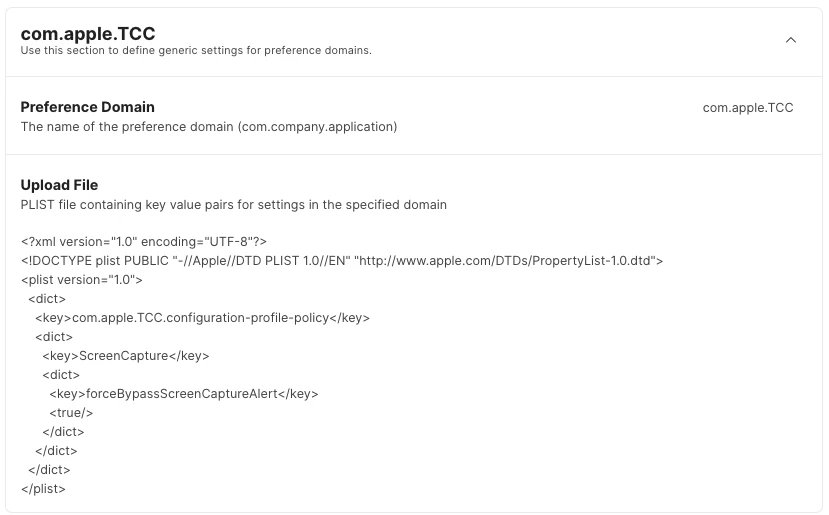
I saw this on a blog this morning, posting here to raise visability.
Much has already been written about the new monthly screen recording prompt in macOS 15 Sequoia. After a bit of research, there is a way to get rid of the prompts; kinda tacky, but does work.
The good news is that there's a way to stop the prompts forever
defaults read ~/Library/Group\\ Containers/group.com.apple.replayd/ScreenCaptureApprovals.plist
This file is protected by TCC, so to access it you'll need to grant Full Disk Access to Terminal app.
{ "/Applications/Shottr.app/Contents/MacOS/Shottr" = "2024-09-21 12:40:36 +0000"; }
In the plist file, the keys are the paths of the executable files with screen recording permission, and the values are dates. I'm using the Shottr screenshot tool as an example.
To stop the prompts forever—for the rest of your life, anyway—set the date to far in the future, for example, the year 3024 instead of 2024.
defaults write ~/Library/Group\\ Containers/group.com.apple.replayd/ScreenCaptureApprovals.plist "/Applications/Shottr.app/Contents/MacOS/Shottr" -date "3024-09-21 12:40:36 +0000"
You'll need to do this for each app, and afterward logout and login again so that the replayd process recognizes the new defaults.
Not gonna do this, but good to have the knowledge; we will see if Apple provides something better.