Solved

Mute ‘background items added’ when new app installs

  • July 31, 2024
  • 2 replies
  • 942 views

Forum|alt.badge.img+5

I have JAMF pro cloud instance and when I enroll new device using PreStage Enrollment, all my 12 application installations show ''background items added" notification on the right side of mac devices. can we mute these notifications?


Best answer by Tangentism

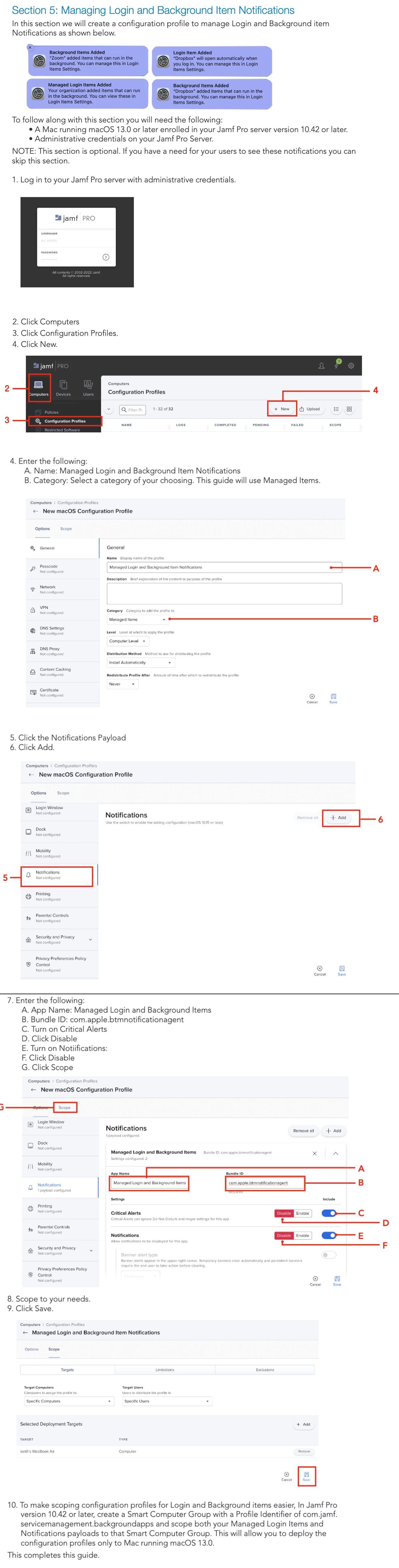
Have a read of this PDF from HCS that shows how to suppress background and login notifications


Just to futureproof this in case the PDF disappears....
 

2 replies

Tangentism
Forum|alt.badge.img+10
  • Honored Contributor
  • Answer
  • July 31, 2024

Have a read of this PDF from HCS that shows how to suppress background and login notifications


Just to futureproof this in case the PDF disappears....



AJPinto
Forum|alt.badge.img+26
  • Legendary Contributor
  • July 31, 2024

Have a read of this PDF from HCS that shows how to suppress background and login notifications


Just to futureproof this in case the PDF disappears....


As per usually, good documentation from HSC. They are really doing the work Apple and MDM's should for documentation. However, this article is mostly tech debt now. Jamf natively supports managed login items and has a payload for them as of about a year ago. The doc still provides good info on how to get the information you need to make the Configuration Profile, but the steps are all out of date. 


I learned something, I did not know you could suppress those managed login item notifications. I am about to start working on testing that, I hate those stupid notifications lol.