Solved

My Mac won't connect to Jamf admin services

  • July 18, 2019
  • 16 replies
  • 95 views

Forum|alt.badge.img+3

Hi,

I have 3 Macs in my environment right now. 1 test device, 2 sort-of administration devices. I have all the JAMF running on one of those, but I need to move them to another one. So I installed JAMF Pro, I wanted to run Jamf Admin and after I enter credentials, it runs for some time and then I get an error:
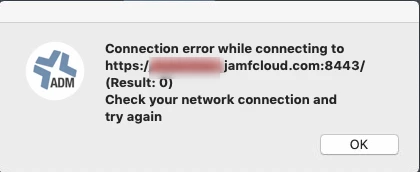
What is interesting is that I cannot access Jamfcloud from safari on the same computer. Other computer on the same network have no problem. I tried a different network as well and it didn't work. What can be wrong?

Best answer by diradmin

@mainelysteve "You'll have to trash the preferences file ~/Library/Preferences/com.jamfsoftware.admin.plist to fix that." -- this is incorrect. When launching Jamf Admin, press down and hold OPTION (ALT if Windows keyboard). This will cause the application to re-prompt for the URL. This works across all Jamf Pro applications which communicate with the webapp.

16 replies

Forum|alt.badge.img+8
  • Valued Contributor
  • July 18, 2019

@kjubus Have you escalated to Jamf Support?


Forum|alt.badge.img+10
  • Valued Contributor
  • July 18, 2019

is the computer enrolled? it could be missing the trusted JSS Root CA


Forum|alt.badge.img+8
  • Valued Contributor
  • July 18, 2019

@hdsreid Different error for that:

The certificate for this server is invalid. You might be connecting to a server that is pretending to be "https:", which could put your confidential information at risk. Would you like to connect to the server anyway?


Forum|alt.badge.img+16
  • Contributor
  • July 18, 2019

The message on that screenshot is the clue to me. The port number shouldn't be entered if you're using jamfcloud. Try removing the :8443 from the end of your url so that it reads https://instancehere.jamfcloud.com.


Forum|alt.badge.img+8
  • Valued Contributor
  • Answer
  • July 18, 2019

@mainelysteve "You'll have to trash the preferences file ~/Library/Preferences/com.jamfsoftware.admin.plist to fix that." -- this is incorrect. When launching Jamf Admin, press down and hold OPTION (ALT if Windows keyboard). This will cause the application to re-prompt for the URL. This works across all Jamf Pro applications which communicate with the webapp.


Forum|alt.badge.img+16
  • Contributor
  • July 18, 2019

@diradmin Learn something new everyday. Thanks for that.


gskibum
Forum|alt.badge.img+13
  • Valued Contributor
  • July 18, 2019

@mainelysteve I manage 7 JSSs and starting a few months ago I began to have to do the option key thing all the time.

The utility SwitchJSS stopped working for me.


Forum|alt.badge.img+3
  • Author
  • New Contributor
  • July 19, 2019

@diradmin seems to resolve the issue. I might have been entering the address without "https" yesterday, but used it today and worked with first try. Both on safari and jamf admin.


sdagley
Forum|alt.badge.img+25
  • Jamf Heroes
  • July 19, 2019

@gskibum Jamf Pro Switcher works for me to switch between multiple JSS instances.


Forum|alt.badge.img+6
  • Contributor
  • July 19, 2019

Wow, I had the same problem this morning. Thanks!


gskibum
Forum|alt.badge.img+13
  • Valued Contributor
  • July 19, 2019

@sdagley Thank you for that tip. Will start using right away,


Forum|alt.badge.img
  • New Contributor
  • August 23, 2019

@diradmin do you know if there is a way to script that so that you can deploy via policy? I've been able to change the url to the JAMF server to it doesn't have :8443 doing a manual install, but am looking to automate for others.

Thanks!


Forum|alt.badge.img+8
  • Valued Contributor
  • August 26, 2019

@alex.cormier Yes; there is a PLIST file that may be updated via shell script with the modified URL.


Forum|alt.badge.img+2
  • New Contributor
  • February 12, 2021

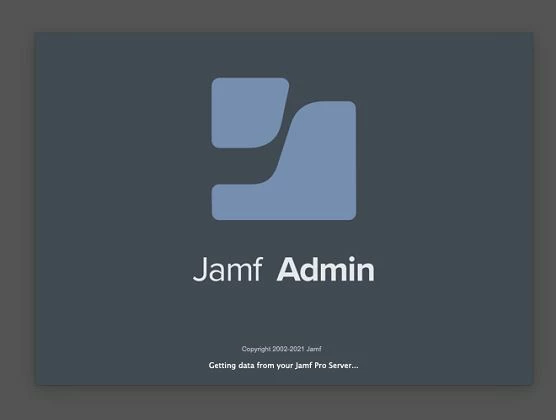
Can't login to JamF admin anymore. It's still hanging in the screen you can see in the attached image.

I can open Composer and JamF Remote. If I type a wrong password JamF Admin recognize this. I can open the webinterface of JamF.

Anyone knows what to do?

Thank you.

Best Regards
Felix


Forum|alt.badge.img+2
  • New Contributor
  • February 12, 2021

Okay, I can connect with a catalina iMac. is this maybe a Big Sur issue?


Forum|alt.badge.img+4

@mainelysteve "You'll have to trash the preferences file ~/Library/Preferences/com.jamfsoftware.admin.plist to fix that." -- this is incorrect. When launching Jamf Admin, press down and hold OPTION (ALT if Windows keyboard). This will cause the application to re-prompt for the URL. This works across all Jamf Pro applications which communicate with the webapp.


Hey! Im having the same issue. However i can connect to other JSS but not the one i wish...i did what you said, it didn't worked. I have to install again the Jamf Admin app, but i would like to know the true behind the problem. Any Idea?