Solved

Need to get Intel based application installed on Mac devices

  • August 12, 2026
  • 4 replies
  • 51 views

alexraja
Forum|alt.badge.img+1

Need to identify and generate a report of Intel-based applications installed on Mac devices.

As this is required to know application compatibility and identify software that still relies on Intel architecture, especially in preparation for future macOS 28.0 releases and Apple's ongoing transition away from Intel-based technologies such as Rosetta 2.

Best answer by talkingmoose

I recently put this extension attribute together for a project. You may find it useful.

https://gist.github.com/talkingmoose/b3553675a613176b35c27b5c5028e0c2

4 replies

Chubs
Forum|alt.badge.img+26
  • Jamf Heroes
  • August 12, 2026

Apologies this isn’t cleaner...the concept was also lifted from Scott Kendall.  You can use this and then query it via an EA or just view the logs.  Just depends on how you want to do it.


#!/bin/zsh
#
# NonNativeAppsFlag
#
# Original concept by: Scott Kendall
#
# License: GPL-3.0
#
# Purpose:
# Headless scan of installed applications. If any app is classified as:
# - fail (Intel)
# - pending (Unknown)
# then write TRUE to:
# /Library/ORG/com.ORG.architectureaudit.plist
#
# Keys written:
# - NonNativeAppsDetected (boolean)
# - NonNativeAppsList (array)
#
# Run as script in Jamf Pro. Script Variables:
# 4 - ORG ID or name (no spaces/special characters)
#

####################################################################################################
# Global variables
####################################################################################################
ORG=${4}
SCRIPT_NAME="NonNativeAppsFlag"
export PATH=/usr/bin:/bin:/usr/sbin:/sbin

PLIST_DIR="/Library/${4}"
PLIST_PATH="${PLIST_DIR}/com.${4}.architectureaudit.plist"
PLIST_KEY="NonNativeAppsDetected"
PLIST_LIST_KEY="NonNativeAppsList"

LOGGED_IN_USER=$(scutil <<< "show State:/Users/ConsoleUser" | awk '/Name :/ && ! /loginwindow/ { print $3 }')
USER_DIR=""
[[ -n "$LOGGED_IN_USER" ]] && USER_DIR=$(dscl . -read "/Users/${LOGGED_IN_USER}" NFSHomeDirectory 2>/dev/null | awk '{ print $2 }')

LOG_FILE="/var/log/${SCRIPT_NAME}.log"
TMP_FILE_STORAGE=$(mktemp "/var/tmp/${SCRIPT_NAME}_report.XXXXX")

STRIP_EXTENSION="yes"

typeset -a APPDIR_SCAN
typeset -a app_list
typeset -a FAILED_APPS

FAIL_FOUND="false"

####################################################################################################
# Common functions
####################################################################################################

function admin_user() {
[[ $UID -eq 0 ]]
}

function create_log_directory() {
local log_dir="${LOG_FILE%/*}"
[[ ! -d "$log_dir" ]] && mkdir -p "$log_dir"
chmod 755 "$log_dir"

[[ ! -f "$LOG_FILE" ]] && touch "$LOG_FILE"
chmod 644 "$LOG_FILE"
}

function logMe() {
echo "$(date '+%Y-%m-%d %H:%M:%S'): $1" | tee -a "$LOG_FILE" >&2
}

function cleanup_and_exit() {
[[ -f "$TMP_FILE_STORAGE" ]] && rm -f "$TMP_FILE_STORAGE"
exit "$1"
}

function check_for_sudo() {
if ! admin_user; then
echo "ERROR: This script must be run as root." >&2
exit 1
fi
}

####################################################################################################
# Plist functions
####################################################################################################

function ensure_plist_path() {
[[ ! -d "$PLIST_DIR" ]] && mkdir -p "$PLIST_DIR"
chmod 755 "$PLIST_DIR"

if [[ ! -f "$PLIST_PATH" ]]; then
cat > "$PLIST_PATH" <<EOF
<?xml version="1.0" encoding="UTF-8"?>
<!DOCTYPE plist PUBLIC "-//Apple//DTD PLIST 1.0//EN" "http://www.apple.com/DTDs/PropertyList-1.0.dtd">
<plist version="1.0">
<dict>
</dict>
</plist>
EOF
chmod 644 "$PLIST_PATH"
chown root:wheel "$PLIST_PATH" 2>/dev/null
fi
}

function write_plist_bool() {
local key="$1"
local value="$2"

/usr/bin/defaults write "$PLIST_PATH" "$key" -bool "$value"
/usr/sbin/chown root:wheel "$PLIST_PATH" 2>/dev/null
/bin/chmod 644 "$PLIST_PATH" 2>/dev/null
}

function write_plist_array() {
local key="$1"
shift
local values=("$@")

/usr/bin/defaults delete "$PLIST_PATH" "$key" 2>/dev/null

if [[ ${#values[@]} -gt 0 ]]; then
for item in "${values[@]}"; do
/usr/bin/defaults write "$PLIST_PATH" "$key" -array-add "$item"
done
fi

/usr/sbin/chown root:wheel "$PLIST_PATH" 2>/dev/null
/bin/chmod 644 "$PLIST_PATH" 2>/dev/null
}

####################################################################################################
# App discovery
####################################################################################################

function build_scan_paths() {
APPDIR_SCAN=("/Applications")

if [[ -n "$USER_DIR" && -d "$USER_DIR/Applications" ]]; then
APPDIR_SCAN+=("$USER_DIR/Applications")
fi
}

function preload_apps() {
app_list=()

local dir app
for dir in "${APPDIR_SCAN[@]}"; do
[[ -d "$dir" ]] || continue
while IFS= read -r app; do
app_list+=("$app")
done < <(find "$dir" -maxdepth 2 -type d -name "*.app" 2>/dev/null)
done
}

####################################################################################################
# Architecture detection
####################################################################################################

function detect_app_architecture() {
local app="$1"
local plist="${app}/Contents/Info.plist"
local bundle_id=""
local exe_name=""
local exe_path=""
local files
local archs=""

bundle_id=$(/usr/bin/plutil -extract CFBundleIdentifier raw -o - "$plist" 2>/dev/null || true)
if [[ "$bundle_id" == *"Safari.WebApp"* ]]; then
echo "WebApp"
return 0
fi

exe_name=$(/usr/bin/plutil -extract CFBundleExecutable raw -o - "$plist" 2>/dev/null || true)
if [[ -n "$exe_name" && -f "${app}/Contents/MacOS/${exe_name}" ]]; then
exe_path="${app}/Contents/MacOS/${exe_name}"
else
files=("${app}/Contents/MacOS/"*(N.))
[[ ${#files[@]} -gt 0 ]] && exe_path="${files[1]}"
fi

if [[ -f "$exe_path" ]]; then
archs=$(/usr/bin/file -b "$exe_path" 2>/dev/null || true)
case "$archs" in
*"Mach-O universal binary"*) echo "Universal" ;;
*"arm64"*"x86_64"*) echo "Universal" ;;
*"arm64"*) echo "Apple Silicon" ;;
*"x86_64"*) echo "Intel" ;;
*"shell script"*) echo "Shell Script" ;;
*"script text"*) echo "Shell Script" ;;
*) echo "Unknown" ;;
esac
else
echo "Unknown"
fi
}

####################################################################################################
# Scan logic
####################################################################################################

function scan_apps() {
local app app_name kind bundle_id app_status

FAILED_APPS=()
FAIL_FOUND="false"

for app in "${app_list[@]}"; do
app_name="${app:t}"
[[ "${STRIP_EXTENSION:l}" == "yes" ]] && app_name="${app_name:r}"

bundle_id=$(/usr/bin/plutil -extract CFBundleIdentifier raw -o - "${app}/Contents/Info.plist" 2>/dev/null || echo "")
kind=$(detect_app_architecture "$app")

case "$kind" in
"Intel")
app_status="fail"
FAIL_FOUND="true"
FAILED_APPS+=("$app_name")
;;
"Unknown")
app_status="pending"
FAIL_FOUND="true"
FAILED_APPS+=("$app_name")
;;
*)
app_status="success"
;;
esac

logMe "${app_name} has an architecture of: ${kind} (${app_status})"
done
}

####################################################################################################
# Main
####################################################################################################

check_for_sudo
create_log_directory
ensure_plist_path
build_scan_paths
preload_apps

scan_apps

if [[ "$FAIL_FOUND" == "true" ]]; then
write_plist_bool "$PLIST_KEY" "true"
logMe "Non-native apps detected. Wrote ${PLIST_KEY}=true to ${PLIST_PATH}"
else
write_plist_bool "$PLIST_KEY" "false"
logMe "No non-native apps detected. Wrote ${PLIST_KEY}=false to ${PLIST_PATH}"
fi

if [[ ${#FAILED_APPS[@]} -gt 0 ]]; then
write_plist_array "$PLIST_LIST_KEY" "${FAILED_APPS[@]}"
logMe "Wrote ${PLIST_LIST_KEY} array to ${PLIST_PATH}"
else
/usr/bin/defaults delete "$PLIST_PATH" "$PLIST_LIST_KEY" 2>/dev/null
logMe "Removed ${PLIST_LIST_KEY} from ${PLIST_PATH}"
fi

cleanup_and_exit 0


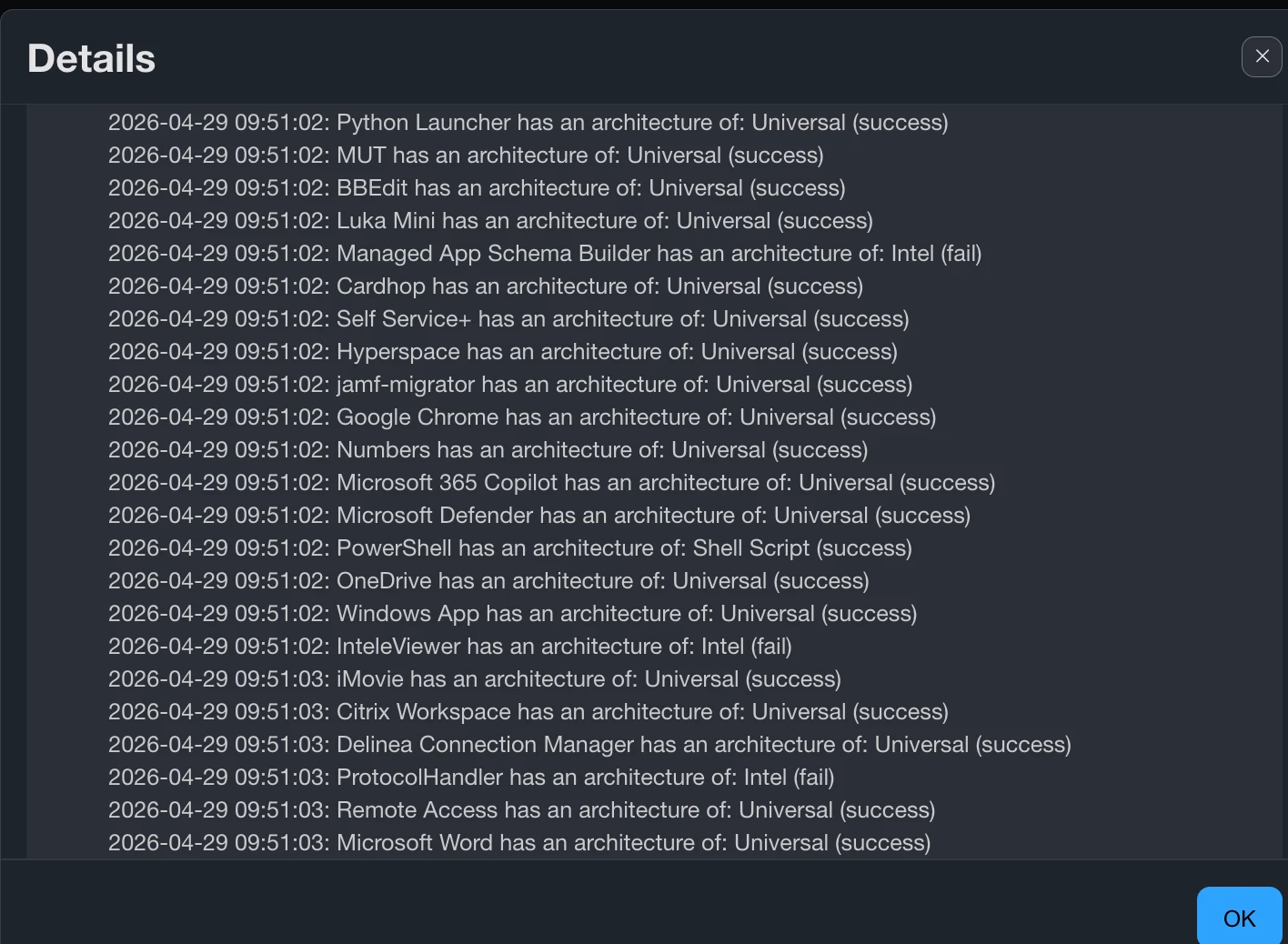
This is what the logs look like:


You can most likely parse the script to report multiple ways, this way just worked for us.

The only reason why we didn’t use an EA was because it runs on EVERY check-in which can slow down check-in times and fill up database fields, slowing your instance down.


talkingmoose
Forum|alt.badge.img+36
  • Community Manager
  • Answer
  • August 13, 2026

I recently put this extension attribute together for a project. You may find it useful.

https://gist.github.com/talkingmoose/b3553675a613176b35c27b5c5028e0c2


peterlbk
Forum|alt.badge.img+11
  • Jamf Heroes
  • August 13, 2026

This one makes a list of all intel apps per device as an EA


#!/bin/bash

result=()

while IFS= read -r -d '' app; do

    exec_name=$(/usr/libexec/PlistBuddy -c "Print CFBundleExecutable" \

        "$app/Contents/Info.plist" 2>/dev/null)

    [[ -z "$exec_name" ]] && continue

    bin="$app/Contents/MacOS/$exec_name"

    [[ -f "$bin" ]] || continue

    file_output=$(file "$bin" 2>/dev/null)

    if [[ "$file_output" == *"x86_64"* && "$file_output" != *"arm64"* ]]; then

        app_name=$(basename "$app" .app)

        result+=("$app_name")

    fi

done < <(find /Applications -maxdepth 2 -name "*.app" -print0)

if [[ ${#result[@]} -eq 0 ]]; then

    echo "<result>None</result>"

else

    joined=$(printf '%s\n' "${result[@]}" | sort | paste -sd ',' - | sed 's/,/, /g')

    echo "<result>$joined</result>"

fi


alexraja
Forum|alt.badge.img+1
  • Author
  • New Contributor
  • August 13, 2026

@peterlbk  - thanks for your suggestion. But the script you shared here is not worked for me at this time.

​​​​​​@talkingmoose  - Thanks a lot for your suggestion, it works for me and I am using it right now.