Question

Newest HP Printers

  • March 17, 2016
  • 91 replies
  • 407 views

Show first post

91 replies

Forum|alt.badge.img+13
  • Honored Contributor
  • January 26, 2018

@mccallister If you use the link above that @aporlebeke posted, download the latest few packages, and run them through Suspicious Package, you can see the drivers and PPDs


Forum|alt.badge.img+1
  • New Contributor
  • April 15, 2018

Late response, but I think this has the M452dn drivers

ftp://ftp.hp.com/pub/softlib/software12/HP_Quick_Start/osx/Installations/Essentials/hp-printer-essentials-S-5_7_5.pkg


Forum|alt.badge.img+9
  • Contributor
  • July 17, 2018

Once you run the HP Easy Start app and go through the process of finding your desired printer by searching for it by name or IP address
Go to "~/Library/Logs/HP Easy Start.log" in there you'll find the URL to download the actual package needed.

In my case, it looked like this "Start downloading the file from HTTP://ftp.hp.com/pub/softlib/software12/HP_Quick_Start/osx/Installations/Essentials/hp-printer-essentials-S-5_7_5.pkg"

I was able to hit that URL in a browser and download the .pkg file, then create a policy to install the package, adds the printer and runs a script to disable printer sharing which gets enabled by default when you push that type of policy.

Hope this helps!


Forum|alt.badge.img+4
  • Contributor
  • September 7, 2018

This thread has been a lot of help to me, thank you!

I was hoping someone might be able to help me with my deployment.

Right now, I am utilizing this script in a policy: https://github.com/MScottBlake/mac_scripts/blob/master/installPrinterFromWindowsPrintServer/installPrinterFromWindowsPrintServer.sh

It calls a separate policy that installs my driver pkg (hp essentials 5 7 5). The driver policy is set to run once per computer. Afterward, it uses lpadmin and script parameters to add the printer to the computer.

This works great for the most part. However, I've noticed some discrepancies in the printer features.

For instance, the HP printers are not able to view their Supply Levels under Options & Supplies. Instead, it says "Information Not Available".
Also, when I open the Printer Utility (HP Utility that is installed from driver package), no printers are shown automatically.

This feels problematic because when I add the same printer, manually through the GUI, it allows me to view Supply Levels and shows up in HP Utility just fine.

How could it be that the drivers are being partially applied if I haven't modified the package in any way?


mscottblake
Forum|alt.badge.img+25
  • Honored Contributor
  • September 7, 2018

@crehorewp Are you adding them to a print server with the script or IPP to the printer directly? When you add the printer manually, are you doing the same thing (print server vs printer)?

In my experience, obtaining the supply information from the print server generally fails, but works when you connect to the printer directly.


dstranathan
Forum|alt.badge.img+19
  • Valued Contributor
  • September 7, 2018

I could be wrong, but I don't recall ever having a SMB or IPP print server echo consumables data down to the client (other than maybe an AirPrint server running on macOS)


Forum|alt.badge.img+14
  • Valued Contributor
  • September 7, 2018

@crehorewp I will echo what the previous two said. I don't think you can get consumable data through a server...at least I've never been able to.

Thanks for posting a link to the that script. I have my own method of installing printers at the moment but I'm intrigued to see if I might prefer this. Going to look at it this afternoon.


Forum|alt.badge.img+4
  • Contributor
  • September 10, 2018

@mscottblake I've filled out my print server info in your script but I did comment out some of the naming variables. In the GUI, I'm going under the IP tab to add printer info and select my driver, which I'm assuming is directly. So probably not a great test.

@dstranathan Ok good to know. The main reason I'm investigating this is because I want to ensure I'm not missing other features from the drivers that may not be as noticeable. I was worried that they aren't being installed/applied fully. But with the feedback I'm receiving here, it seems this may not be the case.

@jhuls Good! I got in this morning and realized it's @mscottblake script!


mscottblake
Forum|alt.badge.img+25
  • Honored Contributor
  • September 10, 2018

@crehorewp I'm just glad you and others have found it helpful.

You can tell if the driver is being applied correctly when you view the printer. Next to the word Kind, it will show the official type of printer based on the driver chosen. If it says it's a generic printer, the driver is not being selected correctly.

I gave a talk about a lot of this stuff at the Penn State MacAdmins conference a few months ago. Here's a link to the video in case anyone else stumbles on this thread. That script is featured in it.


Forum|alt.badge.img+5
  • Contributor
  • February 14, 2019

FYI:

TIL about the “HP Easy Admin” tool. If you’re a school, large org, or enterprise and are looking for the HP driver package for a printer v the home/single-use Easy Setup app, you can use Easy Admin to go get the pkg-based driver installer to be used at scale.

https://support.hp.com/us-en/document/c06164609


Forum|alt.badge.img+7
  • Valued Contributor
  • February 21, 2019

nice find @uurazzle !!! that tool works perfectly!!!


Forum|alt.badge.img+5
  • Contributor
  • February 21, 2019

@jchurch Actually, to give credit where credit is due, it wasn't my find, but was publicized by this tweet by "Mike Boylan" here:

Mike Boylan: “TIL about the “HP Easy Admin” tool. If you’re a school, large org, or enterprise and are looking for the HP driver package for a printer v the home/single-use Easy Setup app, you can use Easy Admin to go get the pkg-based driver installer to be used at scale.”

Forum|alt.badge.img+1
  • New Contributor
  • April 17, 2019

JUST THOUGHT I'D CHIME IN

TO GET THE HP DRIVERS YOU WANT HERE IS THE ANSWER:

1) OPEN HP EASY START
2) VISIT PREFERENCES AND ENABLE LOGGING
3) FIND YOUR PRINTER IN HP EASY START THEN START DOWNLOADING THE DRIVER
4) CLICK "BACK"
5) VISIT HP EASY START PREFERENCES AND CLICK "HP EASY START.log" AND OPEN THE LOG FILE
6) THE DIRECT HTTP LINK TO THE DRIVER .PKG FILE WILL BE AT THE END OF THE LOG
7) COPY / PASTE THE LINK INTO SAFARI AND VOILA!!!!


Forum|alt.badge.img+3
  • New Contributor
  • May 1, 2019

HP has an application called HP Easy Admin, https://support.hp.com/sg-en/document/c06164609, that allows you to download these packages and you don't have to guess which one is the correct one.


Forum|alt.badge.img
  • New Contributor
  • August 14, 2019

The issue that I see with even the HP Easy Admin is that it is still downloading relatively large (~300MB) driver packs, even if the only thing you need is a specific driver for a single model.

I'm trying to figure out exactly how to modify the package to only deploy what I need, similar to the approach @LukeMason took earlier


Forum|alt.badge.img+14
  • Valued Contributor
  • September 25, 2019

Hello All,

First of all, thank you for all the information. I ended up going to HP Easy Admin route and get a PKG driver install for all the printers in our environment. We had success with doing so with Xerox, so I deployed these drivers to a few Macs, but it popped a Kernel Extension issue. Do I have to whitelist each individual driver? Does anybody have the kernel extension for HP?

Thanks,
Jared Flitt
John Carroll University ITS


Forum|alt.badge.img+14
  • Valued Contributor
  • September 25, 2019

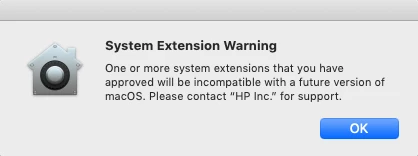
And I just accepted it and got this...


Forum|alt.badge.img+26
  • Honored Contributor
  • September 25, 2019

You should be able to whitelist by Team Identifier in a profile (assuming you meet the prerequisites for using a kernel extension whitelist profile). Here is a write up on how to find the Team ID for a given kernel extension.

https://derflounder.wordpress.com/2018/04/12/whitelisting-third-party-kernel-extensions-using-profiles/

On top of that, the compatibility warning you are getting tells me that your extension may not be properly notarized or may be a 32 bit kernel extension.

If it's notarization, here's an article from Apple:
https://developer.apple.com/documentation/security/notarizing_your_app_before_distribution

If it's the 32 bit vs 64 bit issue, then consult a system report in System Information app. Under extensions, it will list whether your given kernel extension is 32 bit vs 64 bit. Going forward in future versions of macOS, both could end up being a problem for you.


Forum|alt.badge.img+14
  • Valued Contributor
  • September 25, 2019

Thank you @blackholemac for the great info!


Forum|alt.badge.img+8
  • Contributor
  • October 11, 2019

October 2019 update to the entire HP driver library:

ftp://ftp.hp.com/pub/softlib/software12/HP_Quick_Start/osx/Installations/Essentials/hp-printer-essentials-S-5_14_6.pkg


Forum|alt.badge.img+15
  • Esteemed Contributor
  • October 28, 2019

It appears these October 2019 updates no longer support some of the older P series LaserJets (P2015, P2055, P3005). That's not super helpful HP.


Forum|alt.badge.img+17
  • Valued Contributor
  • October 28, 2019

HP has an Easy Admin tool for OSX. With the Easy Admin tool you have direct access to the HP repository to download the driver.

All PPDs are available via the link below. This prevents you from having to install a whole package of drivers.

ftp://ftp.hp.com/pub/softlib/software12/HP_Quick_Start/osx/Applications/HP_Easy_Admin.app.zip


Forum|alt.badge.img+2
  • New Contributor
  • October 30, 2019

It's hard to believe but this HP Easy Admin thing works. Thank you so much for sharing the FTP link. Did you get this from HP? When I chatted with support they said there was NO other way to get drivers except HP Easy Start which is a horrible tool.


apizz
Forum|alt.badge.img+15
  • Honored Contributor
  • October 31, 2019

The problem I have with HP Easy Admin is that there's nothing the app does to try and tell you when once you've downloaded a driver installer for one model and you go to get a different model that the driver is the same. You have to look at the actual downloaded file name and deduce.

It also doesn't stop HP from removing models like @cbrewer mentions. We need a way to say "here are the models I care about" and have HP work out on their end what driver installer(s) we need to cover those.


stevewood
Forum|alt.badge.img+38
  • Hall of Fame
  • October 31, 2019

@aporlebeke

Not an ideal solution, but I use Suspicious Package to peek into the downloaded package to see which drivers are in there.

Also, you can tell by the file size in HP Easy Admin which one it is downloading for each model. The larger one, I think it's around 240 MB, is the S package and the smaller one, I think around 54 MB, is the SE package. Those are the only two packages I've had to download.

I wish they would get some of the older models, like the P3010 and such, so that I could stop using the gigantic Apple HP Driver package that takes 5 minutes or more to install.