Question

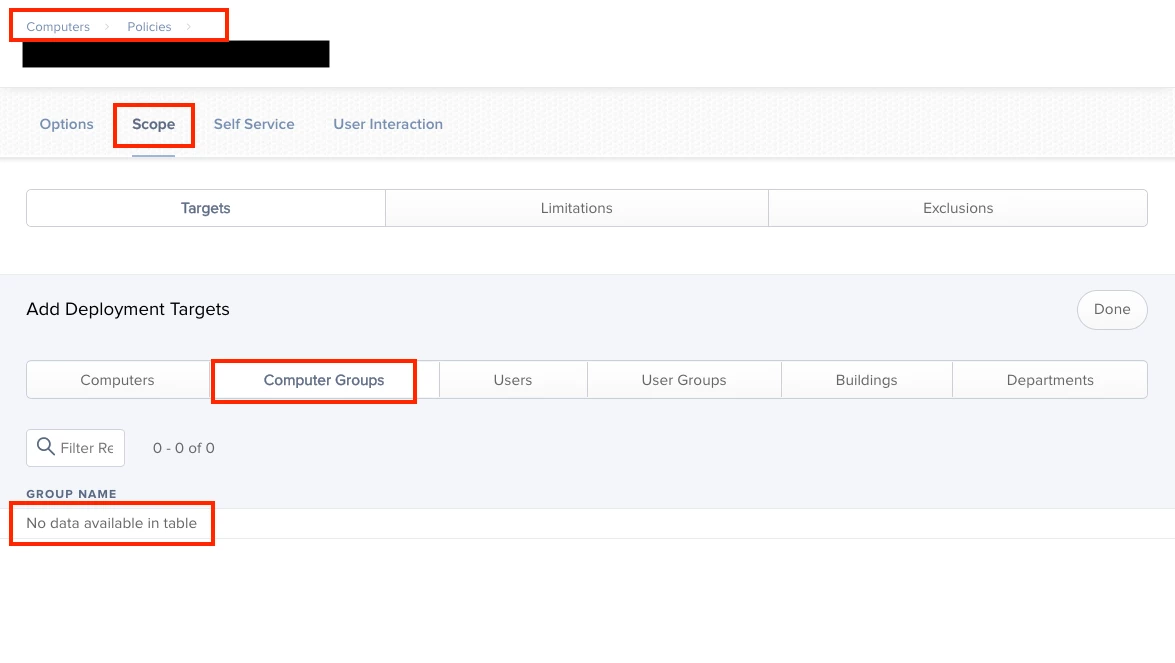
"No data available in table"

  • April 2, 2019
  • 5 replies
  • 43 views

donmontalvo
Forum|alt.badge.img+36

We've seen this problem before, sometimes it clears itself out.

Wanted to start a thread with "No data available in table" in the subject for anyone who searches for it (only one thread that isn't related to scoping).

Anyone ever see this problem? If so has Jamf ever provided any feedback/guidance?

We may open a ticket but wanted to check here first.
5 replies

donmontalvo
Forum|alt.badge.img+36
  • Author
  • Hall of Fame
  • April 2, 2019

It appears that if you set an existing policy from "None" site to "SiteName" site, your scope is erased.


donmontalvo
Forum|alt.badge.img+36
  • Author
  • Hall of Fame
  • April 10, 2019

Jamf was able to confirm (read: I'm not going mad!) that moving a policy into a site wipes all scoping without warning, and plan to add a warning (PI-006925).

https://www.explainxkcd.com/wiki/images/3/37/warning.png


Forum|alt.badge.img+5
  • New Contributor
  • April 22, 2019

Yup, I'm getting the same. In my case, I have a configuration profile configured to push VPN config to a particular site, but I want to exclude users who are members of a particular Smart Computer Group - seems as if jamf doesn't like that :-(


Forum|alt.badge.img+12
  • Valued Contributor
  • April 23, 2019

@ChrisJScott I am a bit puzzled about that statement. I always thought that this works fine as long as the Smart Group belongs to the same site as the Configuration Profile.


Forum|alt.badge.img
  • New Contributor
  • March 16, 2023

This appears to still be an issue.

Currently rebuilding a sites Jamf instance a little..

Uploading a fresh/refreshed VPP service token and scoping to the "Site Name" instead of "None" makes all the applications disappear from the Devices > Mobile Device Apps. 

A "No data available in table" message is left behind whether or not "Automatically Populate Purchased Content" is ticked or not. 

Any fixes available?