Solved

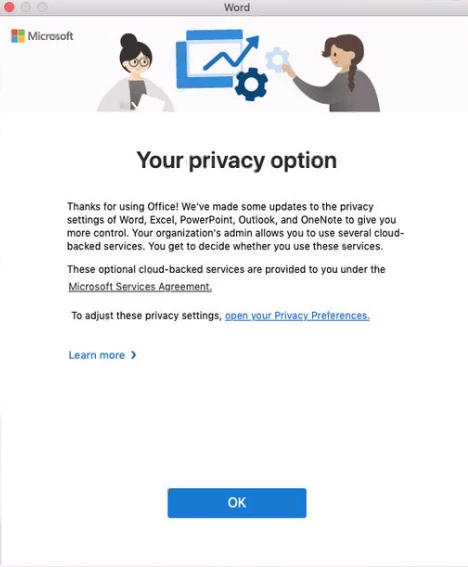
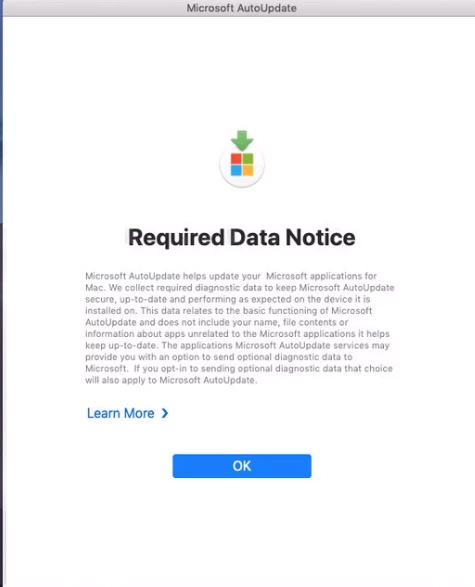
Office 2019 16.28.19081202 suppression of messages

  • August 25, 2019
  • 3 replies
  • 35 views

Forum|alt.badge.img+7

Does any one know how to suppress these two attached messages? Updated some test computers from 2016 to 2019 (16.28.19081202).

First one pops up when a user logs in and the other one when a user launches an application...

Is there already a config profile that can be pushed out that some one has created?

Best answer by 5Y54DMIN

https://github.com/pbowden-msft/MobileConfigs/tree/master/16.28%2B

Solved

3 replies

donmontalvo
Forum|alt.badge.img+36
  • Hall of Fame
  • August 25, 2019

Not sure I'd turn these off, with GDPR and all.


Forum|alt.badge.img+7
  • Author
  • Contributor
  • August 26, 2019

I have turned off the first one using this : https://www.jamf.com/jamf-nation/discussions/32686/microsoft-required-data-notice-pop-up

however can find the needed plist for the your privacy option... any know of something to turn it off?


Forum|alt.badge.img+7
  • Author
  • Contributor
  • Answer
  • August 26, 2019

https://github.com/pbowden-msft/MobileConfigs/tree/master/16.28%2B

Solved