Solved

Outlook Calendar showing 1 hour off

  • March 8, 2018
  • 13 replies
  • 207 views

Forum|alt.badge.img+8

We are seeing several users with calendar item being off by one hour. I'm assuming this is being affected by the daylight savings time coming up. Majority of the users are not seeing this issue. Anyone noticed this happening in their environment? We have location services turned on with set dat and time automatically to apple's time server. Set time zone automatically using current location is enabled as well.

Best answer by mjhersh

I've seen this happening in the calendar's week view, but it shows the correct time in month view and even the work-week view. Seems like a bug in Outlook, and I haven't found any way to fix it.

13 replies

Forum|alt.badge.img+12
  • Contributor
  • Answer
  • March 8, 2018

I've seen this happening in the calendar's week view, but it shows the correct time in month view and even the work-week view. Seems like a bug in Outlook, and I haven't found any way to fix it.



Forum|alt.badge.img+8
  • Author
  • Valued Contributor
  • March 8, 2018

Holly crap, nice catch.


Forum|alt.badge.img
  • New Contributor
  • March 8, 2018

We've found that the issue is caused by Daylight Savings in Outlook v16.10. Have you checked the versions that the users are have and compared it to those that aren't experiencing the issue? We noticed that the issue didn't occur in 15.41 and 16.9.


Forum|alt.badge.img+8
  • Author
  • Valued Contributor
  • March 8, 2018

I contacted Microsoft support. They told me the fix for this issue is in the Fast build channel but they couldn't tell me when the production build will receive the update.


dubel
Forum|alt.badge.img+12
  • Contributor
  • March 13, 2018

I'm seeing this issue as well, but its in all views, its not affecting everyone.


howie_isaacks
Forum|alt.badge.img+23
  • Esteemed Contributor
  • March 13, 2018


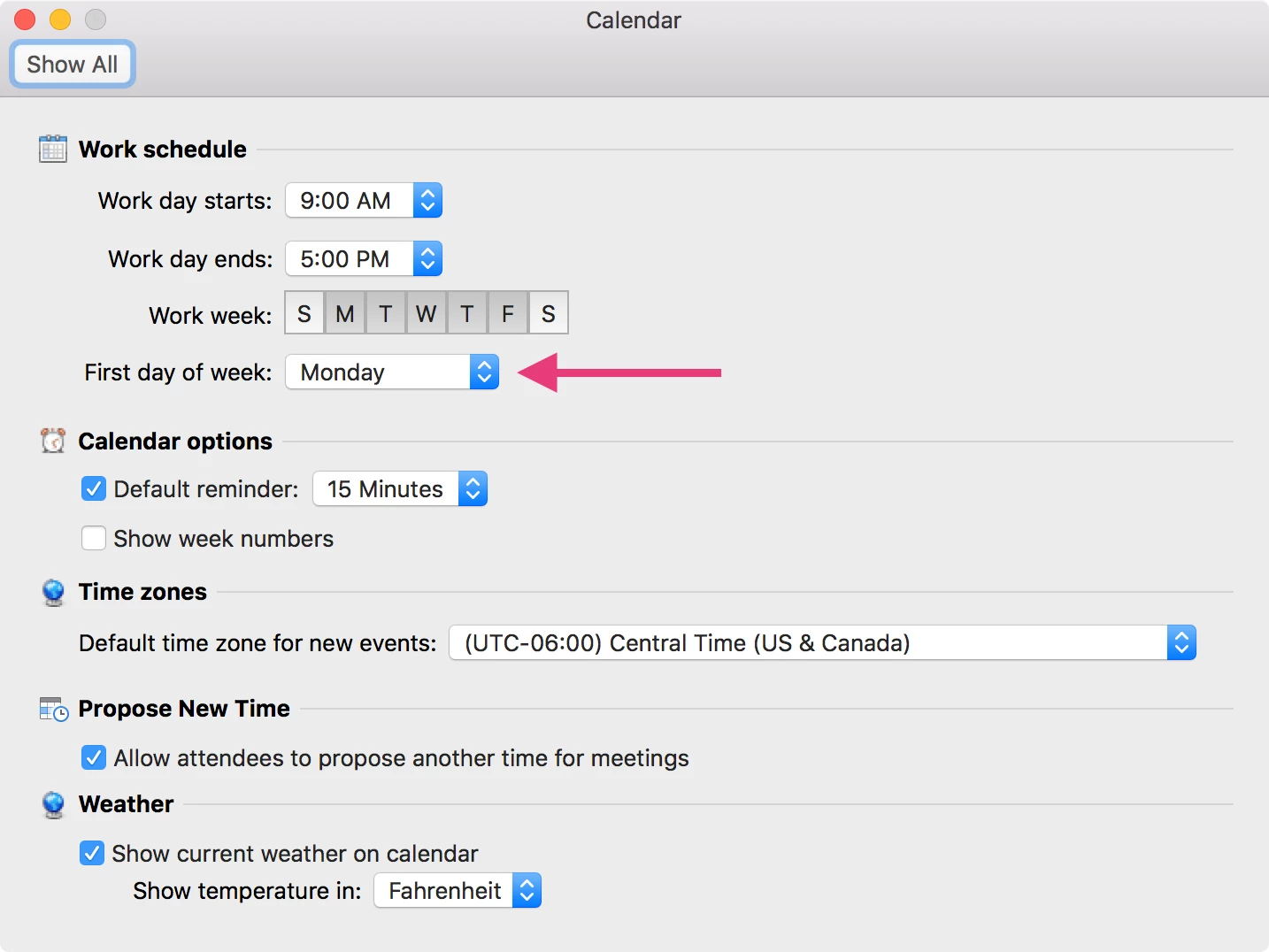
It's a simple fix. In Outlook preferences under Calendar. Change the start of the week to Monday instead of Sunday. That worked for two of my clients. After this week, they can switch it back to Sunday if they want.


dubel
Forum|alt.badge.img+12
  • Contributor
  • March 13, 2018

@howie_isaacks That works! Thanks.


Forum|alt.badge.img+21
  • Honored Contributor
  • March 14, 2018

16.11 updates are available now which should fix the problem. Full installer is here http://macadmins.software


donmontalvo
Forum|alt.badge.img+36
  • Hall of Fame
  • March 14, 2018

Looks like the fix got rolled into 16.12 (InsiderFast) as well.


dubel
Forum|alt.badge.img+12
  • Contributor
  • March 14, 2018

Confirmed that 16.11 does fix the issue.


donmontalvo
Forum|alt.badge.img+36
  • Hall of Fame
  • March 14, 2018

Looks like the fix was slip-streamed into InsiderSlow/InsiderFast releases too.

March 2018 release | Release Date: March 13, 2018 | Version: 16.11.0 (Build 18031100) https://support.office.com/en-us/article/release-notes-for-office-2016-for-mac-ed2da564-6d53-4542-9954-7e3209681a41 Fix an issue, where if the default time zone for your computer observes daylight saving time (DST) and Week view is selected, you may see that all events are shifted by one hour on the calendar grid on the week when DST starts.

donmontalvo
Forum|alt.badge.img+36
  • Hall of Fame
  • March 12, 2019

Hmmm...I wonder if 16.16.7 is having the same issue. Got a couple calls from folks on Insider Fast saying Outlook is crashing. Started today.


Forum|alt.badge.img
  • New Contributor
  • November 7, 2019

If you changer your week, either week or work week, to start on Monday, instead of Sunday, the time zones appear correctly.