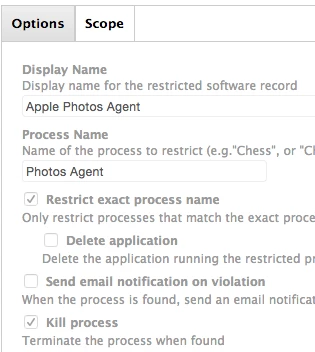
Still new to the Casper Suite. Trying to restrict the Photos app and was able to successfully kill the app via restricted software, but I see the Photos Agent still active in Activity Monitor. I tried creating a separate restricted software entry for the Photos Agent, but it keeps running for some reason. I've done the jamf manage terminal command to ensure it's updated.
Any reason to think that the Photos Agent is necessary to the OS given that it's now baked into 10.10.4 Yosemite?
See below:
Best answer by Look
Considering that both Photos Agent and photolibraryd are some kind agent/daemon/service and launched automatically on login (they exist even if photos has never been run on the machine) they may also be set to keep alive and simply be relaunching immediately on exit. There is of course as you say also the possibility they are doing something useful for the OS that Apple may consider important, not saying you can't kill them just that there may be unintended consequences, some of the other iLife components have been like this in the past, things like the Screensaver and Desktop backgrounds started playing up when you mangled them too much.
After looking at this a bit more, it seems the Photos Agent is part of a process group, which is why it's not being killed. Will keep exploring this ...
Considering that both Photos Agent and photolibraryd are some kind agent/daemon/service and launched automatically on login (they exist even if photos has never been run on the machine) they may also be set to keep alive and simply be relaunching immediately on exit. There is of course as you say also the possibility they are doing something useful for the OS that Apple may consider important, not saying you can't kill them just that there may be unintended consequences, some of the other iLife components have been like this in the past, things like the Screensaver and Desktop backgrounds started playing up when you mangled them too much.