Question

Platform SSO Simplified Setup (macOS 26 + Entra ID): onPremisesSamAccountName not available in token — anyone found a workaround?

  • June 4, 2026
  • 6 replies
  • 371 views

Forum|alt.badge.img+3

Hi everyone,

I've been working through a deployment of Platform SSO Simplified Setup on macOS 26 using Microsoft Company Portal 5.2604.1 (5.2604.0 or newer is required per documentation), and I've hit a wall with username/account name mapping that I wanted to share in case others are running into the same thing and could potentially provide some alternative options.

---

Our Setup

- Jamf Pro 11.28.1
- macOS 26
- Microsoft Company Portal 5.2604.1 (deployed as a PreStage package)
- Microsoft Entra ID
- PSSO profile with Simplified Setup enabled (EnableCreateFirstUserDuringSetup + EnableCreateNewUserAtLogin both true)
- Authentication method: Password
- Associated Domains payload included in the same profile

---

The Problem

Everything works end-to-end — Simplified Setup fires during the Setup Assistant, the user signs in with their Entra credentials, and a local account gets created. However, the local account short name is being set to the full preferred_username value (e.g. John.Smith@company.com), which is not what we want.

Our goal is to have the local account short name match the user's on-premises SAM account name (e.g. jsmith), which is cleaner and consistent with how accounts are named in our environment.

What We've Tried

1. com.apple.PlatformSSO.AccountShortName — This strips the @company.com but leaves us with John.Smith (capital letter, period), which is still non-standard for us.

2. onPremisesSamAccountName — The attribute exists and is populated correctly in Entra (confirmed via Graph API), but it does not appear in the token issued to the Microsoft Authentication Broker (appId: 29d9ed98-a469-4536-ade2-f981bc1d605e) during PSSO registration.

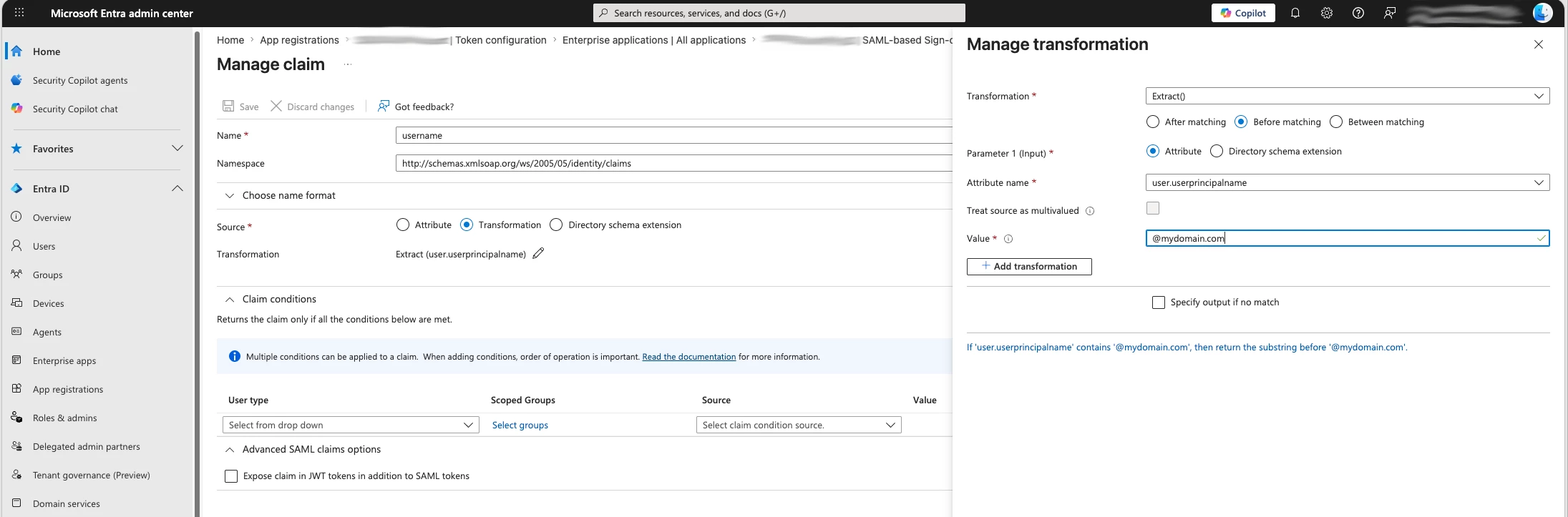
3. Claims Mapping Policy — We created a claims mapping policy via Microsoft Graph PowerShell and successfully assigned it to the Authentication Broker service principal. However, the claim still does not appear in the token. This appears to be because OIDC apps require custom signing keys for claims mapping to take effect, and Microsoft-owned first-party apps cannot have custom signing keys configured.

4. mailNickName — Also not present in the token.

The token issued during PSSO authentication is extremely minimal — it only contains: name, preferred_username, oid, sub, tid, and a handful of internal Microsoft claims. No custom or optional claims can be injected into it through any self-service mechanism we've found.

We've opened a Microsoft support case and their response suggests this is by design — the Authentication Broker token is locked down and not customizable.

A script to rename it after the fact is a thought; however, it’s not our preferred route unless totally necessary.

---

Questions for the Community

1. Has anyone successfully gotten onPremisesSamAccountName or any equivalent clean short username into the PSSO token with Entra ID?

2. Is anyone aware of whether Microsoft has any plans to add onPremisesSamAccountName as a supported native claim for the PSSO broker token?

Any input appreciated — this feels like a significant gap when deploying PSSO with Jamf and Entra ID.


6 replies

Forum|alt.badge.img+6
  • Contributor
  • June 8, 2026

I struggled with this as well, but have it working with the onPremisesAccountName in order to get the actual account name without the domain as the username. I had to edit the following in Jamf Settings:

Cloud Identity Providers:
  Server Configuration:
    User mapping from the SAML assertion: userPrincipalName
  Mappings:
    User name: onpremisessamaccountname

Single Sign-On:
  OIDC IdP integration settings:
    Identity Provider User Mapping: email
    Jamf Pro User Mapping: username
  SAML IdP User Mapping:
    Identity Provider User Mapping: Custom Attribute: http://schemas.xmlsoap.org/ws/2005/05/identity/claims/username
    Jamf Pro User Mapping: Username


I don’t believe any of what we tried on the Entra side with the Enterprise App or App Registration really helped at all.  It ended up being very rigid on the Jamf side as to what was required with the mappings though (as above).


howie_isaacks
Forum|alt.badge.img+23
  • Esteemed Contributor
  • June 9, 2026

According to all that I have read and several posts in the Mac Admins platform-sso channel, we cannot get the onpremisessamaccountname mapped to the Mac’s local username. Entra ID relies on the UPN as the primary identifier to authenticate users and to match the cloud account to the on-premises directory. I tried every possible configuration until I found out that I could not get the onpremisessamaccountname to map to the Mac username.


I decided to configure the Mac username using the UPN prefix. In this configuration, a user with an email address like steve.jobs@apple.com will get their Mac setup using the username “steve.jobs”.


In my PSSO profile used with the PreStage, I used this configuration:

Full Name: name

Account Name: com.apple.PlatformSSO.AccountShortName


I also have an enrollment customization that uses SSO with Entra ID to prompt users to log in with their Entra ID account to enroll. This login pulls in the onpremisessamaccountname so that it will be associated with the Mac in Jamf Pro. This enables Jamf Pro to pull in all the other user information needed. This enrollment customization is what we are currently using with PreStage to identify the user who is enrolling their Mac.


So far, I have found no issues with the username being set up using the UPN prefix, at least not in my environment. The onpremisessamaccountname (AD username) being different from the UPN prefix is a legacy configuration. Entra ID favors the UPN. It does not use the AD username. The only potential drawback is that users will need to authenticate two times during initial enrollment. First, is the SSO enrollment customization. Later, when the user account is created, they need to log in again. This time, they are prompted by Company Portal. The PSSO registration happens at the end of the Setup Assistant process.


Forum|alt.badge.img+3
  • Author
  • New Contributor
  • June 12, 2026

Thank you both for the detailed responses, this is really helpful context.

@Andrew_R, I appreciate you sharing your configuration. To clarify though, the settings you've described appear to be related to Jamf Pro's Cloud Identity Provider and SSO configuration for Jamf Pro itself (i.e., how users authenticate to the Jamf Pro console), rather than the TokenToUserMapping in the PSSO configuration profile that controls the local macOS account short name created during Simplified Setup. Unless I'm misunderstanding your setup, I don't think those mappings would influence what account name gets created on the Mac during enrollment, but happy to be corrected if you're seeing otherwise.

@howie_isaacks, this aligns closely with what we've found as well. We've confirmed that onPremisesSamAccountName simply isn't present in the token issued by the Microsoft Authentication Broker during PSSO registration, and Microsoft support has indicated this is by design. We've escalated to our Microsoft account team to request it as a design change, but that's a long road.

For now we're in the same position as you, using com.apple.PlatformSSO.AccountShortName, which gives us the UPN prefix (e.g. john.smith). In our case the UPN prefix differs from the SAM account name for many users, which is the main reason we were pushing on this. But it sounds like accepting the UPN prefix may be the pragmatic path forward for the time being.

Thanks again to both of you, it's useful to know others have hit the same wall.


Forum|alt.badge.img+6
  • Contributor
  • June 12, 2026

You’re right, I didn’t mention the mapping in the config profile - there we have Account Name set to onpremisessamaccountname


howie_isaacks
Forum|alt.badge.img+23
  • Esteemed Contributor
  • June 12, 2026

In my environment it does not matter what the Mac username is set to. Obviously I want some kind of standard, but we don’t need the onPremisesSamAccountName to be used as the username. The only reason given to me for continuing to use it is because “that’s the way we have always done it”. We still need for the onPremisesSamAccountName name to be involved though. It is what Jamf Pro is using to perform lookups to bring in all user information such as their email address that we use for issuing an identity certificate that connects us to WiFi and VPN. For this reason, I added the SSO enrollment customization that we are already using. The only drawback to doing this is that users need to authenticate two times during enrollment and initial setup with Setup Assistant. PSSO gets configured before the desktop appears. I have found absolutely no issues with the username being set to the UPN prefix.

I don’t think Microsoft will add in the onPremisesSamAccountName to the token. Entra ID uses the UPN for authentication. Why would Microsoft want to take a step backward and keep supporting the old way of authenticating? PSSO is talking directly to Entra ID, not to our internal AD server. After all this testing and exploring, it now makes perfect sense to me why the onPremisesSamAccountName is not set as the Mac username. I realize we all work in different environments. I wish mine wasn’t so tied into the old ways.


howie_isaacks
Forum|alt.badge.img+23
  • Esteemed Contributor
  • June 19, 2026

I’m curious. What is driving the need for the onPremisesSamAccountName to be the Mac username? Here’s a screenshot of the configuration that I settled on. Because we need the onPremisesSamAccountName to be populated in User and Location, along with a lot of other user data from Entra ID, I have an SSO enrollment customization, which is responsible for pulling in all that data. When the user account is created, the user’s UPN prefix is used for the Mac username.