
Question

PPPC for SMARTBoardService

  • January 16, 2019
  • 10 replies
  • 33 views

Forum|alt.badge.img+9

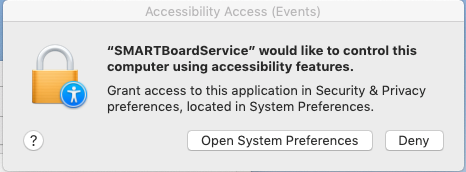
Has anyone had any luck getting SMARTBoardService put into PPPC? The app is located at "/Applications/SMART Technologies/SMART Settings.app/Contents/bin/SMARTBoardService.app", but is not signed.

I'm trying to pre-approve its request for Accessibility access.
10 replies

Forum|alt.badge.img+20
  • Valued Contributor
  • January 16, 2019

Hello @luke.reagor have you tried the PPPC utility?

We started using it and it makes a big difference. We simply add the app on the left side of the window, choose the access the app needs and then it can upload directly to your JSS or you can create a file to upload later. So far, it has been working well for us.


Forum|alt.badge.img+15
  • Valued Contributor
  • January 16, 2019

If the app isn't signed when you run this command, then you'll need to contact the developer and implore them to sign their app. PPPC profiles require the app to be signed.

codesign -dr - /Applications/SMART Technologies/SMART Settings.app/Contents/bin/SMARTBoardService.app

Forum|alt.badge.img+9
  • Author
  • Contributor
  • January 17, 2019

@mconners : Yes, I've tried the PPC utility, but I find it's easier for me to just make the profile directly in Jamf now that it's an option in the config profiles.

@sshort : Yes, it's because the app isn't signed by SMART that we can't get it to work. I was hoping someone had found something that worked. I'm currently trying to force a signature on it and get it to work like that. Following this info, https://stackoverflow.com/questions/27085895/terminals-codesign-command-trouble, I've been able to get it signed, albeit not by SMART but by our ID. But even with it signed, I haven't gotten it to not prompt yet.


Forum|alt.badge.img+4
  • Contributor
  • January 29, 2019

I opened a support ticket with Smart and they provided me with signed versions of Smart Ink and SmartBoardService. PPPC utility could then be used.

They've asked me not to share the files but you can reach out to them and reference my case. They were very helpful.

https://support.smarttech.com/en/forms/contact
SMART Support Case #00200444 - NB 18 for Mojave


Forum|alt.badge.img+16
  • Contributor
  • February 6, 2019

@estes Did you get any indication from support that they were rolling these signed versions into an updated notebook installer?

UPDATE: I sent an inquiry into SMART referring them to your case number and they of course looked at that like a dog tilting it's head to hear a new sound. His response was "Since you are already working with a tier 3 support person you should reply to the email chain". The tech clearly didn't look up my name nor the referred ticket # so now I'm waiting on a response back from him pointing out his goof.


Forum|alt.badge.img+4
  • Contributor
  • February 11, 2019

I'm told that's the plan to release new signed version soon.

Email me your contact info @mainelysteve estes@mentorschools.org


Forum|alt.badge.img+1
  • New Contributor
  • May 21, 2019

Anyone have an update on the signed version of Smart Ink?


Forum|alt.badge.img+15
  • Valued Contributor
  • May 21, 2019

@bsloane Someone reached out in the #tcc room on the macadmin Slack last week to say that SMART was "releasing an update soon."


Forum|alt.badge.img+13

They were releasing an update "soon" 5 months ago.


Forum|alt.badge.img+16
  • Contributor
  • May 22, 2019

I was told by SMART support back in March that it would be available by the end of this month(May 2019).