Question

Pre-stage enrollment Mac Device Name

  • April 22, 2026
  • 9 replies
  • 82 views

Forum|alt.badge.img+4

I have searched AI and here but I can’t find anything that matches (or works) for our organization.  I would like to have (as part of the pre-stage enrollment) the Mac device be renamed to a prefix + s/n.  The configuration profiles logs all show MacBook Pro or Users’s MacBook Pro and not the naming scheme that is approved for the company.  


From what I understand, you can’t go b ack and rename machines in any log. and modify it.                               

9 replies

Chubs
Forum|alt.badge.img+24
  • Jamf Heroes
  • April 22, 2026

You can. Script to:

”jamf setcomputername -name <nameHere>”

Something like that anyways.  We have that set at enrollment on our devices. 


Chubs
Forum|alt.badge.img+24
  • Jamf Heroes
  • April 22, 2026

So complete would be:

prefix=“myOrg”

serial=$(ioreg -l | awk -F\” '/IOPlatformSerialNumber/ {print $(NF-1)}')

jamf setcomputername -name $prefix-$serial


…. or something like that. 


Josh-Q
Forum|alt.badge.img+4
  • Jamf Heroes
  • April 22, 2026

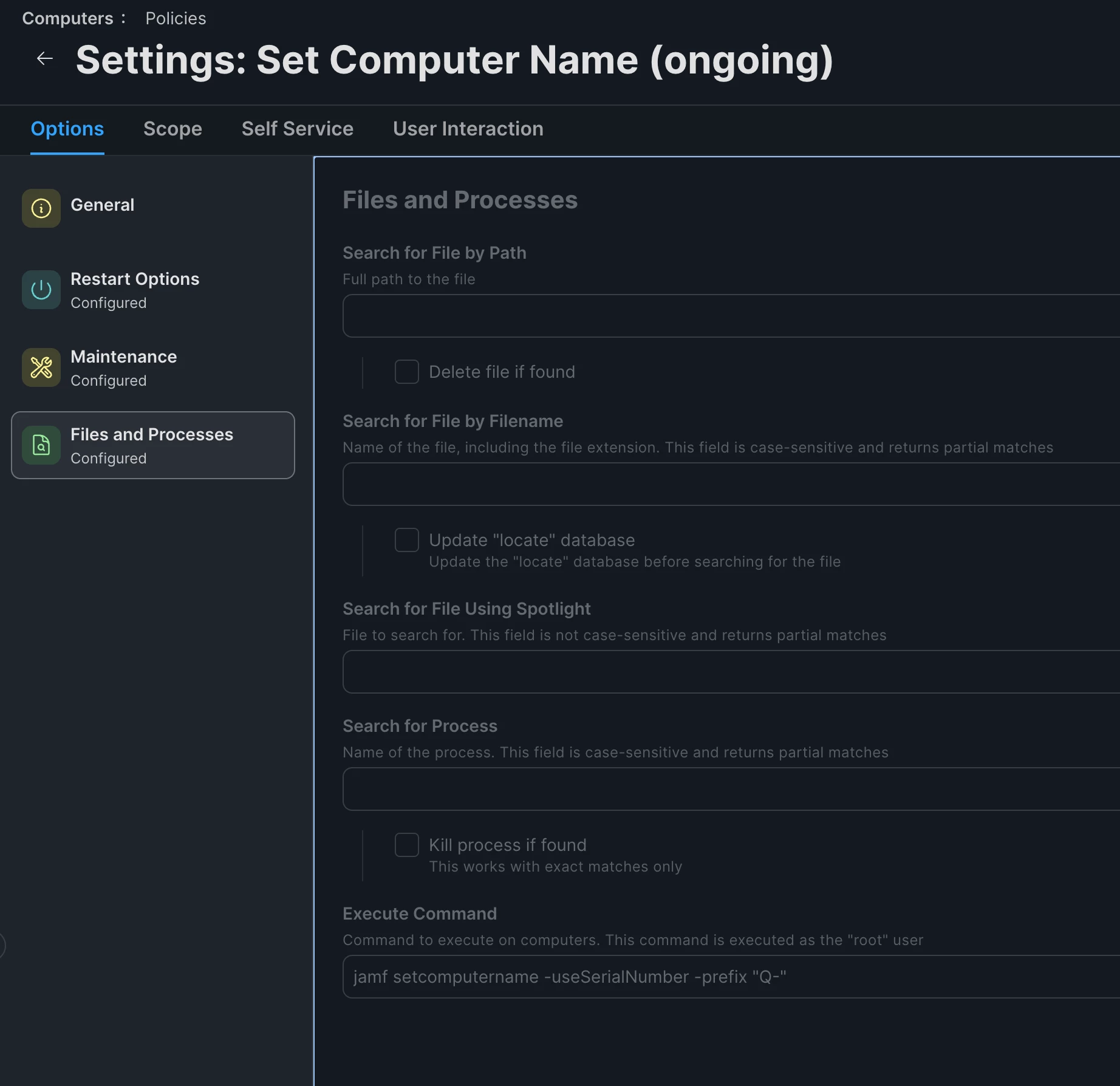
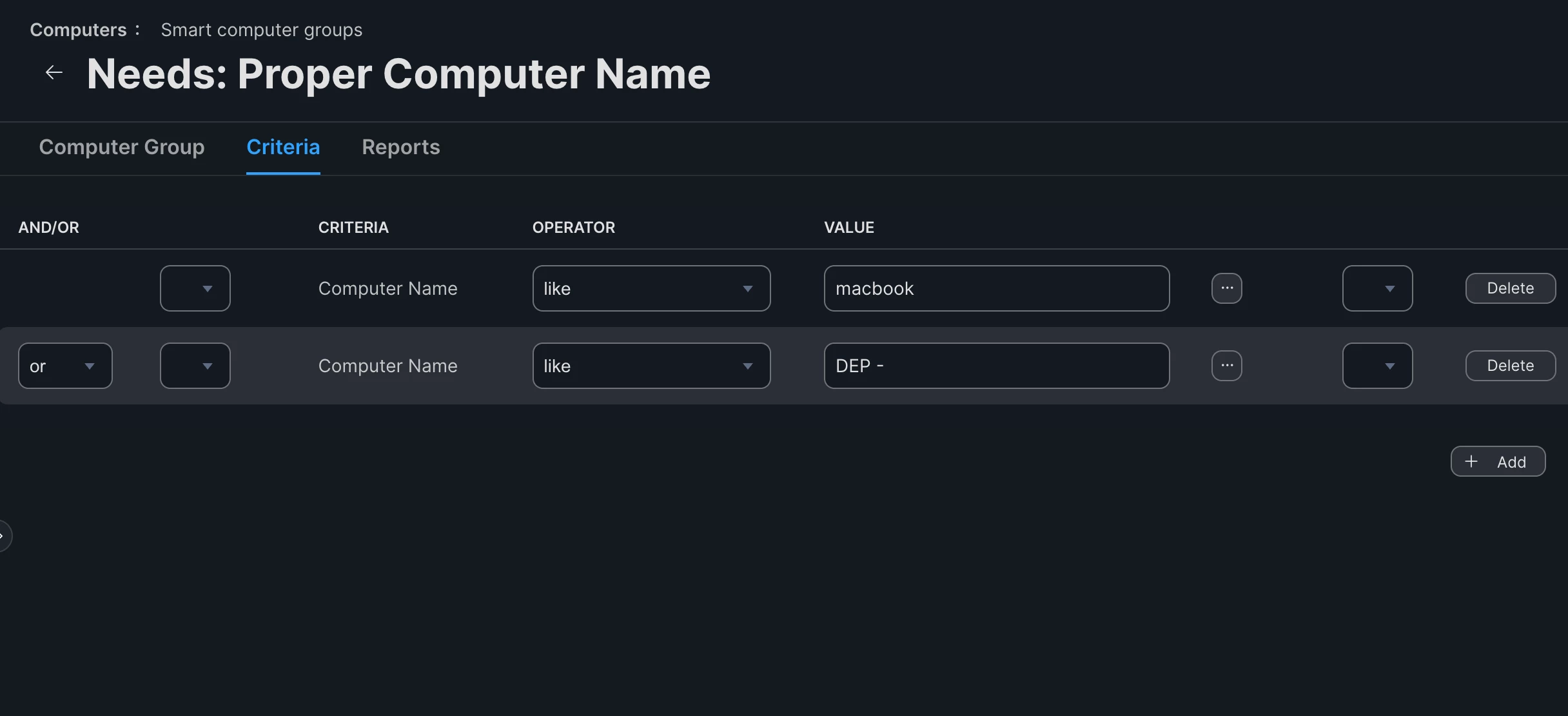
@mmolenda I have an Ongoing policy with a Check-In trigger set to rename any computers (using the Jamf binary) that don’t have a name that is compliant with our naming convention. The policy is scoped to a smart group that looks for names that don’t match our format: <prefix>-<serial_number>


The policy itself just runs a single command via the Files and Processes tab:

jamf setcomputername -useSerialNumber -prefix "Q-"


Policy Settings
Smart Group Criteria


Chubs
Forum|alt.badge.img+24
  • Jamf Heroes
  • April 22, 2026

@Josh-Q Nice call out!  I forgot about that switch. 

We put our asset tag on device names that’s polled from ServiceNow….so we have to do API calls to grab all of that.


Chris_Hafner
Forum|alt.badge.img+27
  • Jamf Heroes
  • April 23, 2026

Many ways to do this as you see. With that said, also make sure you’ve found The MUT


https://marketplace.jamf.com/details/the-mut 


Forum|alt.badge.img+4
  • Author
  • Contributor
  • April 23, 2026

@mmolenda I have an Ongoing policy with a Check-In trigger set to rename any computers (using the Jamf binary) that don’t have a name that is compliant with our naming convention. The policy is scoped to a smart group that looks for names that don’t match our format: <prefix>-<serial_number>


The policy itself just runs a single command via the Files and Processes tab:

jamf setcomputername -useSerialNumber -prefix "Q-"


Policy Settings
Smart Group Criteria


I was able to make this work beautifully post enrollment with some modifications that fit our environment.  Is there a way to make this work pre-enrollment?  The only reason I ask is because the configuration profiles are downloaded as soon as you click “Enroll” and at that point it is pulling “MacBook Pro” which is guess, Apple’s default.  So, in the logs for the configuration profiles, it says MacBook Pro.  I can click on it and see what it is but it is not logged as what it is.

This did work great post-enrollment.  If that is as best I can get, I am happy that it automated the naming of the Mac.


Josh-Q
Forum|alt.badge.img+4
  • Jamf Heroes
  • April 23, 2026

@mmolenda I guess you could deploy an enrollment package that just runs a script or you could set some of your config profiles to only apply once that name has been set. We have the same issue, but in my environment, I personally just deal with it. If I have an issue and I need to see if a config profile applied to a system, I’m normally looking at the system record and not the full config profile log.


It would be nice if the same Device Name payload existed in the Computer Prestage enrollments as they have in the Mobile Device Enrollments, but alas...


Forum|alt.badge.img+14
  • Valued Contributor
  • April 23, 2026

We received a script from our Apple SE that sets device names for our iPads - but would also work for laptops- it is run at enrollment


+1 for MUT also - have used it in the past


eos_bebu
Forum|alt.badge.img+3
  • New Contributor
  • April 24, 2026

you could also use Composer or any other packaging tool to add the script for the renaming of the mac into the postinstall. 

I modified my script to match the example of Josh-Q. 

#!/bin/bash

if [ -f /loca/bin/jamf ]; then
jamf setComputerName -prefix "Q-" -useSerialNumber
else
MacSerial=$(/usr/sbin/system_profiler SPHardwareDataType | /usr/bin/awk '/Serial\ Number\ \(system\)/ {print $NF}')
/usr/sbin/scutil --set ComputerName "Q-${MacSerial}"
sleep 3
/usr/sbin/scutil --set LocalHostName "Q-${MacSerial}"
sleep 3
/usr/sbin/scutil --set HostName "Q-${MacSerial}"
sleep 3
/usr/bin/dscacheutil -flushcache
fi