
Question

PreStage Enrollment Account Name variables are not used if a capital letter is included

  • June 24, 2024
  • 4 replies
  • 80 views

Forum|alt.badge.img+4

Hello everyone,
I have a problem in PreStage Enrollment, when passing through the sAMAccountName, maybe someone here has a solution for it.

We need user certificates per configuration profile, which is why I set up a new PreStage Enrollment for MDM Enabled Users, but currently the ShortName (sAMAccountName) is not taken over for the AccountName if the value contains capital letters (which is unfortunately often the case here).
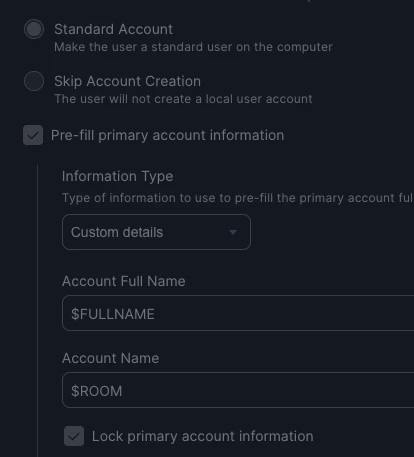
The other attributes were already in use, which is why we used "Room" for mapping the sAMAccountName/onpremisessamaccountname, which works so far, but in PreStage only as long as there is no capital letter. If there is a uppercase letter in it, the value is not filled in the macOS account setup and the fields are not locked.

AD and AAD are set up and Entra ID as IDP for SSO.
There are already hundreds of rolled out Macs in this cloud instance and various dependencies on the username, which is set to the UPN. This is why we cannot generally change the username mapping to the sAMAccountName and change the "account information" to "Device owner's details" in the PreStage Account Settings, which I would expect not to occur with it.

So far I can only think of two options, so I hope that someone else here has another idea.
Option 1 (high impact possible):
Change all sAMAccountNames to lowercase - this could cause problems in various other systems, which is impossible to estimate.
Option 2 (messy, dirty and AD admins will hate me):
Build an automation that writes the sAMAccountName as a lowercase value to another AD attribute, pass that through to the AAD as well, and set up the mapping in Jamf with them.... (AD attributes are almost all in use... whether this is an option at all is therefore not clear yet)

4 replies

Forum|alt.badge.img+7
  • Contributor
  • December 15, 2025

@JoergR Did you find a solution for this issue? 


Forum|alt.badge.img+4
  • Author
  • New Contributor
  • December 15, 2025

Hi ​@MehdiYawari , the two Options i already mentioned and if you´re users always have a mailNickname, that could be an already normalised Value for mapping.
but i think it can cause situationes with an empty mailNickname on new accounts, that enroll before the value was set and synced.
It´s been a while, so please take a look into Microsofts documentations und research for your own.
Maybe meanwhile there are better ways


Forum|alt.badge.img+7
  • Contributor
  • December 15, 2025

@Joerg

Thanks for your quick response.
I had a similar issue but not the same one as you.
Till now, we have made sure that our user do create a local username same as IDP username(our user initiated enrollment method).
Now we want to configure ADE enrollment and we want to keep the local username in lower case.
I wanted to know, if it is possible?
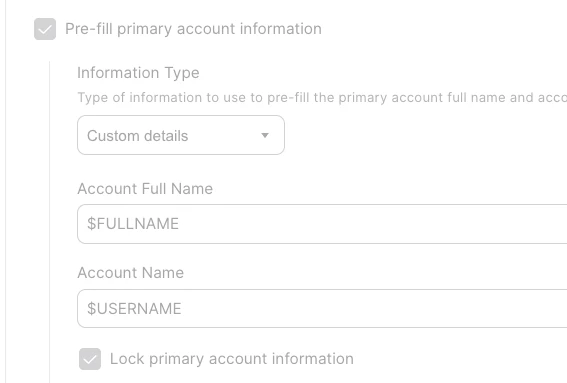
Currently we use $USERNAME in our prestage enrollment but it delivers the username in upper-case which we dont want.
 

Are you using “Lock primary account information” in your setup? And how is the local username looks like in Jamf(All upper-case or lower-case)?
if the username is upper-case, does user based configuration profile work?


Forum|alt.badge.img+4
  • Author
  • New Contributor
  • December 15, 2025

Yes “Lock primary account information” is enabled and if the Variables are used (and not empty), the fields for local user name and Full Name are prefilled and locked in enrollment as intended.

i dont think that a username with upper-case can work, i guess it will just dont lock the fields and create it from the fullname instead of the incompatible local username value.

You should look at the mapping of $USERNAME , maybe theres something wrong, 
I can't imagine why the username would always be capitalized; it's actually just passed through and should come from the AD as is...
only other thing is the cached information in Jamf Users Tab, maybe take a look there and delete the testuser before a new Enrollmenttest, maybe theres some old information in uppercase that wont get synced