Question

Problems with Safari on iPad 26.2

  • January 7, 2026
  • 3 replies
  • 223 views

davidsb
Forum|alt.badge.img

Hi,

Some students iPads updated to iPad OS 26.2 can’t access to safari and then we tried to install chrome and get the same problem. 

Can’t reinstall only the app and if we try to erase the iPad and reinstalling get the same problem :(

Thanks


3 replies

Thomas.Paul
  • New Contributor
  • January 20, 2026

Same here,

any solution yet?


anothersysadmin

Had the same problems at a school i supervise and could fix it. It was actually kinda hard to replicate this issue to a device i have access to because on every one of them safari was usable with the exact same profiles applied.
 

So, hear me out:

  1. the lock of safari applies only, if there is an apple id logged in on the device
  2. you configured a profile with an restriction payload
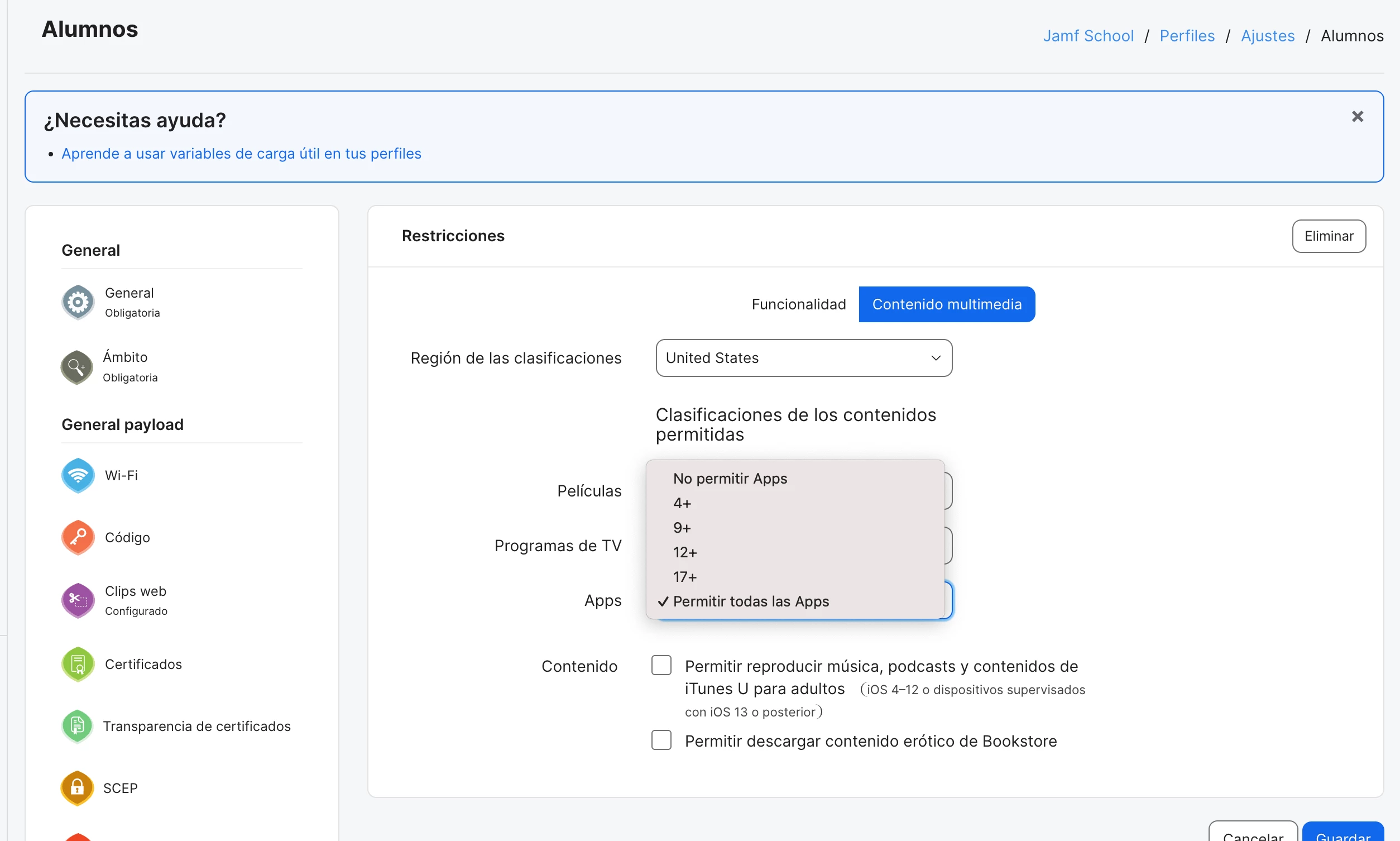
  3. then check unter this profile → restrictions → switch at the top to “media content”
  4. set Apps to at least 17+
  5. give your devices some time reconfigure and safari shoud be usable again :)


Hope that helped.
Martin


davidsb
Forum|alt.badge.img
  • Author
  • New Contributor
  • January 30, 2026

Yes! That’s the point 

In our case: