Question

Pulse Secure to Ivanti Secure Access - Access/Control Popup

  • November 21, 2022
  • 9 replies
  • 117 views

Forum|alt.badge.img+14

We are currently using Pulse Secure v9.1.x and need to upgrade this to the latest offering from Ivanti, Ivanti Secure Access v22.2 in preparation for Ventura.

We have done many Pulse to Pulse upgrades in the past, all PPPC's and System Extensions have been accounted for.

However, going from Pulse to Ivanti, when it is removing/upgrading we are getting a pretty generic popup that we felt could be accounted for with either a new PPPC or addition to existing.
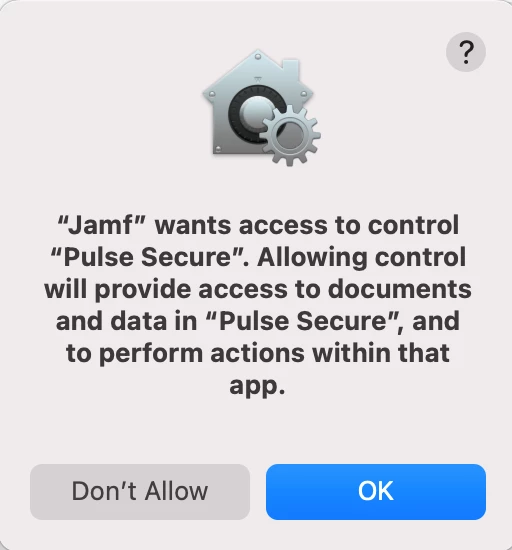
At this time, nothing we have done will stop this particular popup from showing up.

Looking for any info/guidance from anyone that has possibly already gone through this upgrade or similar? 

9 replies

Forum|alt.badge.img+7
  • Contributor
  • November 22, 2022

We have a script to completely close the Pulse app before installing Ivanti (in the same policy), this will ensure the pop-up will not happen


Forum|alt.badge.img+8
  • Contributor
  • December 15, 2022

We have a script to completely close the Pulse app before installing Ivanti (in the same policy), this will ensure the pop-up will not happen


Can you share the script?


Forum|alt.badge.img+14
  • Author
  • Valued Contributor
  • January 9, 2023

We have a script to completely close the Pulse app before installing Ivanti (in the same policy), this will ensure the pop-up will not happen


Yes, can you please share the script?

Our remote access team has Pulse set to respawn if the process is killed, hoping maybe your script will do the job.


jwwaters
Forum|alt.badge.img+2
  • New Contributor
  • April 4, 2023

dstranathan
Forum|alt.badge.img+19
  • Valued Contributor
  • April 27, 2023

Thanks, @jwwaters 

That link has a PDF that details the issue. It's affecting my org. We are trying to upgrade Pulse Secure 9.1.x to Ivanti 22.3.1 using an OEM pkg and Jamf Pro policy. The pkg installs but the user sees a scary TCC-like pop-up for approval.

TLDR: "End users are receiving pop up during the upgrade process (jamf wants access to control "pulse secure"). This issue is caused due to the Ivanti installer trying to update the System Extension, Which requires a privilege. This issue started occurring after PSAM support for MAC with system Extensions from 9.1R15 PDC."
TLDR


mateow
Forum|alt.badge.img+4
  • New Contributor
  • August 31, 2023

We have a script to completely close the Pulse app before installing Ivanti (in the same policy), this will ensure the pop-up will not happen


do you have PPPC for Pulse? 


shriver
Forum|alt.badge.img+4
  • New Contributor
  • November 13, 2023

We have a script to completely close the Pulse app before installing Ivanti (in the same policy), this will ensure the pop-up will not happen


Do you have this Script and can you share it with us?


Forum|alt.badge.img+1
  • New Contributor
  • March 5, 2024

Hi @dstranathan , we are facing the same issue right now while upgrading Ivanti Secure Access Client to the latest version. Were you able to work around this pop-up?


dstranathan
Forum|alt.badge.img+19
  • Valued Contributor
  • March 5, 2024

Hi @dstranathan , we are facing the same issue right now while upgrading Ivanti Secure Access Client to the latest version. Were you able to work around this pop-up?


@kgeerts I think I modified my profile payloads. Been a year can't remember exactly. Hit me up on Slack (same user name) and I'll send you a screenshot of my current config.