Solved

Recon Stuck at "Gatekeeper status" - Golden Gate


Forum|alt.badge.img+7

I’m not sure if this has been reported yet, but Recon gets stuck on Locating hardware information (macOS 27.0), Gatekeeper status: App Store and identified developers

The machine I am using was upgraded to Golden Gate, not a fresh install. The software updates button is unchecked in Inventory Collection. This does not get stuck on any other OS version in my environment, seems to be a Golden Gate issue.

Again, just wanted to get a post out there so a discussion can be started about it.

Best answer by dlbrabb

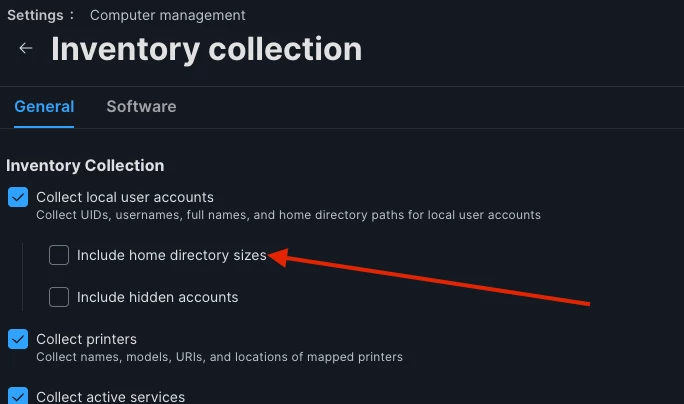
We came across this same issue.  Had to turn off  “Include home directory sizes” in Settings>Computer management>Inventory Collection.


View original

12 replies

Forum|alt.badge.img+3
  • New Contributor
  • September 18, 2026

Not an issue I am seeing, how quick is the hardware ? could just be really slow, I often see older hardware on the latest OS grinds quite badly when recon’ing. I have seen 10 Minutes + for a recon


Forum|alt.badge.img+7
  • Author
  • Contributor
  • September 18, 2026

Not an issue I am seeing, how quick is the hardware ? could just be really slow, I often see older hardware on the latest OS grinds quite badly when recon’ing. I have seen 10 Minutes + for a recon

Ever since I’ve posted this, I’ve just let it sit and it’s still stuck. It’s using the du process.
I’ve done the usual troubleshooting, restarting and so forth. No luck. Too bad I can’t tell if the kernal_task process is also being used by it.

My Mac has an M2 Max, so I don’t think it’s performance related.


dlbrabb
Forum|alt.badge.img+7
  • Contributor
  • Answer
  • September 18, 2026

We came across this same issue.  Had to turn off  “Include home directory sizes” in Settings>Computer management>Inventory Collection.


k0nker
Forum|alt.badge.img
  • New Contributor
  • September 19, 2026

We are running into the same issue with some of our macOS 27 devices, but not all. However, the ones that do complete the recon are all taking 11-15 minutes to complete the recon instead of the usual 1-3. Testing all of our EA’s, turned off Software Update collection, turned off home directory size collection.

Didn’t pop up in beta testing, but alas on release day it started showing up all over as more users updated.


Forum|alt.badge.img+4
  • Contributor
  • September 21, 2026

We came across this same issue.  Had to turn off  “Include home directory sizes” in Settings>Computer management>Inventory Collection.



Thanks. I also realised this today recon is stalling at the du command. Turning off Include home directory sizes for now, fixed it. Thanks


elsmith
Forum|alt.badge.img+11
  • Valued Contributor
  • September 21, 2026

We came across this same issue.  Had to turn off  “Include home directory sizes” in Settings>Computer management>Inventory Collection.


Wow thank you! I’ve been uninstalling/reinstall Cyber agents and other programs for a few days now… unchecked that box and we’re “golden” now! (ok sorry for the really bad pun… )


Forum|alt.badge.img+7
  • Author
  • Contributor
  • September 21, 2026

We came across this same issue.  Had to turn off  “Include home directory sizes” in Settings>Computer management>Inventory Collection.



Thank you! This resolved the issue for me also. 


k0nker
Forum|alt.badge.img
  • New Contributor
  • September 21, 2026

We came across this same issue.  Had to turn off  “Include home directory sizes” in Settings>Computer management>Inventory Collection.


As of yesterday, all devices are checking back in a gain with this setting turned off. Recon takes ~10 minutes now across the board, but we’ve got data flowing. Thank you!


howie_isaacks
Forum|alt.badge.img+24

Often, an extension attribute that has some issue can cause recon to stall. A couple of weeks ago, I made a change to an EA that tested perfectly fine running through CodeRunner but it caused my Mac to stall on recon. I fixed the bad code in the EA and the issue was solved.


Chris_Hafner
Forum|alt.badge.img+29

​@k0nker Dan Snelson did a presentation on how to track runaway extension attributes last year. Might be worth checking for the YouTube video!


howie_isaacks
Forum|alt.badge.img+24

​@Chris_Hafner Thanks for mentioning that. Dan Snelson always has great stuff. I’m going to look for that presentation. I was lucky that I knew right away what EA to blame since it was the last one uploaded into Jamf Pro. I may not be so lucky in the future.


Forum|alt.badge.img+3
  • New Contributor
  • September 24, 2026

We came across this same issue.  Had to turn off  “Include home directory sizes” in Settings>Computer management>Inventory Collection.


Thank you for your info share!