Solved

Restrict user from changing computer name in Ventura

  • Mar 14, 2023 1:01 PM UTC
  • 25 replies
  • 469 views

Mark-Kenny
Forum|alt.badge.img+5

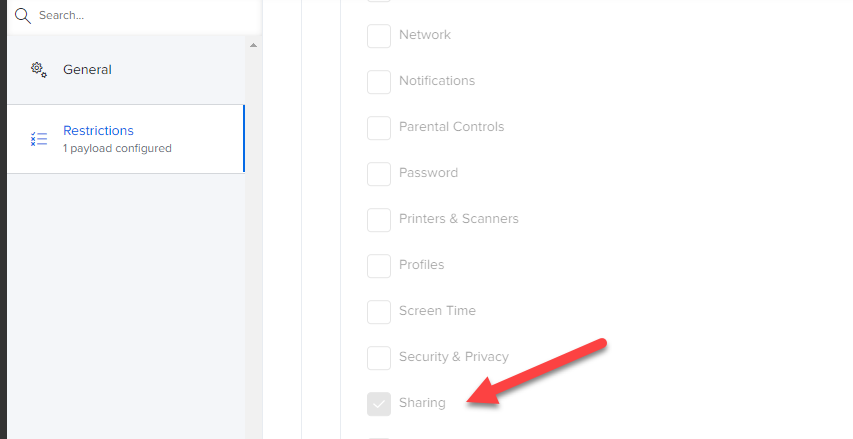
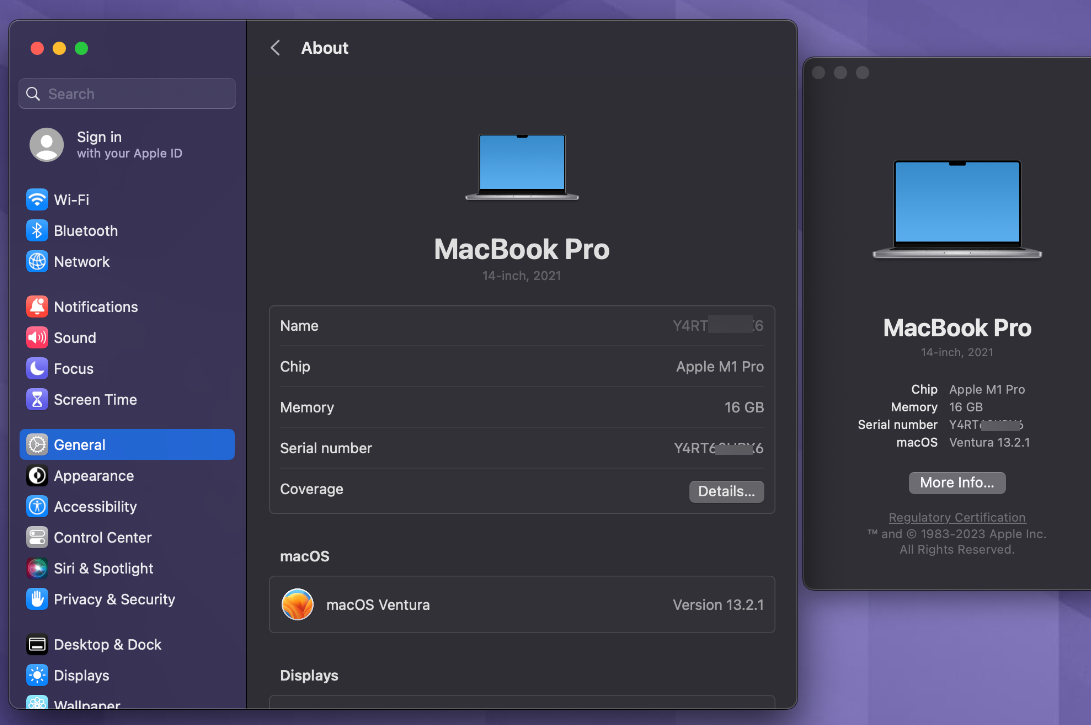
Our config profile for blocking sharing works fine on macOS 12, but 13 you can edit the computer name in General / About just by clicking on name, Restricting the General prefs is not blocking About, but all other General settings.

What have I missed?

Best answer by Mark-Kenny

Sussed it. 

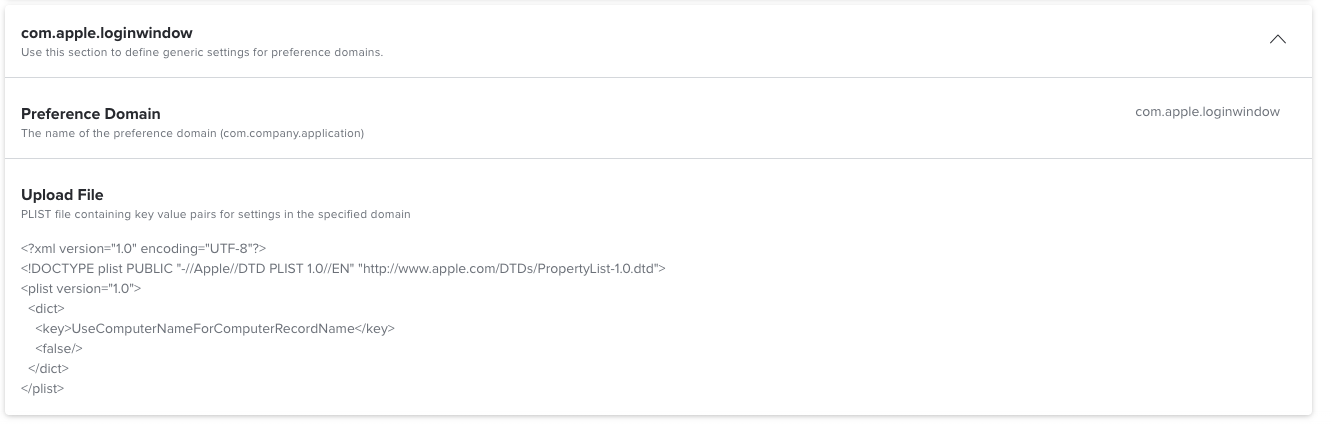
com.apple.loginwindow : Set Mac computer name to computer record name FALSE

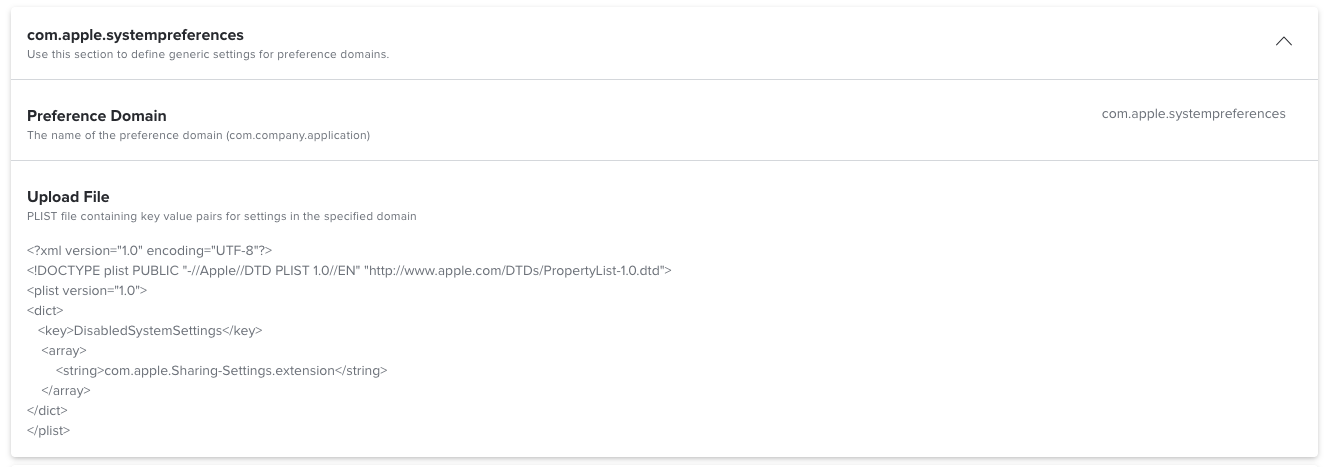
And com.apple.systempreferences : 

<?xml version="1.0" encoding="UTF-8"?>
<!DOCTYPE plist PUBLIC "-//Apple//DTD PLIST 1.0//EN" "http://www.apple.com/DTDs/PropertyList-1.0.dtd">
<plist version="1.0">
<dict>
<key>DisabledSystemSettings</key>
<array>
<string>com.apple.Sharing-Settings.extension</string>
</array>
</dict>
</plist>

View original

25 replies

sdagley
Forum|alt.badge.img+25
  • Jamf Heroes
  • Mar 14, 2023 1:51 PM UTC

@Mark-Kenny have you considered enforcing your Mac naming convention via policy? For my org the daily recon policy  includes a script payload that verifies the Mac name matches the org standard and changes it if it doesn't. 


Mark-Kenny
Forum|alt.badge.img+5
  • Author
  • New Contributor
  • Mar 14, 2023 1:56 PM UTC

@Mark-Kenny have you considered enforcing your Mac naming convention via policy? For my org the daily recon policy  includes a script payload that verifies the Mac name matches the org standard and changes it if it doesn't. 


Two environments, one has the policy and is good, the other doesn't. 


RobinJJ
Forum|alt.badge.img+4
  • Contributor
  • Mar 14, 2023 2:28 PM UTC

I actually change it on check-in. The only policy that runs every 15min 🙊


dmccluskey
Forum|alt.badge.img+9
  • Valued Contributor
  • Mar 14, 2023 2:34 PM UTC

Restrict the Sharing area of system settings

This prevents users from going in and changing it.


Mark-Kenny
Forum|alt.badge.img+5
  • Author
  • New Contributor
  • Mar 14, 2023 2:37 PM UTC

Restrict the Sharing area of system settings

This prevents users from going in and changing it.


Doesn't work in Ventura as the name can be changed under General / About :-( 

Already have the CP in place for macOS 12, issue is 13.


dmccluskey
Forum|alt.badge.img+9
  • Valued Contributor
  • Mar 14, 2023 2:44 PM UTC

I cant for my macs

its greyed out.

maybe because its standard user vs admin.


Mark-Kenny
Forum|alt.badge.img+5
  • Author
  • New Contributor
  • Answer
  • Mar 16, 2023 3:16 PM UTC

Sussed it. 

com.apple.loginwindow : Set Mac computer name to computer record name FALSE

And com.apple.systempreferences : 

<?xml version="1.0" encoding="UTF-8"?>
<!DOCTYPE plist PUBLIC "-//Apple//DTD PLIST 1.0//EN" "http://www.apple.com/DTDs/PropertyList-1.0.dtd">
<plist version="1.0">
<dict>
<key>DisabledSystemSettings</key>
<array>
<string>com.apple.Sharing-Settings.extension</string>
</array>
</dict>
</plist>


Jacek_ADC
Forum|alt.badge.img+7
  • Valued Contributor
  • Apr 21, 2023 6:32 AM UTC

@Mark-Kenny How to set the first part of your solution?

com.apple.loginwindow : Set Mac computer name to computer record name FALSE


Mark-Kenny
Forum|alt.badge.img+5
  • Author
  • New Contributor
  • Apr 21, 2023 8:07 AM UTC


Mark-Kenny
Forum|alt.badge.img+5
  • Author
  • New Contributor
  • Apr 21, 2023 8:08 AM UTC

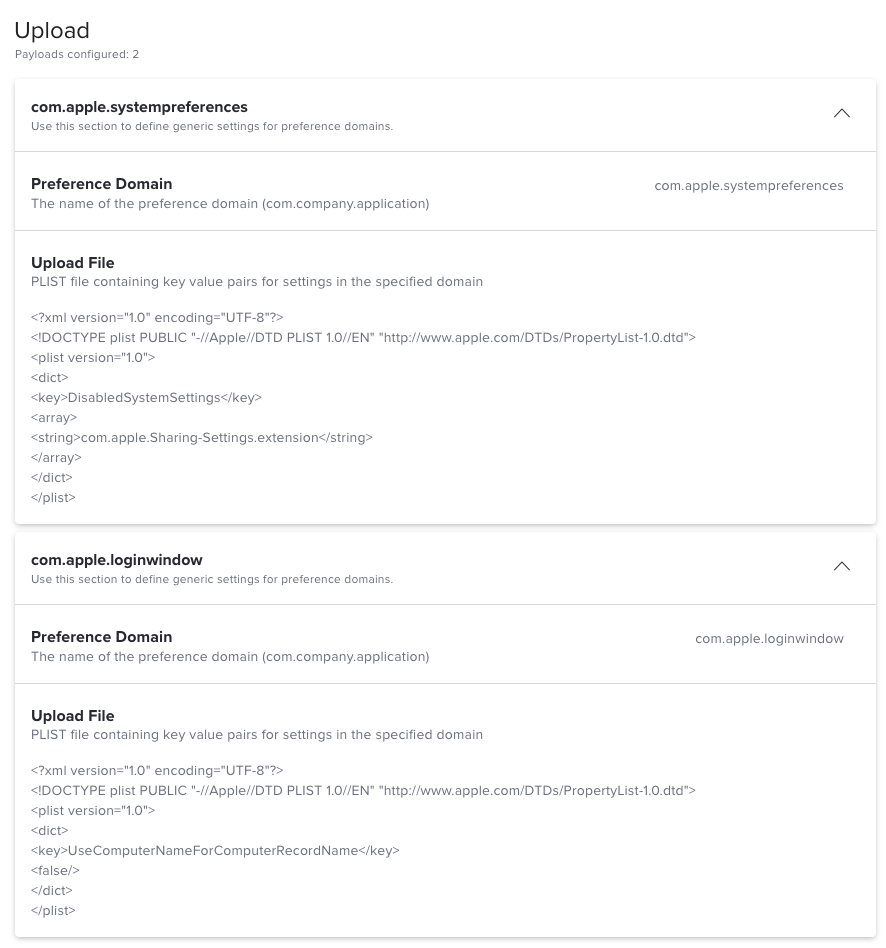
Two payloads in the config profile as show above block changing computer name.


Jacek_ADC
Forum|alt.badge.img+7
  • Valued Contributor
  • Jun 9, 2023 6:09 AM UTC

For us the issue was solved with the config profile starting with ventura 13.3.1 (a) version


Forum|alt.badge.img+1
  • New Contributor
  • Jul 4, 2023 6:52 AM UTC

Sussed it. 

com.apple.loginwindow : Set Mac computer name to computer record name FALSE

And com.apple.systempreferences : 

<?xml version="1.0" encoding="UTF-8"?>
<!DOCTYPE plist PUBLIC "-//Apple//DTD PLIST 1.0//EN" "http://www.apple.com/DTDs/PropertyList-1.0.dtd">
<plist version="1.0">
<dict>
<key>DisabledSystemSettings</key>
<array>
<string>com.apple.Sharing-Settings.extension</string>
</array>
</dict>
</plist>


May I know where to put the Plist? Appreciates 


Mark-Kenny
Forum|alt.badge.img+5
  • Author
  • New Contributor
  • Jul 4, 2023 7:27 AM UTC

May I know where to put the Plist? Appreciates 


Config profiles, custom settings.

com.apple.systempreferences

<?xml version="1.0" encoding="UTF-8"?> <!DOCTYPE plist PUBLIC "-//Apple//DTD PLIST 1.0//EN" "http://www.apple.com/DTDs/PropertyList-1.0.dtd"> <plist version="1.0"> <dict> <key>DisabledSystemSettings</key> <array> <string>com.apple.Sharing-Settings.extension</string> </array> </dict> </plist>


com.apple.loginwindow

<?xml version="1.0" encoding="UTF-8"?> <!DOCTYPE plist PUBLIC "-//Apple//DTD PLIST 1.0//EN" "http://www.apple.com/DTDs/PropertyList-1.0.dtd"> <plist version="1.0"> <dict> <key>UseComputerNameForComputerRecordName</key> <false/> </dict> </plist>


Forum|alt.badge.img+1
  • New Contributor
  • Jul 4, 2023 7:34 AM UTC

Config profiles, custom settings.

com.apple.systempreferences

<?xml version="1.0" encoding="UTF-8"?> <!DOCTYPE plist PUBLIC "-//Apple//DTD PLIST 1.0//EN" "http://www.apple.com/DTDs/PropertyList-1.0.dtd"> <plist version="1.0"> <dict> <key>DisabledSystemSettings</key> <array> <string>com.apple.Sharing-Settings.extension</string> </array> </dict> </plist>


com.apple.loginwindow

<?xml version="1.0" encoding="UTF-8"?> <!DOCTYPE plist PUBLIC "-//Apple//DTD PLIST 1.0//EN" "http://www.apple.com/DTDs/PropertyList-1.0.dtd"> <plist version="1.0"> <dict> <key>UseComputerNameForComputerRecordName</key> <false/> </dict> </plist>


Thanks alot


Forum|alt.badge.img+1
  • New Contributor
  • Aug 23, 2023 9:28 AM UTC

Does not working for me.
I add both in one profile, I can still change the computername in the settings.
Regarding the apple documentation it is deprecated

https://developer.apple.com/documentation/devicemanagement/systempreferences

??


Jacek_ADC
Forum|alt.badge.img+7
  • Valued Contributor
  • Aug 23, 2023 9:35 AM UTC

We are now on the latest os version and since two weeks we do not need this additional profile anymore.

We had also issues with the restricted apple id pane causing by this workaround.

So we just removed the workaround for the computername (Its configured like before in the configuration profile and it works like before).

We created the restriction Configuration profile new for everything we had before.

We removed the previous cp

we scoped the new cp

Everything works like it should

From my side i saw in tests, that after working with this profiles and workarounds its to restart your macbook after the test. At least to completely quit system preferences.

Hopefully this stays like it is :)


Forum|alt.badge.img+1
  • New Contributor
  • Aug 23, 2023 10:38 AM UTC

I did. so I restarted the device. but i still can change. as standard user.


Jacek_ADC
Forum|alt.badge.img+7
  • Valued Contributor
  • Aug 23, 2023 10:49 AM UTC

which version MacOS do you have installed? 

And do you have an Configuration Profile for restricting Computername (not the workaround)


Forum|alt.badge.img+1
  • New Contributor
  • Aug 23, 2023 12:23 PM UTC

latest release so 13.5.1

Did it directly in Jamf and copied paste the plist content. Into ONE profile. (that should not be reason, should it?)


Jacek_ADC
Forum|alt.badge.img+7
  • Valued Contributor
  • Aug 23, 2023 12:27 PM UTC

i had it like from Kenny described. It was in one cp but two different preference domain. That has worked fine


Forum|alt.badge.img+1
  • New Contributor
  • Aug 23, 2023 12:28 PM UTC

Not working.


Jacek_ADC
Forum|alt.badge.img+7
  • Valued Contributor
  • Aug 23, 2023 12:29 PM UTC

But, i just checked once again now, and it seems that without the workaround it doesn't work anymore... haha...

So changing computername on the machine is possible, but only with adminrights. This was not possible before. It was greyed out


Forum|alt.badge.img+1
  • New Contributor
  • Aug 23, 2023 12:31 PM UTC

But, i just checked once again now, and it seems that without the workaround it doesn't work anymore... haha...

So changing computername on the machine is possible, but only with adminrights. This was not possible before. It was greyed out


I am not admin, but I can change. usually my clients are not admin, so that would be fine for me, but anyway even as standard i can change the computer name


Jacek_ADC
Forum|alt.badge.img+7
  • Valued Contributor
  • Aug 23, 2023 12:32 PM UTC

It seems, that some difference is here between MacOS 13.4 to 13.5 and now with 13.5.1 the CP from jamf doesnt restrict the computername anymore


Forum|alt.badge.img
  • New Contributor
  • Sep 22, 2023 4:59 AM UTC

I know this is an older post but has anyone found a solution for this? I tested again on 13.6 and the ability for a non-admin can change the device name in General > About > Name. This of course has been a cause for concern as most of our settings are being applied to smartgroups based on device name. I use JAMF school and not JAMF pro so my ability to control this with a profile is a bit more limited and I cannot find a profile in iMazing that would restrict the devices being renamed.