Solved

Restricted Software HELP

  • July 17, 2018
  • 4 replies
  • 17 views

Forum|alt.badge.img+7

Hi guys, I remembered learning this in Jamf 200 Course, but I've forgotten about it and can't find related discussion here in Jamf Nation.

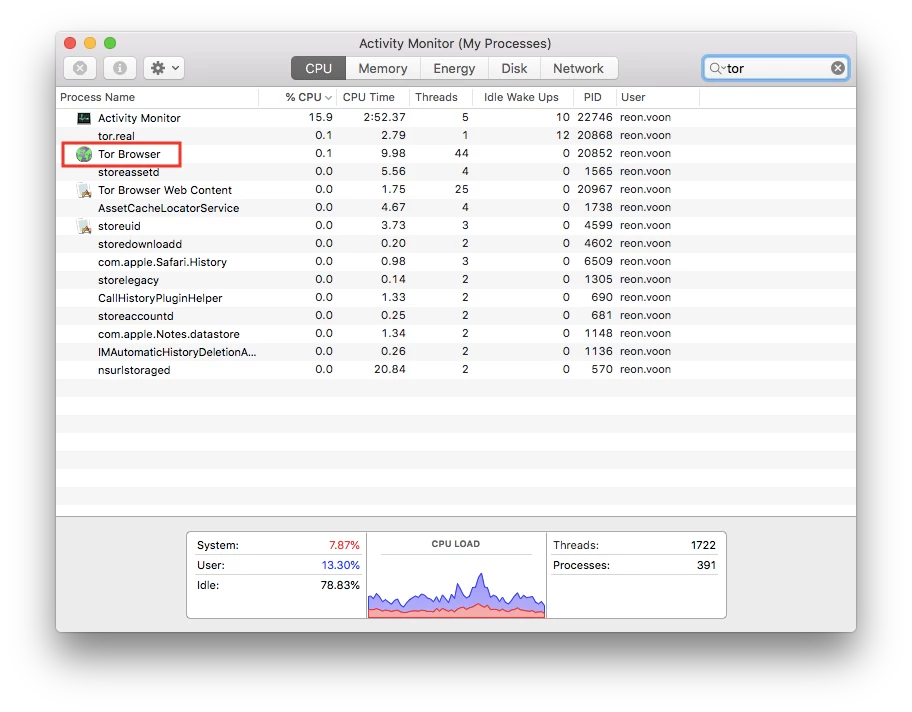
We all know that we can kill process or uninstall the application if process name found, and now I can't kill process when process name contains space like Tor Brower.

Please help if you know, thanks in advance

Best answer by jsherwood

Like you my mind has gone blank - the only thing I can think is that it needs to be escaped using (i.e. Tor Browser)

4 replies

Forum|alt.badge.img+7
  • Contributor
  • Answer
  • July 17, 2018

Like you my mind has gone blank - the only thing I can think is that it needs to be escaped using (i.e. Tor Browser)


Forum|alt.badge.img+8
  • New Contributor
  • July 17, 2018

Are you sure the process name has a space in it? For Tor Browser, I have TorBrowser.app (no spaces) as the process name and I know it has caught the process in this past year. I haven't tested if the process name has changed very recently. For something like Activity Monitor, I have Activity Monitor.app as the process name and that works.


Forum|alt.badge.img+7
  • Author
  • Contributor
  • July 18, 2018


@crbeck pls look at the screenshot, it has a space in activity monitor. I'll try without space later like TorBrowser.app


Forum|alt.badge.img+7
  • Author
  • Contributor
  • July 18, 2018

@jsherwood thanks bro, it works!