Question

Restricting FaceTime on MacBook Neo

  • July 31, 2026
  • 6 replies
  • 31 views

Forum|alt.badge.img+1

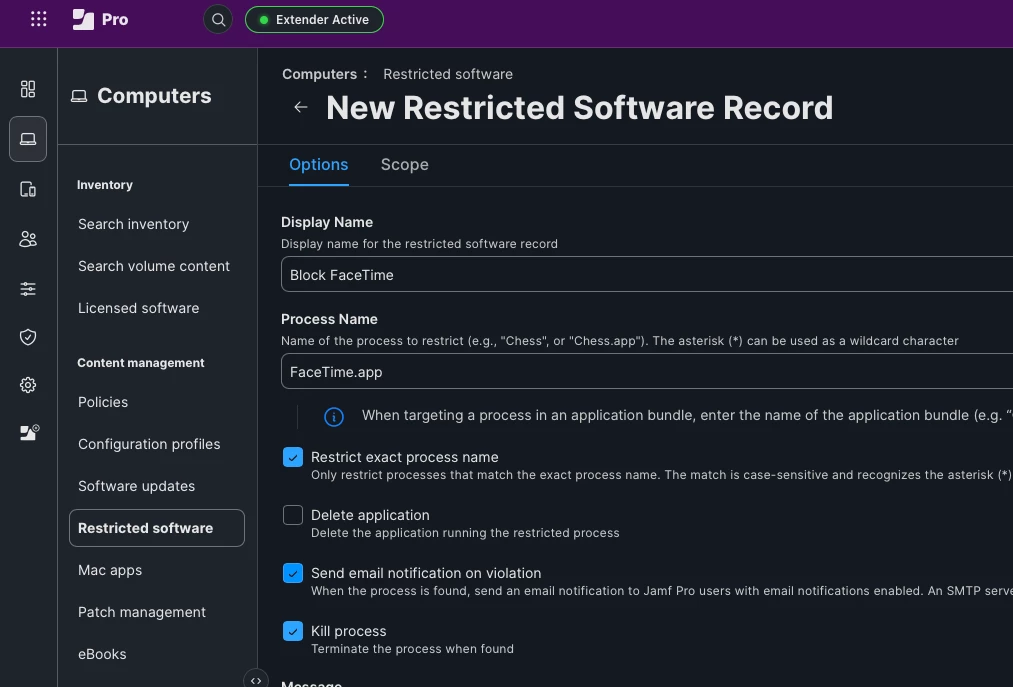
My goal is to block FaceTime from opening, and removal from the dock would be a plus. I’ve looked at other threads on this same issue and consulted AI. I am doing what has been suggested but FaceTime still opens up and allows me to log in; user are not able to sign into their appleid’s. I am running version 11.30.1 of JAMF Pro. Does anyone have a current setup that is successfully blocking FaceTime. I’m just wondering what I am missing. Screen shots would be appreciated. Thanks.

6 replies

mvu
Forum|alt.badge.img+22
  • Jamf Heroes
  • July 31, 2026

Try the Restricted Software? Try the steps in screenshot, scope to your test MacBook Neo. On the MacBook Neo, open Terminal and type: sudo jamf recon. Then try FaceTime.

To remove from Dock, could script it or use a configuration profile payload. We use DockUtil.


Forum|alt.badge.img+1

Thanks. That works fine. I tried the same but then used a blank push command in JAMF Pro to get the command to the macbook. I even waited until the screen blinked indicating other profile updates had loaded. 🤷 I brain cramped and forgot about the recon command. I guess now I will remember. I have to retrain my brain to manage Mac’s.


mvu
Forum|alt.badge.img+22
  • Jamf Heroes
  • July 31, 2026

No worries. Actually, if you test again, try:

sudo jamf manage

This command is more reliable in my experience for this type of task.


Forum|alt.badge.img+1

Changing the topic a little….the recon command is great if I have the computer nearby. What is the best way to get new restricted softwares/polices pushed out quickly to machines that are already deployed?


mvu
Forum|alt.badge.img+22
  • Jamf Heroes
  • July 31, 2026

Once you scope and hit save, it can take a few minutes for the policy to go into effect. Back in my school days, we ran this a lot to stay ahead of the students. It usually took a minute or so, maybe longer for some devices, but it will land.


Forum|alt.badge.img+1

Ok. Thanks for your help.