Solved

Running scripts as admin

  • May 29, 2026
  • 8 replies
  • 120 views

Forum|alt.badge.img+2

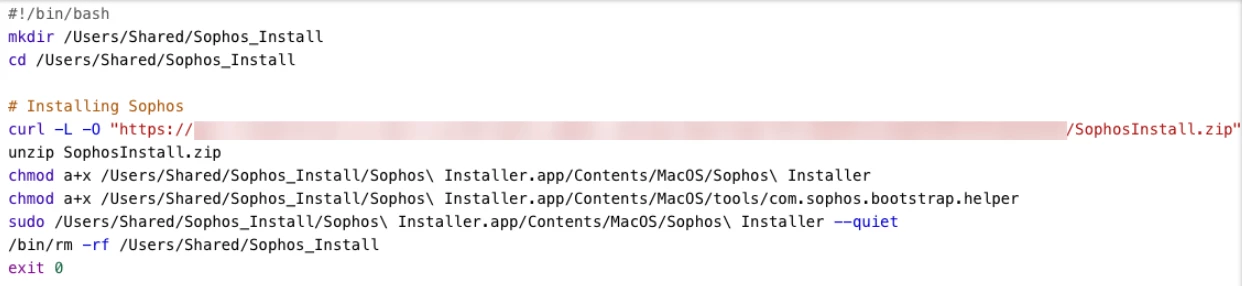
I am trying to install sophos through JAMF School and used their script.
The script it working fine when running it on the mac as sudo, but when i try pushing it through JAMF, nothing happens.

This makes me wonder if i am missing something, i seem to be unable to make the app run as an administrator/sudo user.


Can anyone help?

Best answer by luuk_hennink

Alright, looks like the issue is resolved by using some tips here and AI.
One issue was logging wasnt working and i was copying the script from windows which added some weird errors to JAMF. 
Recopied and added the script through my macbook and it actually works.
For anyone interested, here is the final script used:


#!/bin/bash

# Logging setup
LOG="/Library/Logs/sophos_install.log"
log() { echo "$(date): $1" >> "$LOG"; }

# Create log file and set permissions
touch "$LOG"
chmod 666 "$LOG"

log "Starting Sophos installation"
log "Running as user: $(whoami)"

# Check for root
if [ "$(id -u)" != "0" ]; then
log "ERROR: Script must be run as root"
exit 1
fi

# Stop on any error
set -e

# Setup temp directory (macOS compatible mktemp)
SOPHOS_DIR=$(mktemp -d /tmp/Sophos_Install.XXXXXX)
trap 'log "Cleaning up temp directory..."; rm -rf ${SOPHOS_DIR}' EXIT
cd $SOPHOS_DIR
log "Working directory: $SOPHOS_DIR"

# Download installer
log "Downloading Sophos installer..."
curl -L -O "put intall link here"

# Unzip
log "Extracting installer..."
unzip SophosInstall.zip
log "Contents of temp dir: $(ls $SOPHOS_DIR)"
log "Extraction complete."

# Set permissions
log "Setting permissions..."
chmod a+x "$SOPHOS_DIR/Sophos Installer.app/Contents/MacOS/Sophos Installer"
chmod a+x "$SOPHOS_DIR/Sophos Installer.app/Contents/MacOS/tools/com.sophos.bootstrap.helper"
log "Permissions set."

# Run installer
log "Running Sophos installer..."
"$SOPHOS_DIR/Sophos Installer.app/Contents/MacOS/Sophos Installer" --quiet
log "Installer finished."

# Cleanup
log "Removing temp directory..."
rm -rf $SOPHOS_DIR

log "Sophos installation completed successfully"
exit 0

Thanks for all help and tips!

8 replies

Jay-payglocal
Forum|alt.badge.img
  • New Contributor
  • May 29, 2026

Go through these in order:

  1. Remove all sudo usage
  2. Add logging to script
  3. Use absolute paths
  4. Verify JAMF policy execution
  5. Check /var/log/jamf.log
  6. Confirm Sophos installer doesn't need UI
  7. Try PKG deployment instead of script

agungsujiwo
Forum|alt.badge.img+10
  • Contributor
  • May 29, 2026

Is this the script you are using, and are you running macOS Tahoe?


thebrucecarter
Forum|alt.badge.img+16

As ​@Jay-payglocal  mentions above, make no assumptions about paths or environment variables, or anything else that might be set up in a local user Terminal session.


Forum|alt.badge.img+2
  • Author
  • New Contributor
  • June 1, 2026

Is this the script you are using, and are you running macOS Tahoe?


Yes, it is. And yes, we are running the newest OS (Tahoe i think).


Chubs
Forum|alt.badge.img+26
  • Jamf Heroes
  • June 1, 2026

I’d remove the cd and put the full path in the downloader...actually my script just looking at it would be something similar to this on a very high level:

#/bin/bash

# Variables (edit this)
download=”urlGoesHere”
filePath="/Users/Shared/Sophos_Install"
name=”SophosInstall”

# Download Sophos
curl -L "${download}" --output "$filePath"/"${name}".zip

# Unzip
unzip "$filePath"/"${name}".zip

# Perms edit
chmod atx "$filePath"/Sophos\ Installer.app/Contents/MacOS/Sophos\ Installer
chmod atx "$filePath"/Sophos\ Installer.app/Contents/MacOS/tools/com.sophos.bootstrap.helper

# Install
"$filePath"/Sophos\ Installer.app/Contents/MacOS/Sophos\ Installer --quiet

# Cleanup
/bin/rm -rf "$filePath"/

# Check install
sophosInstalled=$( launchctl list | grep -I sophos )
if [[ $sophosInstall == "0" ]]
then echo "Sophos Installed Successfully"
exit 0
else echo "Sophos did not install successfully. Please retry"
exit 1
fi

Of course the check at the end will likely need to be altered...I just took a stab at it.


Forum|alt.badge.img+2
  • Author
  • New Contributor
  • June 3, 2026

I am unable to get this working. Thing is; when i run the script on the machine manually, it does function as intended. 
Within JAMF School i am unable to set any parameters like run as system. Nor am i able to set script execution policies anymore within JAMF School.
I did add the provided profiles that Sophos added to their guide.

What else could i try? Maybe i could create a PKG file or something?


Forum|alt.badge.img+2
  • Author
  • New Contributor
  • Answer
  • June 3, 2026

Alright, looks like the issue is resolved by using some tips here and AI.
One issue was logging wasnt working and i was copying the script from windows which added some weird errors to JAMF. 
Recopied and added the script through my macbook and it actually works.
For anyone interested, here is the final script used:


#!/bin/bash

# Logging setup
LOG="/Library/Logs/sophos_install.log"
log() { echo "$(date): $1" >> "$LOG"; }

# Create log file and set permissions
touch "$LOG"
chmod 666 "$LOG"

log "Starting Sophos installation"
log "Running as user: $(whoami)"

# Check for root
if [ "$(id -u)" != "0" ]; then
log "ERROR: Script must be run as root"
exit 1
fi

# Stop on any error
set -e

# Setup temp directory (macOS compatible mktemp)
SOPHOS_DIR=$(mktemp -d /tmp/Sophos_Install.XXXXXX)
trap 'log "Cleaning up temp directory..."; rm -rf ${SOPHOS_DIR}' EXIT
cd $SOPHOS_DIR
log "Working directory: $SOPHOS_DIR"

# Download installer
log "Downloading Sophos installer..."
curl -L -O "put intall link here"

# Unzip
log "Extracting installer..."
unzip SophosInstall.zip
log "Contents of temp dir: $(ls $SOPHOS_DIR)"
log "Extraction complete."

# Set permissions
log "Setting permissions..."
chmod a+x "$SOPHOS_DIR/Sophos Installer.app/Contents/MacOS/Sophos Installer"
chmod a+x "$SOPHOS_DIR/Sophos Installer.app/Contents/MacOS/tools/com.sophos.bootstrap.helper"
log "Permissions set."

# Run installer
log "Running Sophos installer..."
"$SOPHOS_DIR/Sophos Installer.app/Contents/MacOS/Sophos Installer" --quiet
log "Installer finished."

# Cleanup
log "Removing temp directory..."
rm -rf $SOPHOS_DIR

log "Sophos installation completed successfully"
exit 0

Thanks for all help and tips!


Chubs
Forum|alt.badge.img+26
  • Jamf Heroes
  • June 3, 2026

I’d remove the cd and put the full path in the downloader...actually my script just looking at it would be something similar to this on a very high level:

#/bin/bash

# Variables (edit this)
download=”urlGoesHere”
filePath="/Users/Shared/Sophos_Install"
name=”SophosInstall”

# Download Sophos
curl -L "${download}" --output "$filePath"/"${name}".zip

# Unzip
unzip "$filePath"/"${name}".zip

# Perms edit
chmod atx "$filePath"/Sophos\ Installer.app/Contents/MacOS/Sophos\ Installer
chmod atx "$filePath"/Sophos\ Installer.app/Contents/MacOS/tools/com.sophos.bootstrap.helper

# Install
"$filePath"/Sophos\ Installer.app/Contents/MacOS/Sophos\ Installer --quiet

# Cleanup
/bin/rm -rf "$filePath"/

# Check install
sophosInstalled=$( launchctl list | grep -I sophos )
if [[ $sophosInstall == "0" ]]
then echo "Sophos Installed Successfully"
exit 0
else echo "Sophos did not install successfully. Please retry"
exit 1
fi

Of course the check at the end will likely need to be altered...I just took a stab at it.

This should have worked - was it even attempted?

And to comment on your script - t’s also not advisable to auto exit as zero because if it fails install, it’ll still show as successful to jamf. 
 

Pro tip: most things do not translate from powershell (windows) to macOS. Most AI parsers won’t translate it correctly either. It’s best to learn about bash/shell/ssh coding instead of vibe coding with AI.