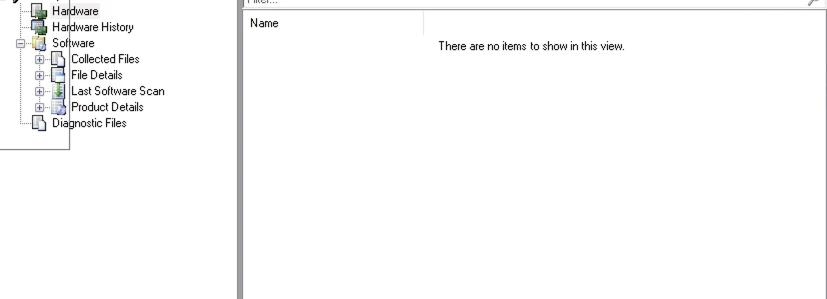
Question

SCCM Plugin - Hardware inventory not appear in resource explorer

  • May 16, 2023
  • 10 replies
  • 61 views

Forum|alt.badge.img+3

Hello,

I installed the sccm plugin for jamf, but I have a problem. I have the synchronization which is carried out but the data does not appear in sccm.

I looked in the logs of the plugin but I have no error, the xml files are well created.

Have you encountered this problem before ?


Regards

10 replies

mvu
Forum|alt.badge.img+20
  • Jamf Heroes
  • May 16, 2023

Have you looked at the JAMF SCCM Proxy Service Helper? Everything look correct here? Cert, URL, account/password?

Try stopping and starting the Service? Manually "Send to SCCM" by clicking the button to see if inventory in SCCM updates.


Forum|alt.badge.img+3
  • Author
  • New Contributor
  • May 16, 2023

Have you looked at the JAMF SCCM Proxy Service Helper? Everything look correct here? Cert, URL, account/password?

Try stopping and starting the Service? Manually "Send to SCCM" by clicking the button to see if inventory in SCCM updates.


Hi, yes everything is ok. when I click on Send to SCCM I have the following message that appears: "Sending the alert message"

the message is stuck


Forum|alt.badge.img+3
  • Author
  • New Contributor
  • May 16, 2023

Hi, yes everything is ok. when I click on Send to SCCM I have the following message that appears: "Sending the alert message"

the message is stuck


The new followiing message appear "Finished SendToJssProxyService()" but nothing appear in sccm.


mvu
Forum|alt.badge.img+20
  • Jamf Heroes
  • May 16, 2023

Did you have inventory coming in successfully before, and now it has stopped?

Might be worth reaching out to Jamf Support. Let us know what you find.


AJPinto
Forum|alt.badge.img+26
  • Legendary Contributor
  • May 16, 2023

I thought that plugin was retired a couple of years ago? Microsoft is fully speed ahead to Intune at this point. I'm actually curious to see what JAMF Support has to say also.


Forum|alt.badge.img+3
  • Author
  • New Contributor
  • May 17, 2023

Did you have inventory coming in successfully before, and now it has stopped?

Might be worth reaching out to Jamf Support. Let us know what you find.


Yes my last inventory was successful, but nothing in SCCM. The files are up to date in the folder C:\\Program Files (x86)\\Jamf\\Jamf SCCM Plug-in\\instancename.jamfcloud.com\\computers.
Yes I will contact support


Forum|alt.badge.img+3
  • Author
  • New Contributor
  • May 17, 2023

I thought that plugin was retired a couple of years ago? Microsoft is fully speed ahead to Intune at this point. I'm actually curious to see what JAMF Support has to say also.


I will contact support and and i will update the post


Forum|alt.badge.img+7
  • Contributor
  • February 27, 2024

@AJPinto and or @tgazelle any updates here? we are only seeing about 1/4 of our machines in the C:\\Program Files (x86)\\Jamf\\Jamf SCCM Plug-in\\instancename.jamfcloud.com\\computers directory and only those machines are the ones that are being updated within SCCM. 


Forum|alt.badge.img+7
  • Contributor
  • February 27, 2024

We're seeing a bunch of errors in the debug folder Unable to register the device 'NAME' GUID:XXXXXXXXXXXX in 'server.name'


Forum|alt.badge.img+7
  • Contributor
  • September 4, 2024

this is apparently being deprecated however there's no date just says when license expires.